

QRead: Food Product Scanner
INTOUCH APPS, OOO Utilities iPhoneiPadiPod touch
QRead: Food Product Scanner is a free Utilities app for iPhone and iPad by INTOUCH APPS, OOO. Requires iOS 17.6. Updated October 21, 2026.
- Price
- Free
- on the App Store
- Size
- 12 MB
- Age 4+
- Updated
- Oct 21
- 2026 · v1.0.3
Screenshots

About QRead: Food Product Scanner
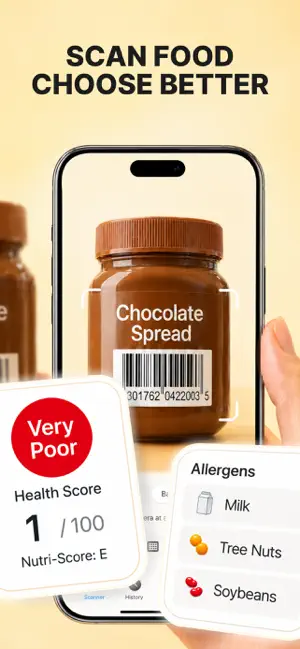
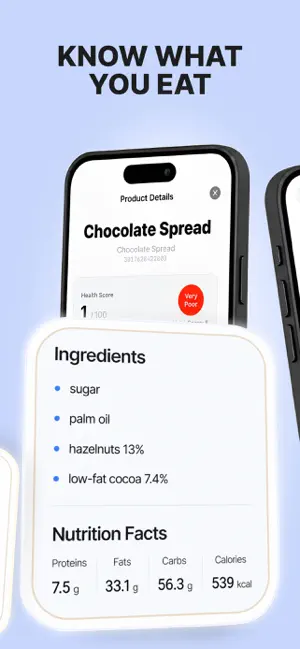
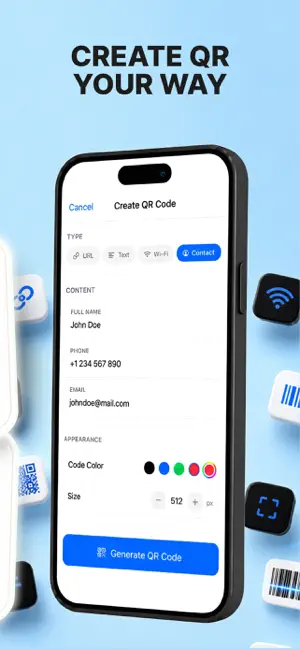
QRead Fast scanning. Intelligent protection. Effortless experience. Turn your smartphone into a powerful all-in-one QR code and barcode scanner designed for speed, accuracy, and security. Whether you're checking product details, opening links, or creating your own QR codes, everything works instantly - just open the app and point your camera. Why Choose QRead? This app combines advanced scanning technology with smart protection features in a clean, user-friendly interface. No complicated setup, no distractions - just reliable performance whenever you need it. Key Features: - Instant Code Recognition Scan QR codes and barcodes in real time with high precision. Simply point your camera and get results immediately. - AI-Enhanced Scanning Easily read damaged, blurry, or partially hidden codes. Intelligent algorithms help recover and decode information that other scanners might miss. - Advanced Link Safety Preview links before opening them. Built-in protection helps detect suspicious or unsafe websites, keeping your browsing secure. - Create Custom QR Codes Generate QR codes for websites, Wi-Fi access, contacts, text, and more. Share them instantly with others. - Wide Format Support Compatible with all major formats including QR, EAN-13, UPC, Code 128, Data Matrix, PDF417, and more. - Smart Actions After scanning, instantly perform actions like opening websites, connecting to Wi-Fi, saving contacts, or sending emails. - Scan History All scans are automatically saved for easy access. Revisit links, products, or information anytime. - Offline Functionality Core features work without an internet connection, so you can scan and create codes anywhere. - Optimized for Any Situation Use flashlight and zoom to scan in low light or from a distance with ease. Perfect for Everyday Use: - Shopping: Check prices and product details instantly - Travel & Dining: Access menus, tickets, and deals - Work: Share contacts and manage information quickly - Home & Office: Connect to Wi-Fi or share links effortlessly Privacy First Your data stays on your device. We do not collect or track your personal information. Built-in security features are designed to protect you without compromising your privacy. Note: Camera access is required for scanning functionality. Privacy Policy: https://docs.google.com/document/d/1lWnPNC7GK1PYBR6ZRy0ZIjm-0DpUynSMKxUZ1c588YM/edit?tab=t.0 Terms of Use: https://docs.google.com/document/d/1uqvXipiaTZKhBrAuCKoK67BaSjBWowcYkwrmimkY2mU/edit?tab=t.0
What’s new
Version 1.0.3 · Updated October 21, 2026
More reliable scanning • Improved email recognition. Text containing numbers is no longer mistaken for a phone number. • Fixed duplicate prefixes in call and email links. • Improved handling of Wi-Fi network names and passwords containing special characters.
App privacy
The developer, INTOUCH APPS, OOO, reported these privacy practices to Apple.
Data Not Collected
The developer does not collect any data from this app.
Alternatives to QRead: Food Product Scanner
Looking for apps like QRead: Food Product Scanner? Here are 6 similar apps on the App Store.
-
 QRead app
-
 ScanShield: QR Scanner
-
 QR Scanner: Reader & Maker
-
 QRCode Super Handy
-
 QR Barcode Scan & Generate
-
 QR Reader & Creator
| App | Rating | Price | Last updated | Compare |
|---|---|---|---|---|
| QRead: Food Product Scanner | – | Free | October 21, 2026 | |
| QRead app | – | Free | Apr 16, 2026 | Compare |
| ScanShield: QR Scanner | – | Free | Jul 8, 2026 | Compare |
| QR Scanner: Reader & Maker | – | Free | May 19, 2026 | Compare |
| QRCode Super Handy | – | Free | May 11, 2026 | Compare |
| QR Barcode Scan & Generate | – | Free | May 5, 2026 | Compare |
| QR Reader & Creator | – | Free | Jun 7, 2026 | Compare |