

ID Photo Craft
Henan Yuechuan Intelligent Technology Co., Ltd. Photo & Video iPhoneiPadiPod touch
ID Photo Craft is a paid Photo & Video app for iPhone and iPad by Henan Yuechuan Intelligent Technology Co., Ltd. Requires iOS 16.6.
- Price
- 0.99 USD
- on the App Store
- Size
- 6 MB
- Age 4+
- Updated
- Sep 1
- 2026 · v1.2.0
Screenshots
About ID Photo Craft
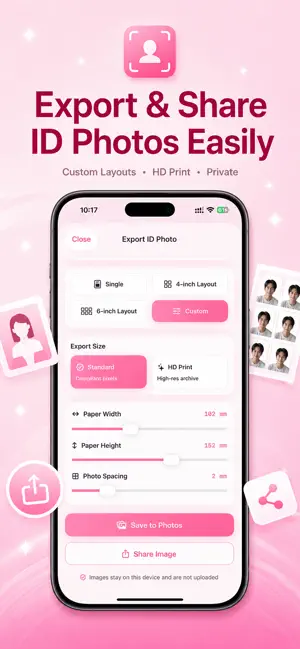
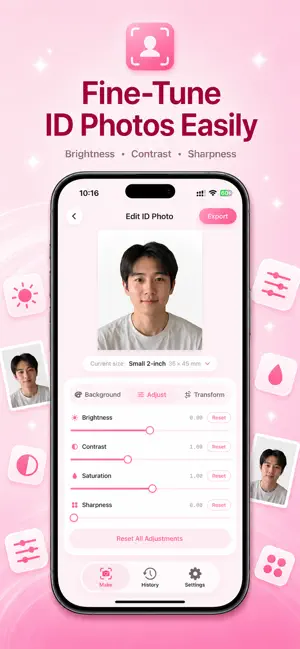
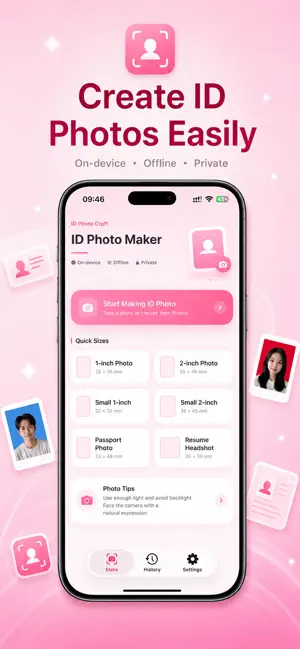
ID Photo Craft is a simple and practical ID photo maker that helps you create, crop, edit, and export ID photos directly on your iPhone. You can import a photo from your library or take a new photo with the camera. The app uses on-device face detection to help position the face, crop the image, change the background color, and export a single ID photo or a printable layout. Key Features: - Local Photo Processing All photo processing is performed on your device. No account is required, and your photos are not uploaded to a server. - Face Detection and Smart Cropping The app uses on-device technology to detect the face area and help adjust the photo composition and crop region. The app uses on-device face detection only to locate the face area for cropping and composition. It does not identify the person, verify identity, authenticate users, or collect biometric data. - Common ID Photo Sizes Supports common ID photo sizes such as 1-inch and 2-inch photos, with room for more sizes depending on your needs. - Background Color Editing Change the background to commonly used colors such as white, blue, or red. - Export and Print Layouts Export a single ID photo or generate a printable layout for convenient printing. - Simple Workflow A clean and straightforward interface helps you create an ID photo in just a few steps. Suitable For: - ID photos - Application photos - Exam registration photos - Resume profile photos - Passport, visa, and document photos - Printable photo layouts Privacy: ID Photo Craft is designed with privacy in mind. Photos are processed locally on your device and are not uploaded to any server. The app does not require account login, does not collect facial data, and does not share your photos with third parties. Please Note: Different organizations, exams, visa applications, and document services may have different requirements for photo size, background color, head position, file size, and other specifications. Please check the official requirements before submitting your photo.
What’s new
Version 1.2.0 · Updated September 1, 2026
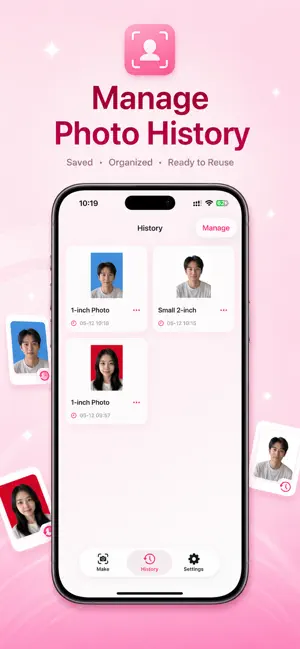
Create and resize finished ID photos without re-shooting, with flexible crop, pixel, file-size, and print-layout controls. This update also adds custom photo sizes, a cleaner size picker, collapsible editing tools, and a refreshed camera and history experience. Plus, smoother performance and UI refinements throughout.
App privacy
The developer, Henan Yuechuan Intelligent Technology Co., Ltd., reported these privacy practices to Apple.
Data Not Collected
The developer does not collect any data from this app.
Alternatives to ID Photo Craft
Looking for apps like ID Photo Craft? Here are 6 similar apps on the App Store. The highest rated is VidSquash: Storage Cleaner (5.0/5), and all 6 are free to download.
-
 VidSquash: Storage Cleaner
5.0
VidSquash: Storage Cleaner
5.0
-
 You & Me Dual Cam
-
 BabyTime - Baby Photo Album
-
 PicSquash - HEIC to JPG & More
5.0
PicSquash - HEIC to JPG & More
5.0
-
 Map Timestamp Camera
-
 Last Frame Extractor
| App | Rating | Price | Last updated | Compare |
|---|---|---|---|---|
| ID Photo Craft | – | 0.99 USD | September 1, 2026 | |
| VidSquash: Storage Cleaner | 5.0 / 5 (2) | Free | Aug 3, 2026 | Compare |
| You & Me Dual Cam | – | Free | May 27, 2026 | Compare |
| BabyTime - Baby Photo Album | – | Free | Sep 30, 2026 | Compare |
| PicSquash - HEIC to JPG & More | 5.0 / 5 (1) | Free | Jul 25, 2026 | Compare |
| Map Timestamp Camera | – | Free | Sep 28, 2026 | Compare |
| Last Frame Extractor | – | Free | May 20, 2026 | Compare |
Compare ID Photo Craft with the top alternatives: ratings, updates, ASO score and keyword gaps →