

KimDrop: Photo & File Transfer
jinbo Han Utilities iPhoneiPadiPod touch
KimDrop: Photo & File Transfer is a free Utilities app for iPhone and iPad by jinbo Han. Requires iOS 16.0. Updated October 21, 2026.
- Price
- Free
- on the App Store
- Size
- 11 MB
- Age 4+
- Updated
- Oct 21
- 2026 · v1.1.0
Screenshots


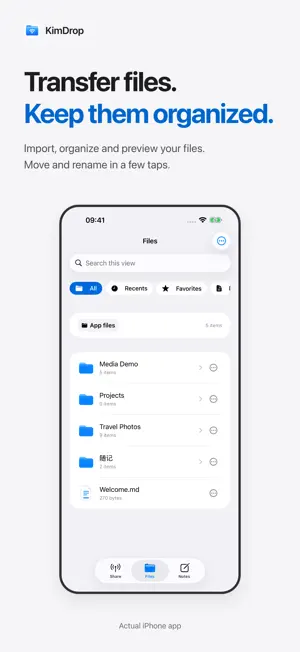

About KimDrop: Photo & File Transfer
Back up your photos. Browse on a bigger screen. Connect your iPhone or iPad and computer to the same Wi-Fi. Open the address shown in KimDrop in a browser and enter its access code to manage files and authorized photos. No desktop client or KimDrop account required. PHOTOS AND ORIGINALS • Browse by album, date or media type. Download an original or export selected items as a ZIP. • Preview HEIC and Live Photos. Save the original still and motion clip separately. • View photos and videos full screen, with a page-filling fallback where needed. • Photo backup means manually exporting and saving files to your computer. Save and verify your downloads. AUDIO, LYRICS AND VIDEO • Play local audio with a queue, speed controls, shuffle and repeat. • Continue listening in the background and use Lock Screen and Control Center playback controls. • Put a matching LRC file beside the audio file for timed lyric highlighting and scrolling. Lyrics are not searched for or generated automatically. • Watch local videos, seek, adjust speed and switch orientation. FILES AND ARCHIVES • Upload, download and import files; create folders, rename, move and delete. • Create ZIP files and extract supported archives, including ZIP, RAR and 7Z, into a new folder. • Find favorites and review local activity history. NOTES: SAVE, EDIT AND FAVORITE • Exchange text, photos, voice messages and files between your phone and computer browser, with an attachment queue. • Edit text messages and favorite any message. Edits and favorites sync between devices and are stored on your phone. • Find saved messages in the Favorites category, search history, filter by type and manage storage. • Send existing files without moving them. Choose whether deleting a message also deletes its file. YOU CONTROL ACCESS • Connect using the four-digit code shown in the app. • Separate controls for browser read-only access, file writes and photo deletion. Photo deletion requires confirmation on your device. • Limited Photos access respects your selection. Stop sharing whenever you want. • iPad sidebar navigation and layouts adapt to orientation and window width. BEFORE YOU CONNECT Use trusted Wi-Fi and keep KimDrop in the foreground during browser transfers. Local connections use HTTP and are not encrypted in transit; an access code does not replace encryption. Files do not pass through a developer-operated cloud relay. Backup is manual, without automatic, scheduled or background backups. Apple Photos may retrieve iCloud-only originals over the internet when requested. Preview and playback depend on format, codec, system and browser support. Unsupported files can be opened in another compatible app. KimDrop manages its own file storage, not other apps’ private data. Requires iOS 16 / iPadOS 16 or later.
What’s new
Version 1.1.0 · Updated October 21, 2026
KimDrop 1.1.0 brings your phone and computer closer together. • New Notes: exchange text, photos, voice messages and files between your device and a computer browser. • Edit text messages and favorite any message. Find saved messages in the Favorites category. Edits and favorites sync across both sides and persist on your device. • Queue attachments, search message history, filter by type and manage storage. Share existing files without moving them. • Keep audio playing in the background, with playback, track and seek controls on the Lock Screen and in Control Center. • Improved HEIC and Live Photo preview caching, loading and fast switching. Downloads preserve your originals. • Batch photo export, matching LRC lyrics, local video playback and common archive extraction in one app.
App privacy
The developer, jinbo Han, reported these privacy practices to Apple.
Data Not Collected
The developer does not collect any data from this app.
Alternatives to KimDrop: Photo & File Transfer
Looking for apps like KimDrop: Photo & File Transfer? Here are 6 similar apps on the App Store. The highest rated is Wingkit (5.0/5), and 5 of the 6 are free to download.


| App | Rating | Price | Last updated | Compare |
|---|---|---|---|---|
| KimDrop: Photo & File Transfer | – | Free | October 21, 2026 | |
| Wingkit | 5.0 / 5 (1) | Free | Oct 30, 2026 | Compare |
| FileKiln | – | Free | Sep 15, 2026 | Compare |
| Pairy: Connecting Devices | – | Free | Oct 23, 2026 | Compare |
| AI Real-Time Counter | 5.0 / 5 (1) | Free | Oct 28, 2026 | Compare |
| AEStego | 5.0 / 5 (1) | Free | Feb 26, 2026 | Compare |
| NapStop Pro | – | 2.99 USD | May 7, 2026 | Compare |