

Imaging Console
栋 张 Photo & Video iPhoneiPadiPod touch
Imaging Console is a paid Photo & Video app for iPhone and iPad by 栋 张. Rated 5.0/5 from 5 ratings. Requires iOS 17.0. Updated October 27, 2026.
- Rating
- 5.0
- 5 ratings
- Price
- 19.99 USD
- on the App Store
- Size
- 156 MB
- Age 4+
- Updated
- Oct 27
- 2026 · v2.8.1
Screenshots


About Imaging Console
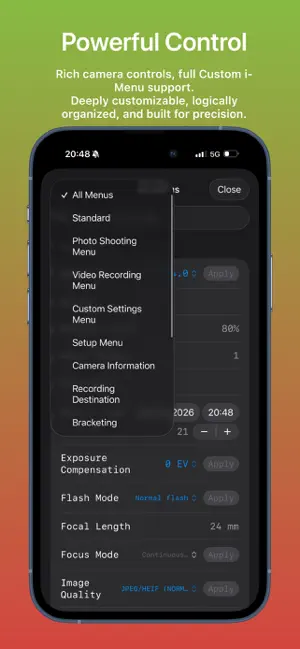
Imaging Console is a professional third-party camera control, monitoring, and file transfer application compatible with Nikon Z series mirrorless cameras and cinema cameras. **Compatibility** Expeed 7 models (Z9, Z8, ZR, Z6III, Z5II, Zf, Z50II) are fully compatible and support all app features. Expeed 6 models (Z5, Z6, Z7, Z6II, Z7II, Z50, Z30, Zfc) do not support group functions. For wireless connections: use "Connect to Smart Device" for control, monitoring, and in‑camera file access; use "Connect to Computer" for control and monitoring only. Important Notice Imaging Console is independently developed and is not affiliated with, endorsed by, authorized by, or associated with Nikon Corporation, RED Digital Cinema, or their affiliated companies. References to Nikon, RED, and related product names are used solely to identify compatible devices. Key Features Hybrid Connectivity Supports USB (MTP/PTP) and wireless (PTP/IP) connections, including camera hotspot, Wi-Fi, and mobile hotspot. Supports both single-camera and multi-camera workflows. Multi-Camera Control Manage and control multiple cameras wirelessly with synchronized photo capture, video recording, mixed capture modes, live monitoring, and synchronized operation for supported shooting modes. Professional Live View Monitor live video with touch focus and convenient camera parameter control. Includes professional monitoring tools such as LUT preview, false color, zebra, histogram, waveform, safe area, level indicator, and composition grids. In-Camera File Management Browse, review, download, protect, rate, and preview files with LUT support. Batch download and advanced filtering are supported. Voice memo management is available on supported flagship cameras. Rapid Transfer Workflow Automatically download newly captured files—or mark selected files as protected on the camera to send them directly to Imaging Console. Choose Gallery, Photos, or Files as the destination, automatically attach GPS, IPTC, and copyright metadata, and support cardless shooting workflows. Review, edit, and deliver selected content faster without interrupting camera operation. LUT & Image Optimization Import custom LUTs and optimization profiles for live preview, in-camera file browsing, post-capture preview, and library viewing. LivePhoto generation and export Supports flexible export from in‑camera video files or imported gallery videos, with HDR preservation and automatic GPS location tagging. Imaging Console is designed to provide photographers, filmmakers, and professional creators with a reliable and efficient camera control workflow.
Ratings & reviews
5.0
5 ratings
What’s new
Version 2.8.1 · Updated October 27, 2026
- Fixed original-image auto-loading when opening a camera-gallery preview for the first time. - Corrected video LUT color handling for more consistent previews and exports. - Improved Live View, virtual-horizon and scope layouts, including focusing with the HUD hidden. - Fixed self-timer panel behavior and film-grain intensity values, and refined controls across screen layouts. - Added support for an optional all-platform lifetime upgrade, enabled in stages by account. Eligible legacy purchases retain the free verification route.
App privacy
The developer, 栋 张, reported these privacy practices to Apple.
Data Linked to You
The following data, which may be collected and linked to your identity, may be used for the following purposes:
- Purchases: Purchase History
- Contact Info: Email Address
- User Content: Photos or Videos
- Identifiers: User ID, Device ID
- Usage Data: Product Interaction
- Other Data: Other Data Types
Used for: App Functionality
Alternatives to Imaging Console
Looking for apps like Imaging Console? Here are 6 similar apps on the App Store. The highest rated is Zenso: Camera Remote (5.0/5), and all 6 are free to download.
-
 Zenso: Camera Remote
5.0
Zenso: Camera Remote
5.0
-
 NX MobileAir
2.5
NX MobileAir
2.5
-
 Gloam 相机
5.0
Gloam 相机
5.0
-
 边框水印大师-一键添加相框水印
4.8
边框水印大师-一键添加相框水印
4.8
-
 StormCam - Cinematic Log Video
4.8
StormCam - Cinematic Log Video
4.8
-
 FotorGear - Camera in Pocket
4.7
FotorGear - Camera in Pocket
4.7
| App | Rating | Price | Last updated | Compare |
|---|---|---|---|---|
| Imaging Console | 5.0 / 5 (5 ratings) | 19.99 USD | October 27, 2026 | |
| Zenso: Camera Remote | 5.0 / 5 (2) | Free | Oct 25, 2026 | Compare |
| NX MobileAir | 2.5 / 5 (28) | Free | Jul 9, 2026 | Compare |
| Gloam 相机 | 5.0 / 5 (7) | Free | Oct 2, 2026 | Compare |
| 边框水印大师-一键添加相框水印 | 4.8 / 5 (272) | Free | Oct 23, 2026 | Compare |
| StormCam - Cinematic Log Video | 4.8 / 5 (666) | Free | Oct 21, 2026 | Compare |
| FotorGear - Camera in Pocket | 4.7 / 5 (1,573) | Free | Oct 21, 2026 | Compare |
Compare Imaging Console with the top alternatives: ratings, updates, ASO score and keyword gaps →