

マイセットタイマー
Takahiko Hara Health & Fitness iPhoneiPadiPod touchApple Watch
マイセットタイマー is a free Health & Fitness app for iPhone and iPad by Takahiko Hara. Requires iOS 16.0. Updated October 20, 2026.
- Price
- Free
- on the App Store
- Size
- 17 MB
- Age 4+
- Updated
- Oct 20
- 2026 · v1.8
Screenshots



About マイセットタイマー
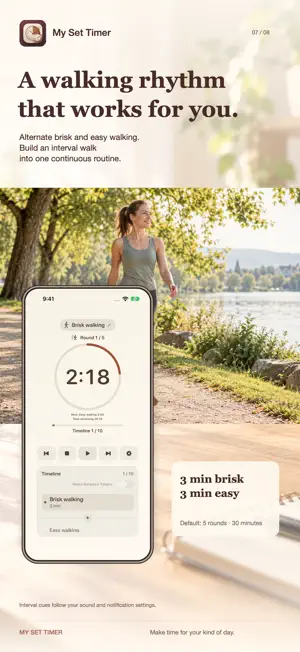
Bring every timer into one routine. My Set Timer lets you run a sequence of timers in the order you choose. Customize names, durations, and order to create routines for studying, exercising, meditating, and more. BUILD YOUR OWN ROUTINES Put preparation, activity, breaks, and cooldowns into one sequence. Save multiple routines so your favorite flows are ready when you are. ADD LEFT/RIGHT PAIRS AND BREAKS Quickly add paired timers for stretches on both sides. Automatically insert a break after each activity, and choose whether to include breaks and how long they last. SEE WHAT’S NEXT Follow your routine with a large countdown, a circular progress ring, and a timeline. Interval sounds and countdown sounds during the final five seconds help you keep track without watching the screen. USE APPLE WATCH Sync routines and settings from iPhone to Apple Watch. Run a session on your Watch independently, with controls to start, pause, resume, and move between steps. While connected, iPhone and Watch share your session’s progress and controls. TRY INTERVAL WALKING Start with a preset that alternates three minutes of brisk walking and three minutes of easy walking for five rounds—a 30-minute routine. Adjust durations, rounds, and optional warm-up and cooldown periods. LOOK BACK AT YOUR PROGRESS Completed sessions are saved in the app. Review your time in the calendar and charts, and see your consistency over time. If you leave a session unfinished, resume from your saved progress. MAKE IT YOURS Choose a color, light or dark tone, and icon for each routine. Set the app’s overall appearance to follow your system or stay light or dark. No ads are shown during sessions. Instant control between iPhone and Apple Watch requires a connection between the devices. Terms of Use: https://okonomitimer.web.app/terms-en.html Privacy Policy: https://okonomitimer.web.app/privacy-en.html
What’s new
Version 1.8 · Updated October 20, 2026
What’s New in Version 1.8 You can now save meditation time to Apple Health. • Turn on saving in Settings. Meditation sessions started after enabling this feature will be saved as Mindful Minutes when completed. • Only time actually spent meditating is recorded. Pauses, breaks, and skipped portions are excluded. • Meditation sessions completed on Apple Watch are also saved after syncing to your iPhone. Apple Health integration is write-only. The app does not read your health data.
App privacy
The developer, Takahiko Hara, reported these privacy practices to Apple.
Data Used to Track You
The following data may be used to track you across apps and websites owned by other companies:
- Location: Coarse Location
- Usage Data: Product Interaction
Data Linked to You
The following data, which may be collected and linked to your identity, may be used for the following purposes:
- Usage Data: Product Interaction
- Health & Fitness: Fitness
- Location: Coarse Location
Used for: Third-Party Advertising, Developer’s Advertising or Marketing, Analytics
Alternatives to マイセットタイマー
Looking for apps like マイセットタイマー? Here are 6 similar apps on the App Store. The highest rated is MSDマニュアル家庭版 (5.0/5), and all 6 are free to download.
-
 Jotfit - Workout Log & Timer
-
 Bear Walking Pal: Step Counter
4.8
-
 MSDマニュアル家庭版
5.0
-
 ダイエットン - 子豚を育てる体重記録アプリ
4.8
-
 MyStepMap
-
 LEAN BODY - ダイエット・ヨガ・ピラティス
5.0
| App | Rating | Price | Last updated | Compare |
|---|---|---|---|---|
| マイセットタイマー | – | Free | October 20, 2026 | |
| Jotfit - Workout Log & Timer | – | Free | Oct 31, 2026 | Compare |
| Bear Walking Pal: Step Counter | 4.8 / 5 (65) | Free | Oct 10, 2026 | Compare |
| MSDマニュアル家庭版 | 5.0 / 5 (1) | Free | Jun 30, 2026 | Compare |
| ダイエットン - 子豚を育てる体重記録アプリ | 4.8 / 5 (5) | Free | Oct 28, 2025 | Compare |
| MyStepMap | – | Free | Oct 26, 2026 | Compare |
| LEAN BODY - ダイエット・ヨガ・ピラティス | 5.0 / 5 (3) | Free | Oct 29, 2026 | Compare |
Compare マイセットタイマー with the top alternatives: ratings, updates, ASO score and keyword gaps →