

ClassPilot - School Planner
Efthymios Tampouris Education iPhoneiPadiPod touch
ClassPilot - School Planner is a free Education app for iPhone and iPad by Efthymios Tampouris. Requires iOS 18.6. Updated October 14, 2026.
- Price
- Free
- on the App Store
- Size
- 13 MB
- Age 4+
- Updated
- Oct 14
- 2026 · v1.6.0
Screenshots
About ClassPilot - School Planner
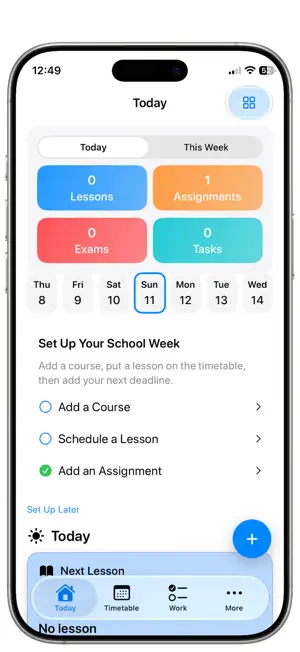
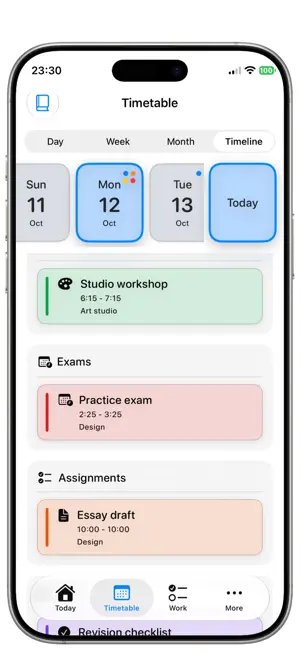
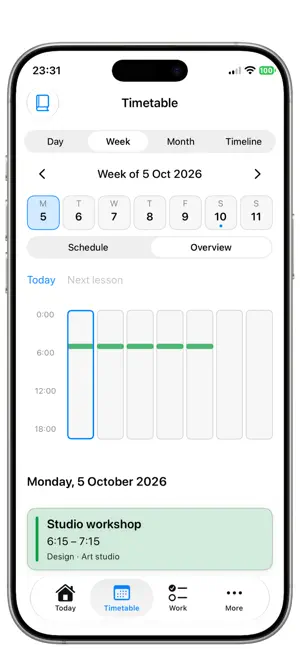
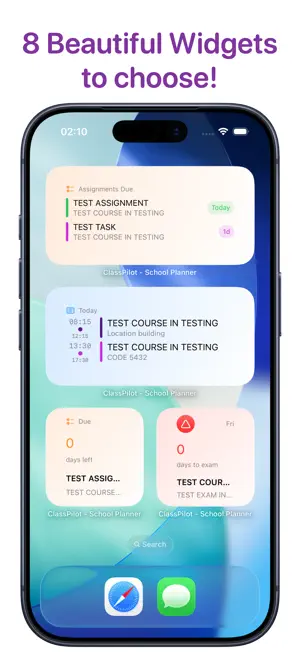
** ClassPilot ** helps you plan a semester, manage daily lessons, track grades, and stay on top of deadlines — whether you’re trying the app for free or running a full classroom workflow on Pro. ** ClassPilot - School Planner is translated in 22 Languages! ** Core capabilities: • Course management: create and organize courses with metadata. • Lesson planner: schedule lessons with start/end times, locations, and quick links. • Assignments & exams: add assignments and exams with due dates, priorities, estimated effort, and status. • Tasks & checklists: lightweight tasks with subtasks, priorities, and completion history. • Grades: full grade visibility with weighted categories and quick grade entry. • Study cards: create flashcards for quick review and spaced practice. • Documents & attachments: attach documents; preview and open files from the app. • Reminders & notifications: set reminders for items and receive local notifications. • Appearance & themes: choose light/dark and theme accents. • Import options: import course data from standard LMS exports. • Local backups: export and restore data. • iCloud sync & background sync: automatic cross‑device sync and conflict resolution. • Dashboard: concise dashboard showing next lesson, upcoming deadlines, and quick actions. • Security & privacy: iCloud sync for cross‑device continuity. • Deep links & sharing: open specific lessons, assignments or courses with classmates or teachers. • Performance: timeline views optimised for smooth scrolling. Extra Advanced Pro features: • Home‑screen widgets: full home widgets (Next Lesson, Today, Assignments, Exams, Course) with multi‑instance support and per‑widget configuration. • Expanded imports: direct imports from MSTeams, Moodle, Google Classroom, Canvas. • Dashboard customization: add, remove and rearrange dashboard modules and widgets. • Calendar sync: two‑way calendar integration with system calendars and advanced sync options. • Advanced exports & sharing: export full course packages, share read/write links, and bulk CSV/ICS export. Usability & reliability: • Deterministic day and week timeline rendering for clear, non‑overlapping event placement. • Overlap resolution and columned event layout for readable schedules. * Free vs Pro — Feature comparison Free: • Courses: 2 • Teachers: 3 • Lessons: 3 • Assignments: 3 • Exams: 3 • Tasks: 3 • Cards: 3 • Documents: 5 • Reminders: 1 • Grade visibility: Full • Appearance/themes: Included • In‑app widget preview: Included • Imports: LMS only • Calendar sync: No • iCloud sync: Yes • Backup & restore: No • Dashboard customisation: Partial • Intelligence access: Free to try Pro (only for 1,99 EUR/month): • Unlimited courses, teachers, lessons, assignments, exams, tasks, cards, documents • Home‑screen widgets (multi‑instance, customisable) • iCloud sync & background sync across devices • Imports: MSTeams, Moodle, Google Classroom, Canvas • Backup & restore, encrypted exports • Dashboard customisation and advanced widgets • Calendar sync and advanced export/sharing options • Priority support and migration assistance Terms of Use (EULA): https://www.apple.com/legal/internet-services/itunes/dev/stdeula/ Privacy Policy URL: https://ops-eng.github.io/ClassPilot/privacy.html - ClassPilot is free to download and use. ClassPilot Pro Subscription gives you unlimited access to our premium content and features. - Payment will be charged to your iTunes Account at confirmation of your subscription. Subscription automatically renews unless auto-renew is turned off at least 24-hours before the end of the current period.
What’s new
Version 1.6.0 · Updated October 14, 2026
Major improvements in this release: - Free plan limits increased! Check the description! - NEW: onboarding guide for a smoother initial setup experience! - Improved Day, Week, Month and Timeline timetables! - Many layout, usability and translation fixes and improvements! - Various bugs exterminated! ** Enjoy the app? Please take a moment to rate it! ** Need Support? Contact us: https://sites.google.com/view/yetanotherswiftapp/support
App privacy
The developer, Efthymios Tampouris, reported these privacy practices to Apple.
Data Not Collected
The developer does not collect any data from this app.
Alternatives to ClassPilot - School Planner
Looking for apps like ClassPilot - School Planner? Here are 6 similar apps on the App Store. The highest rated is StudyFlow: College Planner (5.0/5), and all 6 are free to download.
-
 Schulte Table Focus Trainer
-
 Word Craft Text Game
-
 StudyFlow: College Planner
5.0
StudyFlow: College Planner
5.0
-
 School Planner - HFT
-
 BarExamTrackerPH2026
-
 LawBandit
| App | Rating | Price | Last updated | Compare |
|---|---|---|---|---|
| ClassPilot - School Planner | – | Free | October 14, 2026 | |
| Schulte Table Focus Trainer | – | Free | Oct 6, 2026 | Compare |
| Word Craft Text Game | – | Free | Jul 19, 2026 | Compare |
| StudyFlow: College Planner | 5.0 / 5 (2) | Free | Aug 19, 2026 | Compare |
| School Planner - HFT | – | Free | Oct 23, 2023 | Compare |
| BarExamTrackerPH2026 | – | Free | Apr 29, 2026 | Compare |
| LawBandit | – | Free | Dec 12, 2025 | Compare |