

Snapdraft: Redact Screenshots
Vadym Suprun Photo & Video iPhoneiPadiPod touchMac
Snapdraft: Redact Screenshots is a free Photo & Video app for iPhone and iPad by Vadym Suprun. Requires iOS 17.0. Updated October 27, 2026.
- Price
- Free
- on the App Store
- Size
- 4 MB
- Age 4+
- Updated
- Oct 27
- 2026 · v1.7
Screenshots


About Snapdraft: Redact Screenshots
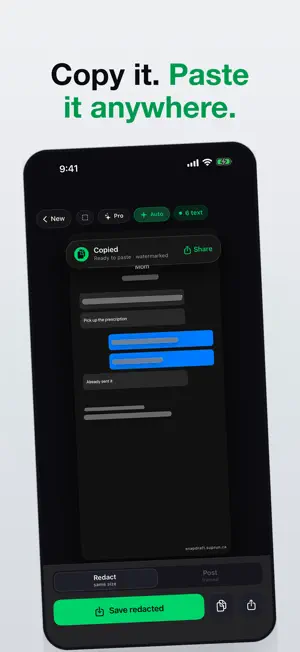
About to post a screenshot? Snapdraft finds the private details in it — phone numbers, emails, addresses, card and account numbers, API keys, faces and QR codes — and blurs them before anyone else sees them. It all happens on your iPhone, iPad or Mac. Nothing is uploaded. Pick a screenshot, paste one, drop one in, or open one from Files. Apple's Vision framework reads it on the device, and a second later the sensitive parts are already blurred. Tap a blur to remove a false positive, drag across anything it missed, long-press a face to change its cover. Then Copy, Share or Save — the redacted image comes out at its original size, ready to paste into Slack, Messages, Linear or an email. Want it to look like a designed post instead? Switch to Post mode, which wraps the screenshot in an iPhone frame on one of six backgrounds. ON IPAD The screenshot gets the screen and the controls sit in a column beside it, in any orientation, full screen, in Split View or in Stage Manager. Open images from Files, drag the redacted result straight into the app next to it, and use keyboard shortcuts for save, copy, new and undo. ON THE MAC A real Mac app, not a scaled-up iPhone screen. Paste a screenshot with ⌘V, open one from Finder or Photos, and save the redacted copy where you choose with ⌘S. The commands live in the menu bar, and you can drag the result straight into Slack or Mail. One purchase covers iPhone, iPad and Mac. WHY NOT JUST USE MARKUP? Markup is fine for one obvious thing. The trouble is the second thing: the phone number in the signature, the email in the header, the face in the corner of the group chat. Snapdraft looks for all of them at once, so you are checking its work instead of hunting yourself. And its blur is a real Gaussian blur baked into the pixels of the saved image, not a shape on top. WHAT IT FINDS • Phone numbers, emails, street addresses • Card numbers and account numbers • API keys and tokens — Stripe, AWS, OpenAI, GitHub, Slack, Google, JWTs, private-key headers and Bearer tokens • Names of people, places and companies, and links • Faces, including small ones in group photos • QR codes and barcodes WHAT YOU CAN DO • Tap a blur to remove it; drag to add one; undo any change • Cover faces with a blur circle or an emoji — sunglasses, disguise, see-no-evil or dotted-line — and change any single face with a long-press • Pinch to zoom, and draw precise blurs while zoomed in • Copy, Share or Save to Photos as a full-resolution PNG • Post mode: iPhone frame, six backgrounds, three padding presets, status bar on or off, fit or fill SHORTCUTS The "Redact Image" action runs the same detection without opening the app and hands back the redacted image. Add it to a shortcut with "Show in Share Sheet" turned on and Snapdraft appears in every app's share sheet. FREE, WITH ONE OPTIONAL UNLOCK Every feature is free and unlimited: every detection, every face cover, every background, both save modes. Saved images carry a small "snapdraft.suprun.ca" mark in the corner. A one-time purchase removes it — that is the only thing it does, and there is no subscription. PRIVATE BY DESIGN No account, no ads, no tracking, no analytics SDKs, and no server for your screenshots to go to. Snapdraft is made by one developer, and the app works in airplane mode. GOOD FOR • Developers posting screenshots with keys and customer data in them • Support teams sharing a user's screen in a ticket • Designers showing client work without the client's names • Anyone about to send a group-chat screenshot to someone who wasn't in the chat Questions or a missed detection? [email protected]
What’s new
Version 1.7 · Updated October 27, 2026
On the open iPhone Duo held upright, the screenshot now gets the full width, with the controls along the bottom.
App privacy
The developer, Vadym Suprun, reported these privacy practices to Apple.
Data Not Collected
The developer does not collect any data from this app.
Alternatives to Snapdraft: Redact Screenshots
Looking for apps like Snapdraft: Redact Screenshots? Here are 6 similar apps on the App Store. The highest rated is Moody Teleprompter: Prompter (4.8/5), and all 6 are free to download.
-
 Maskr: Auto Redact Photos
-
 PictNota - Blur & Photo Editor
-
 HideCut
-
 Mosa: Blur, Pixelate & Redact
-
 AI Climb Video Editor: CruxCut
4.4
AI Climb Video Editor: CruxCut
4.4
-
 Moody Teleprompter: Prompter
4.8
Moody Teleprompter: Prompter
4.8
| App | Rating | Price | Last updated | Compare |
|---|---|---|---|---|
| Snapdraft: Redact Screenshots | – | Free | October 27, 2026 | |
| Maskr: Auto Redact Photos | – | Free | May 1, 2026 | Compare |
| PictNota - Blur & Photo Editor | – | Free | Oct 25, 2026 | Compare |
| HideCut | – | Free | Jun 11, 2026 | Compare |
| Mosa: Blur, Pixelate & Redact | – | Free | Sep 18, 2026 | Compare |
| AI Climb Video Editor: CruxCut | 4.4 / 5 (11) | Free | Oct 31, 2026 | Compare |
| Moody Teleprompter: Prompter | 4.8 / 5 (9) | Free | Oct 15, 2026 | Compare |