

DocFlow Personal
Michel Winkler Productivity iPhoneiPadiPod touch
DocFlow Personal is a free Productivity app for iPhone and iPad by Michel Winkler. Requires iOS 15.1. Updated June 13, 2026.
- Price
- Free
- on the App Store
- Size
- 43 MB
- Age 4+
- Updated
- Jun 13
- 2026 · v1.3.8
Screenshots
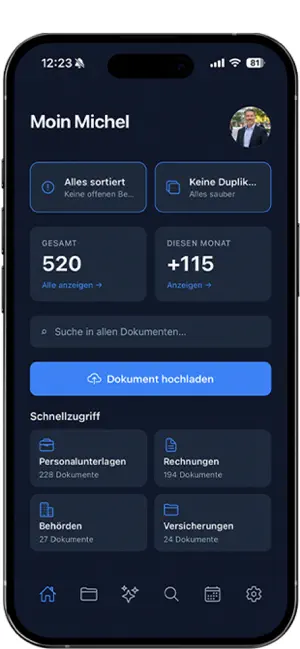


About DocFlow Personal
Your paperwork, sorted automatically. DocFlow takes the hassle out of managing documents: snap a photo or upload a file — the app recognizes what it is, files it in the right folder, and remembers deadlines for you. WHAT DOCFLOW DOES AUTOMATIC CLASSIFICATION Invoices, contracts, pay stubs, government mail, insurance — everything is recognized and categorized by AI. No manual tagging. FULL-TEXT SEARCH Search for "lease agreement", "electricity 2024", or "dentist bill" — instantly finds what you need, even inside PDFs and photos. CALENDAR WITH REMINDERS Deadlines from contracts and notices are automatically added to your calendar. Push notifications before things get tight. SMART INSIGHTS Detects duplicate insurance policies, missing pay stubs, unusual cost increases, forgotten payment reminders. CHAT WITH YOUR DOCUMENTS Ask "How much did I spend on electricity last year?" or "Which contracts expire in March?" — DocFlow answers from your own data. SCANNER WITH AUTO-CROP Automatically detects document edges, scans multiple pages in one go. CLOUD SYNC Connect Google Drive or Dropbox. Your documents stay in your cloud folder — DocFlow is just the smart overview on top. EXPENSE OVERVIEW See at a glance where your money goes — by category, by month, by recipient. EUROPEAN SOFTWARE, GDPR-COMPLIANT DocFlow runs on German servers, your original files stay in your own cloud. No ads, no tracking, no selling of your data. For text recognition and classification, the text content of your documents is sent to Google Gemini with your explicit consent — details in the privacy policy. FREE TO START Free plan: 50 pages + 100 AI requests per month — enough for most people to try it out. Pro/Premium plans for higher volume. Terms of Use (EULA): https://docflow-personal.de/agb Privacy Policy: https://docflow-personal.de/datenschutz
What’s new
Version 1.3.8 · Updated June 13, 2026
What's new in this version: • Sharing made simple: send documents and receipts straight to DocFlow from other apps using the Share menu. • Automatic bookings now show a sparkle icon, so you can see at a glance what DocFlow suggested or matched for you. • Income and expenses now appear cleanly separated within each category. • Accurate totals even with very large document counts. • Dark mode polish: fixed white loading spinners and made dashboard tiles more consistent.
App privacy
The developer, Michel Winkler, reported these privacy practices to Apple.
Data Linked to You
The following data, which may be collected and linked to your identity, may be used for the following purposes:
- Contact Info: Other User Contact Info, Email Address, Name
- Health & Fitness: Health
- Financial Info: Credit Info, Other Financial Info
- Location: Coarse Location
- User Content: Photos or Videos, Other User Content
- Identifiers: User ID
- Sensitive Info: Sensitive Info
Used for: Analytics, App Functionality
Alternatives to DocFlow Personal
Looking for apps like DocFlow Personal? Here are 6 similar apps on the App Store. The highest rated is Rulo: Receipt Warranty Tracker (5.0/5), and all 6 are free to download.
-
 Family DocVault
-
 Rulo: Receipt Warranty Tracker
5.0
-
 Renewo: Document Expiry
-
 Document Organizer - DocuRadar
-
 HENOS
-
 Filedra: PDF Scanner & OCR
| App | Rating | Price | Last updated | Compare |
|---|---|---|---|---|
| DocFlow Personal | – | Free | June 13, 2026 | |
| Family DocVault | – | Free | Jul 6, 2026 | Compare |
| Rulo: Receipt Warranty Tracker | 5.0 / 5 (1) | Free | Sep 11, 2026 | Compare |
| Renewo: Document Expiry | – | Free | Oct 21, 2026 | Compare |
| Document Organizer - DocuRadar | – | Free | Sep 8, 2026 | Compare |
| HENOS | – | Free | Oct 21, 2026 | Compare |
| Filedra: PDF Scanner & OCR | – | Free | Oct 7, 2026 | Compare |
Compare DocFlow Personal with the top alternatives: ratings, updates, ASO score and keyword gaps →