

Yomiage: Read PDFs Aloud
hiroyuki matsuzaki Book iPhoneiPadiPod touch
Yomiage: Read PDFs Aloud is a free Book app for iPhone and iPad by hiroyuki matsuzaki. Requires iOS 17.0. Updated October 4, 2026.
- Price
- Free
- on the App Store
- Size
- 6 MB
- Age 4+
- Updated
- Oct 4
- 2026 · v1.5.1
Screenshots


About Yomiage: Read PDFs Aloud
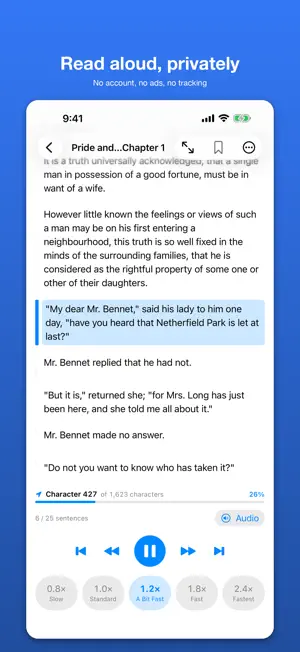
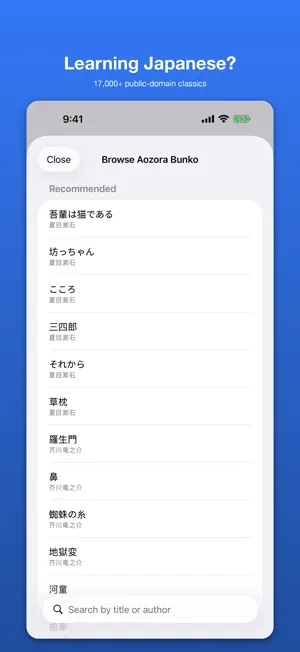
Listen to PDFs, EPUB books, Word files and web articles with every core reading tool included at no cost: no account, no ads, no tracking. Follow along as each sentence is highlighted, search and bookmark passages, and keep listening through long documents. Core reading runs on your device and works offline. A note on voices: Yomiage reads with the voices built into your iPhone. For the most natural sound, download an Enhanced or Premium voice in Settings > Accessibility > Spoken Content > Voices. (Siri voices can't be used by third-party apps.) ■ READ YOUR DOCUMENTS ALOUD • PDFs with selectable text, EPUB, DOCX and TXT. Scanned or photographed pages aren't supported (no OCR) • Web articles: paste a URL, or share from Safari and other apps • Sentence-by-sentence highlighting that follows the voice • Speed, pitch and pauses between paragraphs • Sleep timer (5–60 minutes) for commutes, chores and bedtime • Multi-part documents play continuously • Full-text search and bookmarks • English and Japanese voices are chosen automatically from the document's language • Drama Mode reads dialogue and narration in different voices • Touch and hold a word to set how it should be pronounced ■ LISTEN & PRACTICE: AUDIO AND VIDEO PLAYER Import mp3 / wav / m4a / mp4 / mov for listening practice: • A-B repeat for any passage you choose • Waveform scrubbing to jump back instantly • Speed presets • A mini player that keeps playing while you move around the app • Lock screen and headphone controls, background playback ■ LEARNING JAPANESE? 17,000+ CLASSICS BUILT IN Browse and download public-domain Japanese literature from the built-in Aozora Bunko catalog (Natsume Sōseki, Ryūnosuke Akutagawa, Kenji Miyazawa and more). The texts are in Japanese; their furigana is used to choose readings. ■ HANDS-FREE AND ACCESSIBLE • Siri and Shortcuts to play and continue • Spotlight search for your documents (you can turn it off) • VoiceOver and Dynamic Type support • An alternative for people who prefer listening because of dyslexia, eye strain or low vision • Split view and keyboard shortcuts on iPad ■ PRIVATE BY DESIGN • No account or sign-in, no ads, no behavioral data collection, no tracking • No third-party SDKs • Imported documents are read with on-device iOS voices Importing a web article needs an internet connection. Optional AI features send the text you choose to the provider whose API key you set up, only after you agree, and you can withdraw consent at any time. ■ YOMIAGE PREMIUM (OPTIONAL, AUTO-RENEWING SUBSCRIPTION) Everything above works without Premium. Premium unlocks integrations for people who already have OpenAI or Speechify API access: • Text cleanup, chapter insights and summaries, using your own OpenAI API key • Cloud voices, emotion styles and MP3 export, using your own Speechify API key Important: Premium includes no AI credits, API access or cloud voice time. Those providers bill you separately, and without your own API key the Premium features won't work. Premium is offered monthly or yearly. The price for your region is shown in the app before you buy. ■ SUBSCRIPTION TERMS • Payment is charged to your Apple ID at confirmation of purchase. The subscription renews at the same price unless auto-renew is turned off at least 24 hours before the end of the current period. • Manage or cancel any time in Settings > Apple ID > Subscriptions. • Terms of Use (EULA): https://www.apple.com/legal/internet-services/itunes/dev/stdeula/ • Privacy Policy: https://legal-pages-hiros-projects-fdd12c60.vercel.app/privacy#tts-reader-en
What’s new
Version 1.5.1 · Updated October 4, 2026
• Fixed: Speechify could not be selected because there was no place to enter its API key. • New: a field for your OpenAI API key, used by AI Summary and AI text cleanup. • Playback speed now lives in one place — the speed buttons under the player — and applies to every file. • Shorter pauses between paragraphs. • Fixed long chapters failing with Speechify; errors now show the reason. • The file picker reopens the folder you used last. • Select and delete all parts of a split document at once. • Fixes for Spotlight, Open In, and share-sheet imports. • Many other fixes and improvements.
App privacy
The developer, hiroyuki matsuzaki, reported these privacy practices to Apple.
Data Not Linked to You
The following data, which may be collected but is not linked to your identity, may be used for the following purposes:
- User Content: Other User Content
- Identifiers: User ID
Used for: App Functionality
Alternatives to Yomiage: Read PDFs Aloud
Looking for apps like Yomiage: Read PDFs Aloud? Here are 6 similar apps on the App Store. The highest rated is Strophe: Ebook Text to Speech (3.0/5), and all 6 are free to download.
-
 Bunvox
-
 MiracleNovel: Read Romance
-
 Shelfieline
-
 Pagecast – Read Aloud Offline
-
 Strophe: Ebook Text to Speech
3.0
Strophe: Ebook Text to Speech
3.0
-
 Speakify Reader
| App | Rating | Price | Last updated | Compare |
|---|---|---|---|---|
| Yomiage: Read PDFs Aloud | – | Free | October 4, 2026 | |
| Bunvox | – | Free | Oct 15, 2026 | Compare |
| MiracleNovel: Read Romance | – | Free | Oct 15, 2026 | Compare |
| Shelfieline | – | Free | Oct 5, 2026 | Compare |
| Pagecast – Read Aloud Offline | – | Free | Sep 29, 2026 | Compare |
| Strophe: Ebook Text to Speech | 3.0 / 5 (1) | Free | Sep 16, 2026 | Compare |
| Speakify Reader | – | Free | Sep 22, 2026 | Compare |