

Kidline - Kid Safe Calling
Senior Games Club Entertainment iPhoneiPadiPod touch
Kidline - Kid Safe Calling is a free Entertainment app for iPhone and iPad by Senior Games Club. Rated 5.0/5 from 1 ratings. Requires iOS 16.0.
- Rating
- 5.0
- 1 ratings
- Price
- Free
- on the App Store
- Size
- 38 MB
- Age 4+
- Updated
- Oct 3
- 2026 · v1.3.0
Screenshots


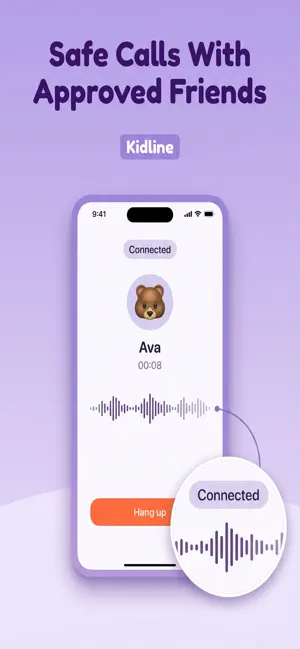
About Kidline - Kid Safe Calling
Turn an old iPhone or iPad into your child's own home phone. Tap a face to call. Kidline phones ring like a landline, even on the lock screen. Only the friends, family and grown-ups you approve can call. Calls are never recorded. Inside Kidline there is no browsing, no feed and no phone number. Your child sees big, colorful faces of the people you've approved. One tap on a face places a call. TURN A SPARE PHONE INTO A HOME PHONE - Works on iPhone 8 or iPad (5th generation) and newer, running iOS 16 or later - Works over Wi-Fi. No SIM card or phone plan needed - Pair it in minutes: your phone shows a QR code, the old phone scans it - Run a ring test before you hand it over - Keep it on the charger with Kidline open and it rests on a dim night screen, ready to ring like a landline - When it's locked, calls ring on the lock screen with the caller's name (check that the ringer is on and no Focus is blocking Kidline) - Setup also walks you through optional Screen Time and Guided Access lock-down CALL HOME - On a Kidline phone, the first face is Home. One tap rings your iPhone like a regular call, even when it's locked - Works during quiet time unless you turn that off, and never counts toward a limit GRANDPARENTS AND OTHER GROWN-UPS - Invite Grandma, Grandpa or an aunt with a private code - They use Kidline on their own phone, no Kid Mode needed. It rings like a regular call, and they can call back with one tap - You choose the name and face your child sees. Grown-ups only see the kids they're linked to ONLY PEOPLE YOU APPROVE - Connect families with a private invite code or QR code - You choose every friend, family member and grown-up - Pause, block or remove a contact any time, or report a concern - Your child appears to other families by nickname and emoji TAP A FACE TO CALL - One-to-one voice calls with big faces, no reading needed - A short pre-ring lets an accidental tap be cancelled before anything rings - Missed a call? One tap on "Call me back!" puts a bell on your child's face on the friend's home screen RING SONGS - 8 playful ring songs plus the classic ring. Each contact gets their own, so your child can tell who's calling - With spoken prompts on, the phone also says who's calling WALKIE-TALKIE (PREMIUM) - Press and hold to talk between two Kidline phones - Both families switch it on for that friend - One walkie friend at a time - Never recorded QUIET TIME - Set one quiet window for the family, such as Bedtime 8pm-7am - The home screen turns into a calm night scene and calls pause until it ends - If a friend's family has quiet time on, calls to them pause too ACTIVITY FOR PARENTS - See who called whom, when, and for how long - See missed calls, call-back requests, walkie-talkie use and new contacts - Calls and walkie-talkie are never recorded PICTURE MESSAGES (PREMIUM, OFF BY DEFAULT) - Doodles and stickers between approved contacts - Turn them on in Settings. You can see every picture GOOD TO KNOW Kidline calls other Kidline users only. It cannot call 911, other emergency numbers or regular phone numbers. Help > In an emergency explains what to set up instead. FREE AND PREMIUM - Free: calls with 2 friends or family and 2 grown-ups per child. Call home is always included - Premium: unlimited friends, family and grown-ups, walkie-talkie and picture messages - Kidline Premium is $4.99 per month or $39.99 per year (US prices; may vary by country) Payment is charged to your Apple ID when you confirm the purchase. Your subscription renews automatically unless you cancel at least 24 hours before the end of the current period. Your account is charged for renewal within 24 hours before the end of the current period. Manage or cancel anytime in your App Store account settings. No ads. We never sell your data. Terms of Use: https://www.seniorgamesclub.com/terms-and-conditions/ Privacy Policy: https://www.seniorgamesclub.com/kidline-privacy-policy/
What’s new
Version 1.3.0 · Updated October 3, 2026
NEW - Grandparents and other grown-ups: invite Grandma with a code. She uses Kidline on her own phone, it rings like a regular call when your child calls, and she can call back with one tap. No Kid Mode needed - Call home: on a Kidline phone, the Home face rings your iPhone like a regular call. It works during quiet time unless you turn that off in Settings - Ring songs: 8 playful ring songs plus the classic ring. Each contact gets their own, and the phone can say who's calling - Help: a new "In an emergency" page. Kidline can't call 911, so it explains what to set up on the phone instead IMPROVED - Activity shows grown-ups and calls home - Crash reports now come from Apple's built-in reports, sent without any account or device identifiers, to help us fix bugs faster - Update the Kidline phone too: grown-ups and Call home need this version on every phone in your family Calls and walkie-talkie are never recorded.
Play today's Sudoku puzzle
A quick 6×6 Sudoku every day; levels grow to the classic 9×9. A free daily puzzle from Fiplay, same board for everyone. It plays right here, no download.
App privacy
The developer, Senior Games Club, reported these privacy practices to Apple.
Data Linked to You
The following data, which may be collected and linked to your identity, may be used for the following purposes:
- Purchases: Purchase History
- Contact Info: Email Address, Name
- User Content: Other User Content
- Identifiers: User ID, Device ID
- Usage Data: Product Interaction
- Diagnostics: Other Diagnostic Data
Used for: Analytics, App Functionality
Data Not Linked to You
The following data, which may be collected but is not linked to your identity, may be used for the following purposes:
- Diagnostics: Crash Data, Performance Data
Used for: Analytics, App Functionality
Alternatives to Kidline - Kid Safe Calling
Looking for apps like Kidline - Kid Safe Calling? Here are 6 similar apps on the App Store. The highest rated is LumiTube (5.0/5), and all 6 are free to download.
-
 PiPop
-
 LumiTube
5.0
-
 Live.krd
5.0
-
 BES WonderHop OLD
3.8
-
 AI Desktop XP
4.3
-
 Italian Brainrot Maker: Rotino
4.9
| App | Rating | Price | Last updated | Compare |
|---|---|---|---|---|
| Kidline - Kid Safe Calling | 5.0 / 5 (1 rating) | Free | October 3, 2026 | |
| PiPop | – | Free | Aug 25, 2026 | Compare |
| LumiTube | 5.0 / 5 (7) | Free | May 28, 2026 | Compare |
| Live.krd | 5.0 / 5 (1) | Free | Aug 5, 2026 | Compare |
| BES WonderHop OLD | 3.8 / 5 (13) | Free | Aug 11, 2026 | Compare |
| AI Desktop XP | 4.3 / 5 (9) | Free | Sep 18, 2026 | Compare |
| Italian Brainrot Maker: Rotino | 4.9 / 5 (34) | Free | Oct 14, 2026 | Compare |