

ErgoCam: Posture Coach
zYouSoft, Inc. Health & Fitness iPhoneiPadiPod touchMac
ErgoCam: Posture Coach is a free Health & Fitness app for iPhone and iPad by zYouSoft, Inc. Requires iOS 26.2. Updated June 17, 2026.
- Price
- Free
- on the App Store
- Size
- 10 MB
- Age 12+
- Updated
- Jun 17
- 2026 · v1.1.5
Screenshots

About ErgoCam: Posture Coach
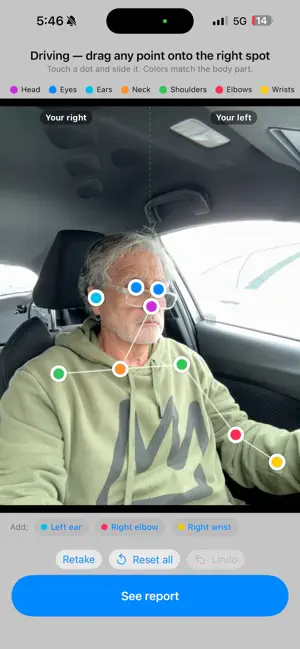
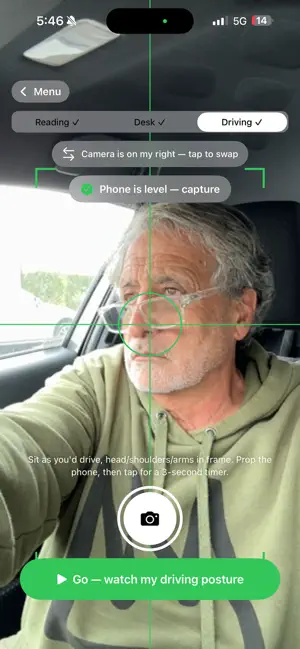
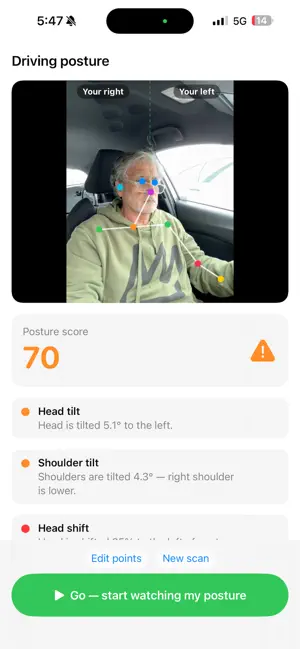
ErgoCam is a real-time posture coach that uses your iPhone's front camera to spot the bad habits that quietly wreck your back, neck, and shoulders — before the pain shows up. THREE MODES, ONE APP • Phone:catches tech neck (chin tucked toward your collar), screens held too close, and head-tilt strain while you scroll. • Desk: watches your shoulders, chest, and chin in real time. Alerts the moment you slump toward the screen. • Driving: mount the phone on the dash. ErgoCam watches for drowsiness (eye closure, head dropping) and slumped driving posture. Audio-only alerts keep your eyes on the road. CALIBRATED TO YOU • One-tap calibrate per mode — phone, desk, and driving each remember their own baseline, so the app never fires "bad posture" on a healthy variant. • Fine-tune by tapping your shoulders, chin, and chest on a frozen frame. The app uses YOUR anatomy as the slouch reference, not a generic model. • Driving uses a five-point side profile (ear, neck, shoulder, side of upper back, side of lower back) so it understands posture from a dashboard angle. REAL CONTROLS • On/off switches for tech neck and head-tilt detection if a detector keeps firing on a posture you consider fine. • A "back straight" sensitivity slider that scales slouch, forward-head, and chest-gap alerts together. • Sound + haptic, visual flash banner, or silent visual-only mode for meetings. • Reminder pings if you want a gentle check-in even when ErgoCam isn't on screen. DESIGNED TO ACTUALLY STAY ON • Won't go dark — ErgoCam keeps the screen awake while it's watching, so your auto-lock doesn't quietly shut posture coaching off. PRIVATE BY DESIGN • Every Vision computation happens on your iPhone. Camera frames never leave the device — no cloud upload, no account required. WHO IT'S FOR • Remote workers who slump into their laptops by 4 PM. • Anyone who scrolls in bed and wonders why their neck hurts. • Drivers without built-in driver-monitoring — especially long-haul, older drivers, and parents of new drivers. • People who've tried posture-correcting straps and want a smarter, less annoying nudge. Sit up. Look up. Drive safe. • Chin & neck position tracking Helps identify forward-head posture and neck compression. • Eye fatigue & drowsiness detection Monitors eyelid openness and fatigue indicators during long sessions. • Smart wellness reminders Receive posture corrections, stretch reminders, and focus breaks. • Privacy-first design All processing happens locally on your device. No cloud tracking. No recordings uploaded. • Lightweight & automatic Runs quietly in the background while you work. IDEAL FOR • Remote workers • Students • Developers • Designers • Gamers • Office professionals • Anyone spending long hours in front of a screen WHY ERGOCAM? Most people do not realize how often they slouch, lean forward, or strain their neck until discomfort appears. ErgoCam brings real-time awareness to your posture using the camera already built into your Mac. Better posture starts with awareness. ErgoCam — See your posture. Improve your habits.
What’s new
Version 1.1.5 · Updated June 17, 2026
What's New in 1.1.5 Smarter, more reliable posture detection • ErgoCam now catches more of the postures that actually strain your neck and back — head dropped forward, head tilted back, and head cocked to one side — and it's far more consistent from one position to the next. • New: it detects when your head sinks down between your shoulders (your neck disappears from view) and reminds you to sit tall. Works in every position — Reading, Desk, and Driving. • Posture is now judged on what the camera actually sees rather than leaning on your saved calibration, so a level, healthy posture no longer gets flagged by mistake — and a genuinely poor one no longer slips through as "Good." • When the camera can't get a clear read of you, ErgoCam now says "Looking for you…" instead of showing a false "Good posture." See that it's working • Live tracking dots now stay on your face while ErgoCam is watching you — green when your posture is good, red when something needs fixing. Easier, clearer calibration • After ErgoCam auto-places your posture points, a note reminds you that you can drag any point to fine-tune it. • A long buzz lets you know the moment a capture finishes — handy when your phone is propped to the side for Desk or Driving and you're looking away. Just turn back and adjust. • When you add a point by hand, it now flashes until you drag it into place, so you always know which one to position. Thanks for using ErgoCam. Keep sitting tall!
App privacy
The developer, zYouSoft, Inc., reported these privacy practices to Apple.
Data Not Collected
The developer does not collect any data from this app.
Alternatives to ErgoCam: Posture Coach
Looking for apps like ErgoCam: Posture Coach? Here are 6 similar apps on the App Store. The highest rated is Upriq - Posture Slouch Alert (5.0/5), and all 6 are free to download.
-
 AI Body Scan
-
 PrimeMotion Workplace
-
 Posture Boost - Align Yourself
-
 SitRight AI
-
 Upriq - Posture Slouch Alert
5.0
Upriq - Posture Slouch Alert
5.0
-
 ErgonomAi
| App | Rating | Price | Last updated | Compare |
|---|---|---|---|---|
| ErgoCam: Posture Coach | – | Free | June 17, 2026 | |
| AI Body Scan | – | Free | Sep 18, 2026 | Compare |
| PrimeMotion Workplace | – | Free | Aug 28, 2026 | Compare |
| Posture Boost - Align Yourself | – | Free | Apr 26, 2026 | Compare |
| SitRight AI | – | Free | Sep 12, 2026 | Compare |
| Upriq - Posture Slouch Alert | 5.0 / 5 (1) | Free | Apr 11, 2026 | Compare |
| ErgonomAi | – | Free | Apr 16, 2026 | Compare |