

Calendar Planner & To do list
Sviatoslav Illiashenko Productivity iPhoneiPadiPod touch
Calendar Planner & To do list is a free Productivity app for iPhone and iPad by Sviatoslav Illiashenko. Rated 5.0/5 from 6 ratings. Requires iOS 18.
- Rating
- 5.0
- 6 ratings
- Price
- Free
- on the App Store
- Size
- 14 MB
- Age 4+
- Updated
- Aug 26
- 2026 · v1.5
Screenshots
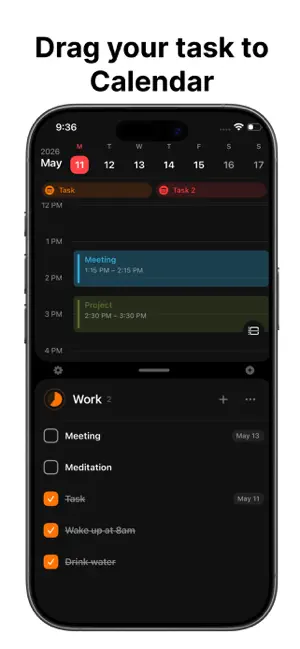

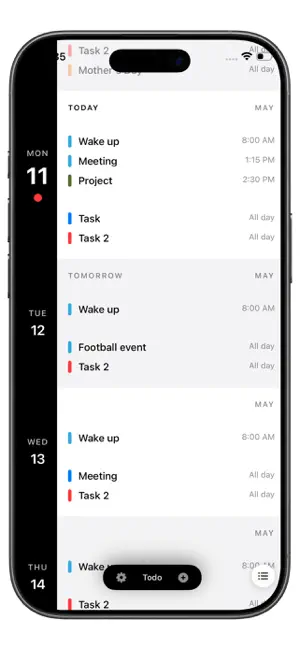

About Calendar Planner & To do list
Calendar Split Planner is a free daily planner that brings your calendar and to do list together in one beautiful app. Schedule events, organize tasks, and plan your time — all from a single split screen. WHY YOU'LL LOVE IT Split-Screen Design — see your daily schedule and task list side by side. No more switching between apps to know what's next. Drag & Drop Magic — drop any task from your to do list onto the calendar to instantly schedule it. Move tasks between days with a swipe. Apple Calendar Integration — your calendar events sync directly with the iOS Calendar app. Every event you create in Split Planner appears in Apple Calendar, and vice versa. Smart Lists & Organizer — keep your daily routine clean with custom task lists, an Inbox for quick capture, and a Today view that shows everything on your plate right now. Recurring Tasks & Goals — build habits with daily, weekly, monthly, or custom repeating tasks. Set goals, track routines, and stay consistent. Reminders & Notifications — get reminded before each task or event so nothing slips through. Set custom alerts to match your schedule. Beautiful Themes — choose from carefully crafted light and dark themes to match your style. Interactive Widgets — pin your tasks to your home screen. Tap to check off, browse your lists, or see today's schedule at a glance. PERFECT FOR - Daily planning and time blocking - Building routines and tracking habits - Managing personal tasks and work projects - Students organizing classes, assignments, and deadlines - Anyone who wants a cleaner way to plan their day FREE TO START Split Planner is free to use with all core features included — unlimited tasks, calendar events, drag and drop, Apple Calendar sync, and the Today widget. Upgrade to Premium to unlock additional themes, more widgets, iCloud sync across all your devices, and more. NO ACCOUNT NEEDED No sign-up. No tracking. Your data lives on your device (and optionally syncs through your personal iCloud). We never see your tasks or events. WHAT'S COMING NEXT Weekly and monthly views, more widget styles, a Mac version, and many more features inspired by you. Have an idea? Reach out — every email gets a reply. Plan your day. Get more done. Stay focused. Privacy Policy: https://docs.google.com/document/d/1NuEJ075xH1YBzsKE-l_ZN40eW0PuajOpyWML7L13kP0/edit?usp=sharing Terms of. Use: https://docs.google.com/document/d/1J9PGmsLnWMy3D01L7dVXK9y8iMoJsAXavjJohflv7WY/edit?usp=sharing
Ratings & reviews
5.0
6 ratings
What’s new
Version 1.5 · Updated August 26, 2026
Added the ability to choose which Apple calendars are displayed in the app.
App privacy
The developer, Sviatoslav Illiashenko, reported these privacy practices to Apple.
Data Not Collected
The developer does not collect any data from this app.
Alternatives to Calendar Planner & To do list
Looking for apps like Calendar Planner & To do list? Here are 6 similar apps on the App Store. The highest rated is Smarter Day: Daily Structure (5.0/5), and all 6 are free to download.
-
 Blaze Calendar
-
 Smarter Day: Daily Structure
5.0
Smarter Day: Daily Structure
5.0
-
 Ivy: Plan. Do. Reflect.
5.0
Ivy: Plan. Do. Reflect.
5.0
-
 TimeBoxer Daily Planner
5.0
TimeBoxer Daily Planner
5.0
-
 Weekline Weekly Planner & Todo
5.0
Weekline Weekly Planner & Todo
5.0
-
 nocal - calendar reinvented
4.0
nocal - calendar reinvented
4.0
| App | Rating | Price | Last updated | Compare |
|---|---|---|---|---|
| Calendar Planner & To do list | 5.0 / 5 (6 ratings) | Free | August 26, 2026 | |
| Blaze Calendar | – | Free | Oct 23, 2026 | Compare |
| Smarter Day: Daily Structure | 5.0 / 5 (11) | Free | Aug 11, 2026 | Compare |
| Ivy: Plan. Do. Reflect. | 5.0 / 5 (16) | Free | Sep 17, 2026 | Compare |
| TimeBoxer Daily Planner | 5.0 / 5 (5) | Free | Oct 12, 2026 | Compare |
| Weekline Weekly Planner & Todo | 5.0 / 5 (4) | Free | Oct 23, 2026 | Compare |
| nocal - calendar reinvented | 4.0 / 5 (2) | Free | Sep 11, 2026 | Compare |