

Contacts to PDF: Address Book
Aaron Hampton Productivity iPhoneiPadiPod touchMac
Contacts to PDF: Address Book is a free Productivity app for iPhone and iPad by Aaron Hampton. Rated 5.0/5 from 1 ratings. Requires iOS 26.0.
- Rating
- 5.0
- 1 ratings
- Price
- Free
- on the App Store
- Size
- 6 MB
- Age 4+
- Updated
- Sep 29
- 2026 · v1.2
Screenshots


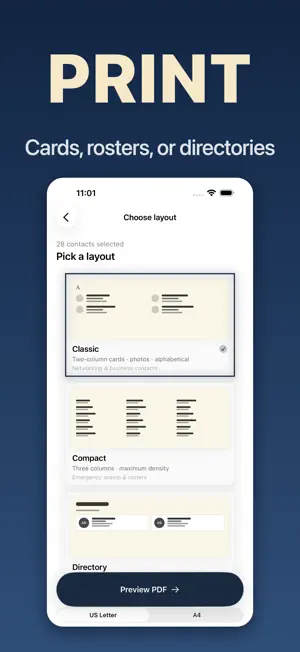
About Contacts to PDF: Address Book
Turn your contacts into a printable PDF in minutes. Pick exactly who to include, choose a layout, export. Everything stays on your device. Perfect for: • Leaving an emergency contact sheet with a babysitter or caregiver • Making a phone book for a parent or grandparent who doesn't use a smartphone • Printing a staff roster or office directory • Keeping a paper backup of your address book HOW IT WORKS 1. MAKE — Generate a contact sheet in minutes. No setup, no sign-in. 2. PICK — Choose exactly which contacts to include. The babysitter doesn't need all 400 contacts — just the 8 that matter. 3. PRINT — Pick from three layouts, then save, AirDrop, email, or print. THREE LAYOUTS • Classic — Roomy cards with names, numbers, emails, and addresses. Reads like a printed address book. • Compact — Dense list that fits more contacts per page. Great for fridge-sheet phone books. • Directory — Two-column format perfect for staff rosters and team lists. PRIVACY-FIRST Your contacts never leave your device. ContactPDF works entirely offline — no analytics, no tracking, no account, no cloud upload. The app asks for Contacts permission once, generates the PDF locally, and that's it. WHO IT'S FOR • Parents prepping an emergency sheet for the babysitter or nanny • Adult children helping an elderly parent stay connected with a printable phone book • Office managers printing staff directories or team rosters • Anyone who wants a paper backup of their address book WHY PDF? Because paper still works. A printed contact list doesn't need batteries, signal, or a passcode. Pin it to the fridge. Slip it in a wallet. Hand it to a caregiver. ContactPDF makes that easy.
What’s new
Version 1.2 · Updated September 29, 2026
A reliability update with fixes throughout. • Imports more of your contacts correctly, including vCards saved in UTF-16 and cards that were skipped or duplicated. • Long names and phone numbers now wrap in the PDF instead of being cut off. • February 29 birthdays now appear correctly. • Exporting a PDF can no longer hang. • Search results stay current after your contacts change. • Contacts sort into the right alphabetical section in every language. • If you deselect every contact, that choice is now remembered after you relaunch. • In the Compact layout, options that don't apply are now turned off. • The purchase screen handles App Store connection problems more gracefully.
App privacy
The developer, Aaron Hampton, reported these privacy practices to Apple.
Data Not Collected
The developer does not collect any data from this app.
Alternatives to Contacts to PDF: Address Book
Looking for apps like Contacts to PDF: Address Book? Here are 6 similar apps on the App Store. The highest rated is Contacts Printer (5.0/5), and all 6 are free to download.
-
 Contacts Printer
5.0
Contacts Printer
5.0
-
 Convert Picture to PDF: JPG
-
 Quick Contact Biz Card Manager
-
 Timewarp
5.0
Timewarp
5.0
-
 MD Adressbuch
-
 Guest List: RSVP Tracker
| App | Rating | Price | Last updated | Compare |
|---|---|---|---|---|
| Contacts to PDF: Address Book | 5.0 / 5 (1 rating) | Free | September 29, 2026 | |
| Contacts Printer | 5.0 / 5 (1) | Free | Apr 5, 2026 | Compare |
| Convert Picture to PDF: JPG | – | Free | Jun 30, 2026 | Compare |
| Quick Contact Biz Card Manager | – | Free | Sep 7, 2026 | Compare |
| Timewarp | 5.0 / 5 (2) | Free | Jul 31, 2026 | Compare |
| MD Adressbuch | – | Free | May 1, 2026 | Compare |
| Guest List: RSVP Tracker | – | Free | Sep 25, 2026 | Compare |