

Harmony: Music Trainer
Melvin Warnet Education iPhoneiPadiPod touch
Harmony: Music Trainer is a free Education app for iPhone and iPad by Melvin Warnet. Requires iOS 15.1. Updated September 20, 2026.
- Price
- Free
- on the App Store
- Size
- 54 MB
- Age 4+
- Updated
- Sep 20
- 2026 · v1.2.1
Screenshots


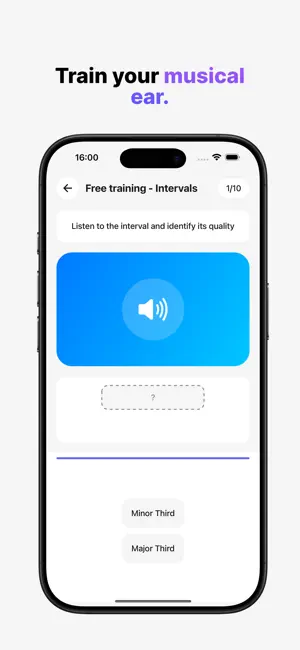
About Harmony: Music Trainer
Unlock the musician in you with Harmony. Whether you're a beginner or a seasoned player, Harmony trains you to recognize, read, and play music. Four domains, one method: theory becomes a game of focused exercises you tune to your level. The 4 domains • Notes — spot and place every note. • Intervals — measure the distance between two pitches. • Scales — major, minor, modes, and more. • Chords — from triads to extended chords, inversions included. Three ways to train • By sight — read the note straight off the staff (treble or bass clef, key signatures, ledger lines). • By ear — hear a note, interval, or chord, then identify it. • By playing — play the target back on an interactive piano. Play your way • By touch, on the virtual keyboard. • By microphone, singing or with your instrument. • By MIDI, plugging in your keyboard (USB or Bluetooth). Track your progress • Short sessions — choose how many questions, and get your precision at the end. • Clear statistics — your mastery domain by domain, by question type, and by concept. • Your practice day streak, to keep the rhythm going. Why Harmony? • Tailored — pick the concepts, question formats, and difficulty. • Easy to get into — a guided tour shows you the essentials on first launch. • Distraction-free — a clean interface built for focus. • On every screen — phone and tablet alike. • Offline — everything works without a connection. • Multilingual — English, French, Spanish, and three note notations (Do-Re-Mi, C-D-E, German notation). Harmony is just getting started. We improve it every day to build the most complete training companion, from theory basics to a trained ear. Happy practicing!
What’s new
Version 1.2.1 · Updated September 20, 2026
What's new in version 1.2.1 • Virtual guitar: answer the exercises on a guitar neck instead of the keyboard. Right-handed or left-handed, your choice in the general settings. The feature is in beta, we would love your feedback. • The harmonymusictrainer.com website is live: the app presentation and the contact form, which you can also reach from the Information tab. • Fix: scrolling the instrument with your finger no longer plays notes by accident. • Fix: sound is sent to earphones and Bluetooth headphones again. Happy practicing!
App privacy
The developer, Melvin Warnet, reported these privacy practices to Apple.
Data Not Linked to You
The following data, which may be collected but is not linked to your identity, may be used for the following purposes:
- Contact Info: Email Address
- Usage Data: Product Interaction, Advertising Data, Other Usage Data
Used for: Analytics
Alternatives to Harmony: Music Trainer
Looking for apps like Harmony: Music Trainer? Here are 6 similar apps on the App Store. The highest rated is Ear Training - Modern (5.0/5), and all 6 are free to download.
-
 Ear Training - Modern
5.0
-
 Solfagen
-
 Sonachord
-
 Interval Ear Training
4.0
-
 Modalissimo Ear Training
5.0
-
 Habanera: See How Music Works
| App | Rating | Price | Last updated | Compare |
|---|---|---|---|---|
| Harmony: Music Trainer | – | Free | September 20, 2026 | |
| Ear Training - Modern | 5.0 / 5 (1) | Free | Aug 10, 2026 | Compare |
| Solfagen | – | Free | Jun 15, 2026 | Compare |
| Sonachord | – | Free | Jul 15, 2026 | Compare |
| Interval Ear Training | 4.0 / 5 (1) | Free | Oct 14, 2026 | Compare |
| Modalissimo Ear Training | 5.0 / 5 (1) | Free | Oct 3, 2026 | Compare |
| Habanera: See How Music Works | – | Free | Sep 28, 2026 | Compare |