

Alarm Clock: Wake Up Missions
Phuc Pham Utilities iPhoneiPadiPod touch
Alarm Clock: Wake Up Missions is a free Utilities app for iPhone and iPad by Phuc Pham. Requires iOS 17.0. Updated August 29, 2026.
- Price
- Free
- on the App Store
- Size
- 6 MB
- Age 4+
- Updated
- Aug 29
- 2026 · v1.2.0
Screenshots



About Alarm Clock: Wake Up Missions
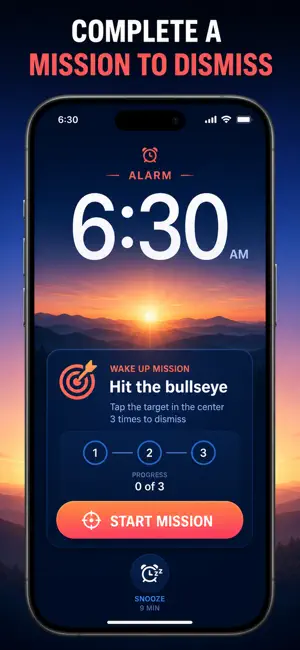
You set the alarm. You hit snooze anyway. This alarm clock does not let that happen — it keeps ringing until you finish a real wake-up mission, so the part of your brain that swipes at 6 AM without waking up never gets the chance. Most alarm apps end at a bigger snooze button. This one is built around eight missions you can assign per alarm: solve math, match a photo you registered, shake the phone, repeat a memory pattern, type a phrase, do counted squats, scan a barcode across the room, or hit a moving bullseye. Then it stays with you at night — a 4-track sleep sound mixer to fall asleep to, and a sleep session tracker that listens for snoring and scores the night. One app for the whole bedtime-to-morning loop, and none of it leaves your iPhone. WHAT YOU GET - Wake up on the first alarm because the sound will not stop until a mission is done - Eight mission types, chosen per alarm, so you can match the difficulty to the day - A bedtime you actually keep, with reminders before lights out and a follow-up check after the alarm - Fall asleep faster by layering up to 4 ambient sounds and setting a fade-out timer - See whether you snored and how the night scored, on weekly and monthly charts - Take your sleep history anywhere with a one-tap CSV export PERFECT FOR - Heavy sleepers who sleep straight through a normal alarm - Shift workers and students who cannot afford one missed morning - Light sleepers who need rain, ocean, or white noise to drop off - Anyone curious whether snoring is behind their tired mornings WHY NOT JUST USE THE BUILT-IN CLOCK APP Because the built-in clock only asks for a tap, and a half-asleep tap is free. A mission costs effort, and effort is what actually wakes you. The stock app also has no sound mixer, no snore detection, and no record of how you slept — so you never find out why the mornings feel so hard. PRIVACY No account, no sign-up, no cloud sync, no tracking SDK. Alarms, sleep sessions, snore counts, and saved mixes stay in local storage on your iPhone. The microphone is used only during a sleep session you start yourself, and the camera only inside a photo or barcode mission. FULL ACCESS The free version includes up to 3 alarms, the math mission, 5 sleep sounds, and 7 days of sleep history. Full access unlocks all eight mission types, unlimited alarms, the complete 20-sound library with the 4-track mixer, snore detection and sleep scoring, unlimited history with CSV export, plus bedtime reminders and wake-up checks. Available as a weekly or yearly subscription, or a one-time lifetime purchase. Set tonight's alarm, pick the mission you would hate to fail, and see what tomorrow morning looks like. Terms of Use (EULA): https://web-levi.web.app/terms Privacy Policy: https://web-levi.web.app/privacy-policy Questions? Reach us anytime through the support link on our App Store page.
What’s new
Version 1.2.0 · Updated August 29, 2026
Bug fixes and performance improvements.
App privacy
The developer, Phuc Pham, reported these privacy practices to Apple.
Data Not Collected
The developer does not collect any data from this app.
Alternatives to Alarm Clock: Wake Up Missions
Looking for apps like Alarm Clock: Wake Up Missions? Here are 6 similar apps on the App Store. The highest rated is ZzZlapp: Alarm Clock Missions (5.0/5), and all 6 are free to download.
-
 Alarm Clock: Mission Alarm
-
 Rouse: Alarm Clock & Missions
-
 Loud Alarm Clock: Awaken
-
 AlarmX - Mission & Sleep Alarm
-
 ZzZlapp: Alarm Clock Missions
5.0
-
 Mission: Loud Alarm Clock
| App | Rating | Price | Last updated | Compare |
|---|---|---|---|---|
| Alarm Clock: Wake Up Missions | – | Free | August 29, 2026 | |
| Alarm Clock: Mission Alarm | – | Free | Oct 24, 2026 | Compare |
| Rouse: Alarm Clock & Missions | – | Free | Oct 21, 2026 | Compare |
| Loud Alarm Clock: Awaken | – | Free | Oct 20, 2026 | Compare |
| AlarmX - Mission & Sleep Alarm | – | Free | Sep 23, 2026 | Compare |
| ZzZlapp: Alarm Clock Missions | 5.0 / 5 (1) | Free | Apr 20, 2026 | Compare |
| Mission: Loud Alarm Clock | – | Free | Sep 1, 2026 | Compare |