

Split - Scan & Split Bills
Foundry Studio Labs LLC Finance iPhoneiPadiPod touch
Split - Scan & Split Bills is a free Finance app for iPhone and iPad by Foundry Studio Labs LLC. Requires iOS 14.0. Updated August 5, 2026.
- Price
- Free
- on the App Store
- Size
- 20 MB
- Age 4+
- Updated
- Aug 5
- 2026 · v1.01
Screenshots


About Split - Scan & Split Bills
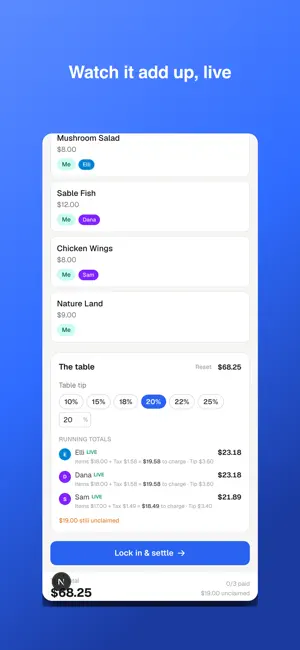
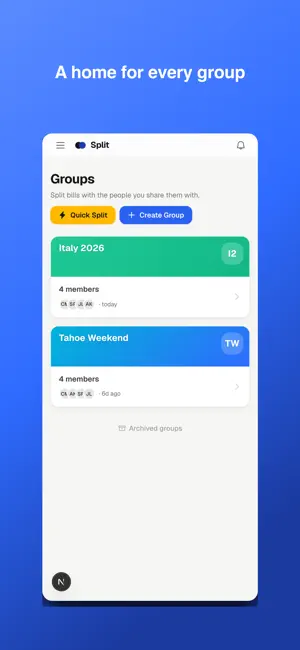
Split the bill the easy way — whether it's tonight's dinner or an ongoing trip or group event. LIVE SPLIT — the whole table, on their own phones Put Split's QR on the table. Everyone scans, taps the items they had, and the total adds up in real time, tax and tip handled. No app or account needed to join. No spreadsheet, no "who had the steak?", no chasing anyone for money. GROUPS — for expenses that don't end after one night Roommates, trips, couples, teams — keep a running tally of who paid and who owes whom. Split any expense the way that's actually fair: evenly, by exact amounts, by percentage, by shares, or by item. Every split type comes with a plain-English explanation, so everyone understands exactly how it was divided. Split does the math and shows the simplest way to settle up. SCAN ANY RECEIPT Snap a photo and Split reads the line items, tax, and tip. Assign each item with a tap, fix anything inline. Foreign receipts convert to your currency automatically. PAY OR GET PAID IN A TAP Settle up through Venmo, Cash App, PayPal, and more — right from the split. Free to start. Split Pro unlocks unlimited groups, members, receipt scans, and Quick Splits. Split Pro is $3.99/month and renews automatically. Your account is charged at confirmation of purchase; it renews unless canceled at least 24 hours before the current period ends. Manage or cancel anytime in your store account settings. Terms of Use (EULA): https://split.foundrystudiolabs.com/terms Privacy Policy: https://split.foundrystudiolabs.com/privacy
What’s new
Version 1.01 · Updated August 5, 2026
Splitting the bill just got smoother — from one dinner to an ongoing group: • Live Split — put your QR on the table and watch everyone's total (items, tax, tip) fill in as they claim their own items. No app or account needed to join. • Clearer group splits — every split type (evenly, by shares, by %, by exact amounts, by item) now shows a plain-English explanation, so everyone sees exactly how a shared expense was divided. • Pay or get paid in a tap — Venmo, Cash App, PayPal, and more. • A clearer "Who's paying?" choice and color-coded people. • Receipts from abroad convert to your currency automatically.
App privacy
The developer, Foundry Studio Labs LLC, reported these privacy practices to Apple.
Data Linked to You
The following data, which may be collected and linked to your identity, may be used for the following purposes:
- Purchases: Purchase History
- Financial Info: Other Financial Info
- Contact Info: Email Address, Name, Phone Number
- Contacts: Contacts
- User Content: Photos or Videos, Other User Content
- Identifiers: User ID
Used for: App Functionality
Data Not Linked to You
The following data, which may be collected but is not linked to your identity, may be used for the following purposes:
- Diagnostics: Crash Data, Performance Data
Used for: App Functionality
Alternatives to Split - Scan & Split Bills
Looking for apps like Split - Scan & Split Bills? Here are 6 similar apps on the App Store. The highest rated is Easner: Global Mobile Banking (5.0/5), and all 6 are free to download.
-
 BillSplitter AI - Scan & Split
-
 FiatFlex
-
 DivvyBill: Split Bills Expense
-
 Easner: Global Mobile Banking
5.0
Easner: Global Mobile Banking
5.0
-
 splitrr
5.0
splitrr
5.0
-
 Zeeo: Global Money Account
5.0
Zeeo: Global Money Account
5.0
| App | Rating | Price | Last updated | Compare |
|---|---|---|---|---|
| Split - Scan & Split Bills | – | Free | August 5, 2026 | |
| BillSplitter AI - Scan & Split | – | Free | May 10, 2026 | Compare |
| FiatFlex | – | Free | Aug 8, 2026 | Compare |
| DivvyBill: Split Bills Expense | – | Free | Jul 18, 2026 | Compare |
| Easner: Global Mobile Banking | 5.0 / 5 (2) | Free | Oct 16, 2026 | Compare |
| splitrr | 5.0 / 5 (1) | Free | Jul 23, 2026 | Compare |
| Zeeo: Global Money Account | 5.0 / 5 (2) | Free | Oct 19, 2026 | Compare |