

TalkCue
Moriah Point LLC Productivity iPhoneiPadiPod touch
TalkCue is a free Productivity app for iPhone and iPad by Moriah Point LLC. Rated 5.0/5 from 1 ratings. Requires iOS 26.4. Updated October 12, 2026.
- Rating
- 5.0
- 1 ratings
- Price
- Free
- on the App Store
- Size
- 13 MB
- Age 4+
- Updated
- Oct 12
- 2026 · v1.2.2
Screenshots



About TalkCue
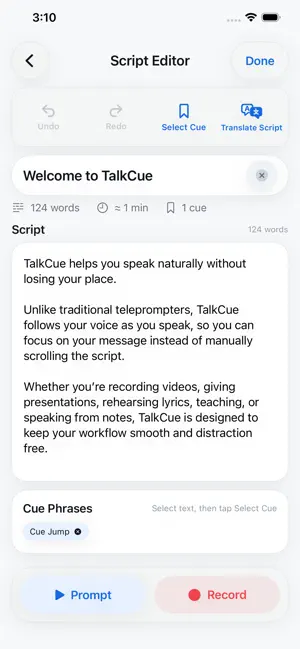
Speak naturally. Stay on message. Finish with content ready to share. TalkCue is a voice-aware teleprompter and video-recording studio built for creators, presenters, educators, performers, and business professionals. Unlike fixed-speed teleprompters, Voice Follow moves through your script as you speak. You set the pace, pause naturally, and focus on your delivery instead of chasing scrolling text. Cue Jump lets you move to saved sections simply by speaking their cue phrases. Record using your iPhone’s built-in microphone or connected AirPods. Position your camera for the best shot while keeping your microphone close to your voice. Choose a prepared script or start with Freestyle when you want to capture an idea without writing first. During scripted recording, your text appears over the live camera preview but stays out of the finished video. The result is clean video and audio without teleprompter text, timers, or controls. After recording, TalkCue keeps the entire workflow together: • Review and organize your videos • Edit the captured transcript • Turn a transcript into a new reusable script • Preview readable captions • Export a finished captioned video • Share a timed SRT subtitle file • Translate scripts and captions across eight supported languages Supported languages include English, Spanish, French, German, Italian, Portuguese, Dutch, and Swedish. Translation availability may vary by device and operating system. Additional features include: • Scripted and Freestyle recording • Voice Follow and Manual prompting • Hands-free Cue Jump navigation • Front and rear camera support • 720p and 1080p recording • Portrait and landscape presentation • Adjustable text size and countdown • Script creation, editing, duplication, translation, and import • Dedicated libraries for scripts and recorded videos • Light, dark, and system appearance Whether you write first or speak first, TalkCue helps you move from idea to confident delivery, polished recording, accurate captions, and multilingual output—with fewer apps and fewer steps. Terms of Use: https://www.apple.com/legal/internet-services/itunes/dev/stdeula/ Privacy Policy: https://moriahpoint.io/talkcue/privacy/
What’s new
Version 1.2.2 · Updated October 12, 2026
• Added a smaller text size and four size options in both prompters. • Improved offline access for users with a verified lifetime purchase. • Updated the Quick Guide and Complete User Manual. Existing text-size selections now appear smaller. Choose the next size up to restore your previous appearance.
App privacy
The developer, Moriah Point LLC, reported these privacy practices to Apple.
Data Not Collected
The developer does not collect any data from this app.
Alternatives to TalkCue
Looking for apps like TalkCue? Here are 6 similar apps on the App Store. The highest rated is Video Teleprompter – CueSync (5.0/5), and all 6 are free to download.
-
 Likuid Spaces
-
 Dialog Touch
-
 Video Teleprompter – CueSync
5.0
-
 TeleprompterPAD
3.3
-
 Luma Surveillance
1.8
-
 xTiles: notes, tasks, projects
3.5
| App | Rating | Price | Last updated | Compare |
|---|---|---|---|---|
| TalkCue | 5.0 / 5 (1 rating) | Free | October 12, 2026 | |
| Likuid Spaces | – | Free | Sep 7, 2026 | Compare |
| Dialog Touch | – | Free | Apr 18, 2025 | Compare |
| Video Teleprompter – CueSync | 5.0 / 5 (6) | Free | Oct 11, 2026 | Compare |
| TeleprompterPAD | 3.3 / 5 (26) | Free | May 6, 2025 | Compare |
| Luma Surveillance | 1.8 / 5 (290) | Free | Apr 24, 2025 | Compare |
| xTiles: notes, tasks, projects | 3.5 / 5 (125) | Free | Oct 2, 2026 | Compare |
Compare TalkCue with the top alternatives: ratings, updates, ASO score and keyword gaps →