

LuDo Tasks - weekly focus
Alejandro Alvarez Wilmanski Productivity iPhoneiPadiPod touchMacApple Watch
LuDo Tasks - weekly focus is a free Productivity app for iPhone and iPad by Alejandro Alvarez Wilmanski. Rated 5.0/5 from 1 ratings. Requires iOS 26.0.
- Rating
- 5.0
- 1 ratings
- Price
- Free
- on the App Store
- Size
- 12 MB
- Age 4+
- Updated
- Oct 13
- 2026 · v1.5.5
Screenshots


About LuDo Tasks - weekly focus
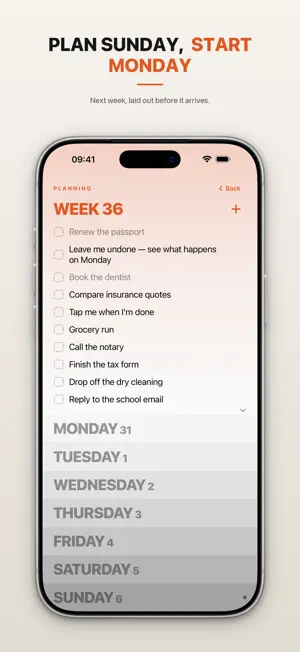
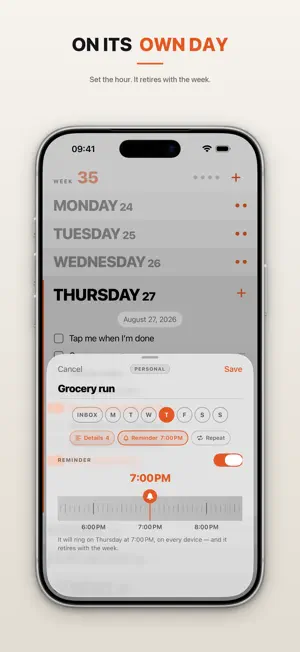
LuDo Tasks is the best way to plan the week you're in. Open it and your whole week is right there — seven days, stacked on one screen. Tap a day, add what you need to do, and get on with it. No setup. No accounts. No learning curve. Just your current week, at a glance. HOW IT WORKS Seven days, always visible, plus an inbox at the top for anything you haven't slotted into a day yet. Tap the checkbox to complete. Swipe to edit or delete — or, with a mouse or trackpad, right-click. Drag tasks between days — or back to the inbox — however your week shifts. A hand-drawn scribble crosses things off, like a paper notebook. AN HONEST WEEK At the end of every week, LuDo Tasks resets cleanly. Completed tasks are quietly archived. Unfinished ones don't vanish or turn red with guilt — they flow to the top of next week's inbox, ready to reschedule or let go. Nothing is ever silently lost. You decide what carries over. Own your week — the done and the undone. BUILT FOR A GLANCE The whole point: see your week in one look and know where you stand. No digging through menus, no notifications you didn't ask for, no dashboards to maintain. Designed to be opened, read, and closed — then actually used. PLAN NEXT WEEK, ON SUNDAY From Sunday, the Sunday card opens next week's board: your pending tasks are already there, ready to place onto the days they belong to. Add what's coming, come back to it all Sunday — Monday arrives already sorted. You can also add a task without opening the app: Siri, Spotlight, the Action Button or the widget. MORE, ONLY WHEN YOU NEED IT Keep Personal, Work and more as separate contexts — the same week, seen from different sides. Swipe the WEEK band to switch; each context keeps its own color and its own honest spillover. Set tasks to repeat every week for the things that always come back. Give a task a reminder — its day, an hour, done. Open a task to keep notes and checklists behind its title. On iPad, the week spreads into columns, with your contexts side by side. On the Mac, it lives in a window built for a pointer and a keyboard. On Apple Watch, it's on your wrist. And glance at your week without opening the app, with Home Screen and Lock Screen widgets — free for everyone. A WEEK FOR TWO Share one context with one other person — a partner, a flatmate, a teammate. You both see and edit the same tasks, each from your own iCloud account; nothing to set up beyond an invitation link, and ending the share leaves each of you a complete copy. It runs on Apple's iCloud, never on servers of ours — there are none. PRIVATE BY DESIGN Your tasks live on your devices. No accounts. No external servers. No analytics or tracking of any kind. Your data is yours. SYNCED ACROSS YOUR DEVICES Your tasks, contexts and settings sync privately between your iPhone, iPad and Mac through iCloud — Apple's own infrastructure, never our servers. Sign in to iCloud and it's on. Prefer to stay on one device? A single switch in Settings turns sync off and keeps everything already there. Free for everyone. FREE TO TRY — YOURS WITH ONE PAYMENT Download LuDo Tasks for free and plan your week: the seven days, the honest spillover, the color themes and the widgets are all free. The free version keeps up to three tasks per day — enough for a real week. One simple payment (never a subscription) unlocks unlimited tasks, contexts, weekly repeating tasks, reminders and shared contexts — forever, on every device you own, including every future update. We will never add subscriptions, and we will never charge for the core of what the app is. Follow us on Instagram: @ludoweekly
What’s new
Version 1.5.5 · Updated October 13, 2026
LuDo Tasks comes to the Mac. Your week now has a home on the Mac too: the same seven days at a glance, built for a pointer and a keyboard, with Settings in a window of its own. It syncs with your iPhone and iPad through your own iCloud, and the one-time unlock covers it — buy once, use it on every device. LuDo is now called LuDo Tasks — under the icon, on your watch and everywhere the app says its name. Also: a task completes only when you tap its checkbox, so a stray tap on the row no longer ticks it off. Repeating tasks in Settings show their days as a small row of circles. Inviting someone to a shared context is now LuDo's own screen, with a QR code to scan. And on iPad with a mouse or trackpad, a task now drags the moment you move it — no long press. Own your week.
App privacy
The developer, Alejandro Alvarez Wilmanski, reported these privacy practices to Apple.
Data Not Collected
The developer does not collect any data from this app.
Alternatives to LuDo Tasks - weekly focus
Looking for apps like LuDo Tasks - weekly focus? Here are 6 similar apps on the App Store. The highest rated is Audiary - Text to Speech (5.0/5), and all 6 are free to download.
-
 Note-Due: Tasks & Notes
4.0
Note-Due: Tasks & Notes
4.0
-
 House Bober: Home Maintenance
-
 Insight - AI Document Agent
-
 Bracket: Think It Through
-
 Audiary - Text to Speech
5.0
Audiary - Text to Speech
5.0
-
 Tempus Fugit: Pendulum Clock
3.0
Tempus Fugit: Pendulum Clock
3.0
| App | Rating | Price | Last updated | Compare |
|---|---|---|---|---|
| LuDo Tasks - weekly focus | 5.0 / 5 (1 rating) | Free | October 13, 2026 | |
| Note-Due: Tasks & Notes | 4.0 / 5 (1) | Free | Oct 11, 2026 | Compare |
| House Bober: Home Maintenance | – | Free | Sep 7, 2026 | Compare |
| Insight - AI Document Agent | – | Free | Jun 4, 2026 | Compare |
| Bracket: Think It Through | – | Free | Jul 6, 2026 | Compare |
| Audiary - Text to Speech | 5.0 / 5 (2) | Free | Sep 14, 2026 | Compare |
| Tempus Fugit: Pendulum Clock | 3.0 / 5 (4) | Free | Oct 15, 2026 | Compare |