

Teleprompter - Take Toucan
Smith Matt Photo & Video iPhoneiPadiPod touch
Teleprompter - Take Toucan is a free Photo & Video app for iPhone and iPad by Smith Matt. Requires iOS 26.2. Updated July 30, 2026.
- Price
- Free
- on the App Store
- Size
- 26 MB
- Age 4+
- Updated
- Jul 30
- 2026 · v1.4
Screenshots


About Teleprompter - Take Toucan
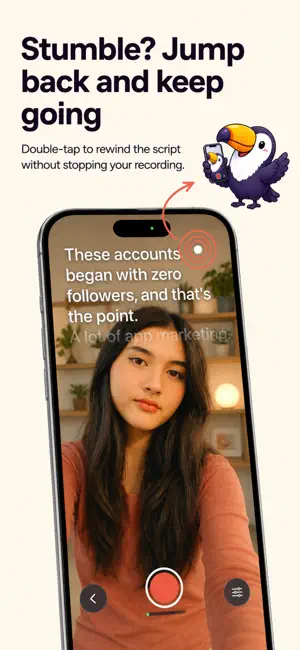
Stumble mid-take, and most teleprompter apps make you start again. Take Toucan lets you rewind live: double-tap while filming and pick up a few words back without cutting the recording or losing the shot. WRITE WITH ANY AI. RECORD HERE. Take Toucan does not bundle its own AI, so you do not pay for one twice. Draft and edit your video scripts in ChatGPT, Claude, or whichever AI and writing tools you already use. Bring them into Take Toucan as plain Markdown through the share extension, iCloud, or copy and paste. No locked-in editor. HOW IT WORKS - Write or import a script as Markdown - Position it over your camera and choose your scroll speed - Stumble on a line? Double-tap to rewind the script and keep recording - Review your takes, mark your best and export to Photos or share anywhere FEATURES - Live Rewind: jump back and re-read a line without stopping the recording - Bring-your-own-AI scripts: write and edit in any tool - Plain Markdown: portable scripts with no locked-in editor - Share extension: send scripts from Notes, ChatGPT, Safari and other apps - Takes library: compare, mark, delete and export recordings in one place - Progress tracking: see your recording and export momentum - iCloud sync: keep scripts available between iPhone and Mac - TikTok description field: store your posting copy alongside each script Take Toucan is built by one person, not a studio. If something does not work as it should, please get in touch through the support link below. Privacy Policy: https://www.taketoucan.com/privacy Terms of Use: https://www.taketoucan.com/terms EULA: https://www.apple.com/legal/internet-services/itunes/dev/stdeula/
What’s new
Version 1.4 · Updated July 30, 2026
A reliability update with improvements to subscriptions and behind-the-scenes performance. Thanks for using Take Toucan.
App privacy
The developer, Smith Matt, reported these privacy practices to Apple.
Data Linked to You
The following data, which may be collected and linked to your identity, may be used for the following purposes:
- Usage Data: Product Interaction, Other Usage Data
- Location: Coarse Location
- Other Data: Other Data Types
- Purchases: Purchase History
- Identifiers: User ID
- Diagnostics: Performance Data, Other Diagnostic Data
Used for: Third-Party Advertising, Developer’s Advertising or Marketing, Analytics, App Functionality
Data Not Linked to You
The following data, which may be collected but is not linked to your identity, may be used for the following purposes:
- Usage Data: Advertising Data
- Purchases: Purchase History
Used for: Third-Party Advertising, Developer’s Advertising or Marketing, Analytics
Alternatives to Teleprompter - Take Toucan
Looking for apps like Teleprompter - Take Toucan? Here are 6 similar apps on the App Store. The highest rated is SADA Teleprompter & Record (5.0/5), and 5 of the 6 are free to download.
-
 Teleprompter - Videos Prompter
-
 EasyCue: Teleprompter
-
 SUC AI
-
 SpeakCue AI Teleprompter
-
 CueTake: AI Prompter&Captions
-
 SADA Teleprompter & Record
5.0
SADA Teleprompter & Record
5.0
| App | Rating | Price | Last updated | Compare |
|---|---|---|---|---|
| Teleprompter - Take Toucan | – | Free | July 30, 2026 | |
| Teleprompter - Videos Prompter | – | Free | Jun 19, 2026 | Compare |
| EasyCue: Teleprompter | – | Free | Jul 23, 2026 | Compare |
| SUC AI | – | Free | Aug 17, 2026 | Compare |
| SpeakCue AI Teleprompter | – | 7.99 USD | Jun 25, 2026 | Compare |
| CueTake: AI Prompter&Captions | – | Free | Oct 3, 2026 | Compare |
| SADA Teleprompter & Record | 5.0 / 5 (1) | Free | Oct 7, 2026 | Compare |