

Photographica
keiji matsumoto Photo & Video iPhoneiPadiPod touch
Photographica is a free Photo & Video app for iPhone and iPad by keiji matsumoto. Requires iOS 18.0. Updated September 29, 2026.
- Price
- Free
- on the App Store
- Size
- 31 MB
- Age 4+
- Updated
- Sep 29
- 2026 · v1.0.7
Screenshots


About Photographica
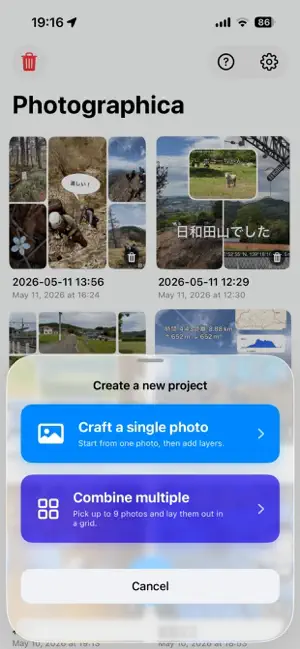
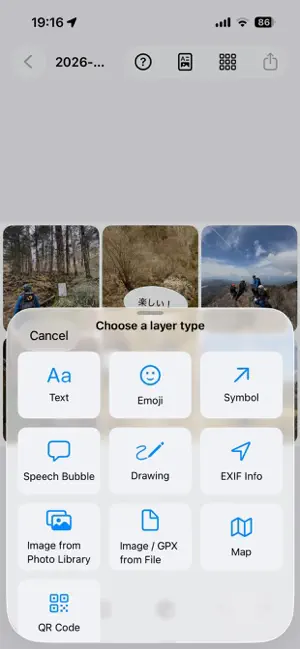
Photographica is an information-focused photo editor that lets you put together a polished, info-rich shot in seconds. It automatically detects and separates the subjects in your photo into layers, so the popular "text behind the subject" effect is just a tap away (results may vary depending on the photo). KEY FEATURES ■ Layers you can slip BETWEEN subjects The app auto-detects what's in your photo and stacks each subject back-to-front. Drop your layer in at any depth you like. ■ A rich set of layer types • Text — fonts, colors, strokes and rotation, all customizable • Symbols — insert arrows and basic shapes with a single tap • Emoji stamps — turn system emoji into stamps as-is • Freehand drawing — sketch freely with your finger or Apple Pencil • Image layers — drop in another photo as a stamp • Speech bubbles — quick and easy comic-style edits • Map layers — embed a map using GSI, OSM or OTM tiles • GPX tracks — overlay your hiking or travel route on a map ■ Beautifully formatted shot info Coordinates, elevation, capture bearing, date — the metadata bound to your photo can be inserted onto the image with refined formatting. Choose your coordinate style (decimal or DMS) and units in detail, and fine-tune the position on a built-in map picker. Edited locations can be written back to EXIF, dramatically improving the accuracy of your hiking and travel records. ■ Photo-level edits Rotate, crop and resize the underlying photo. Crops support both fixed aspect ratios and free shapes. ■ Styles and filters Apply filters to individual layers or to the whole photo — from subtle color grading to bold artistic effects. ■ Projects and iCloud sync Every edit is saved as a project you can revisit any time from a grid-style browser. Projects sync via iCloud Documents, so you can move seamlessly between iPhone and iPad. ■ Export and share Export to PNG or JPEG, send via the share sheet, or save to Photos with EXIF preserved — ready for social media, print or long-term archives. PRICING The free version lets you try nearly every feature (with banner ads, rewarded video ads and a watermark). Upgrade to the full version to remove ads and watermarks. • 3-month seasonal subscription: $5.99 • Lifetime purchase: $19.99 REQUIREMENTS Runs on iPhone and iPad with iOS 18 or later. Available in English and Japanese. PERFECT FOR • Adding text and arrows to photos for stylish social media posts • Embedding accurate location and elevation on hiking and travel shots • Decorating family and kids' photos with playful elements • Anyone wanting depth-aware effects ordinary photo editors can't deliver • Apple Pencil users looking for serious mobile photo editing Terms of Use (EULA): https://www.apple.com/legal/internet-services/itunes/dev/stdeula/ Privacy Policy: https://kzi.jp/privacy-policy.html
What’s new
Version 1.0.7 · Updated September 29, 2026
- Fixed an issue where text size became incorrect when swapping cells
App privacy
The developer, keiji matsumoto, reported these privacy practices to Apple.
Data Used to Track You
The following data may be used to track you across apps and websites owned by other companies:
- Usage Data: Advertising Data
Data Not Linked to You
The following data, which may be collected but is not linked to your identity, may be used for the following purposes:
- Usage Data: Advertising Data
Used for: Third-Party Advertising
Alternatives to Photographica
Looking for apps like Photographica? Here are 6 similar apps on the App Store.


| App | Rating | Price | Last updated | Compare |
|---|---|---|---|---|
| Photographica | – | Free | September 29, 2026 | |
| Nepenthe | – | Free | Sep 23, 2026 | Compare |
| TimeSlice Go | – | Free | Jul 7, 2026 | Compare |
| HALFROLL | – | Free | Oct 27, 2026 | Compare |
| Editio: Photo Editor & Collage | – | Free | Oct 6, 2026 | Compare |
| BeforeAfter+ 定点観測カメラ | – | Free | Oct 25, 2026 | Compare |
| CropMan | – | Free | Jul 16, 2026 | Compare |
Compare Photographica with the top alternatives: ratings, updates, ASO score and keyword gaps →