

Trading Journal - Owlog
Trim Tahirsylaj Finance iPhoneiPadiPod touch
Trading Journal - Owlog is a free Finance app for iPhone and iPad by Trim Tahirsylaj. Requires iOS 17.0. Updated October 13, 2026.
- Price
- Free
- on the App Store
- Size
- 9 MB
- Age 17+
- Updated
- Oct 13
- 2026 · v2.0
Screenshots

About Trading Journal - Owlog
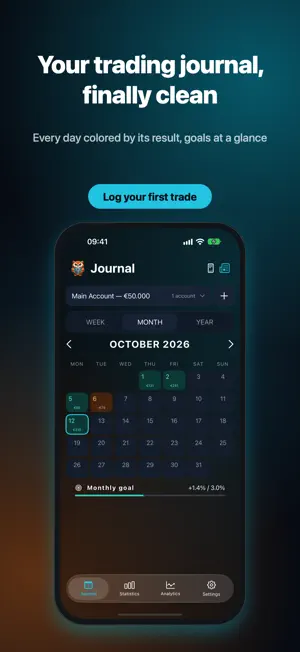
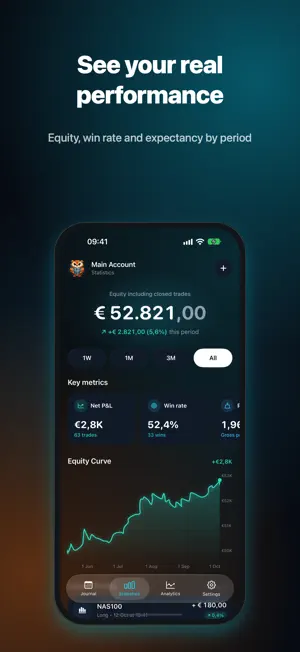
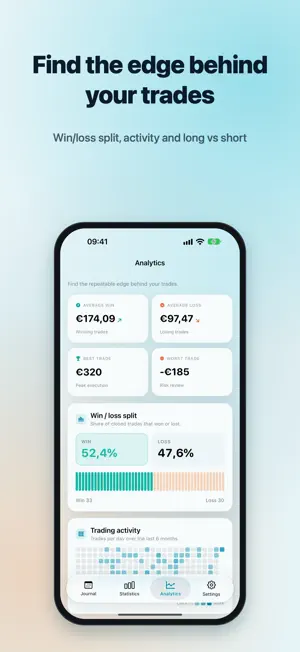
Owlog is the trading journal for traders who want to log fast, review honestly and improve trade after trade. — Log a trade in seconds — Pick the market, symbol, session and duration with taps and sliders — no menus. Direction, outcome, P&L and risk sit on one line, and the R-multiple is calculated for you. Your time goes into your notes, emotions and screenshots, where the real learning happens. Forex, indices, stocks, crypto, futures and commodities are all supported, plus your own custom symbols. — Review every day, chart first — Tap a day in the calendar and go through its trades one at a time: your chart screenshot in front, then the numbers, the setup and your own words. Every day is colored by its result, with weekly, monthly and yearly goals at a glance. — See your real performance — A clean Statistics screen with your balance, period filters (1W, 1M, 3M, All), key metrics and an interactive equity curve — touch it to see any day's value. — Find your edge — Analytics built for review: • Win/loss split and long vs short performance • Trading activity heatmap • P&L distribution and session P&L (Asia / London / New York) • Expectancy, profit factor, average win and loss, best and worst trades • Behaviour review from your own notes Every metric updates live as you log trades. — Size every position — Enter your stop in pips, points or price and your risk in %, money or lots. Owlog converts with live ECB exchange rates and shows the exact size to enter — tap it to copy. Pip values match industry calculators for currency pairs and metals; point values are built in for indices and CME futures. — Made for iPhone Duo and landscape — Unfold iPhone Duo and Owlog opens into two columns: the calendar stays on the left while the day's trades fill the right. Place the navigation bar on the left, right or bottom. — Your data, your device — Owlog runs locally on your iPhone. Optional iCloud sync keeps your journal in your private iCloud across your Apple devices. No ads, no tracking, no analytics SDKs. — 14-day full trial, then your call — New users get 14 days of full access. The trial is free and does NOT auto-renew. After it ends, Owlog stays free with the Forex journal and the last 7 days of analytics. Upgrade to Owlog Pro any time for every asset class, multiple accounts, full history, advanced analytics and export. Subscription information: • Owlog Pro Monthly and Yearly auto-renewable subscriptions • Payment is charged to your Apple ID at confirmation of purchase • Your subscription auto-renews unless cancelled at least 24 hours before the end of the current period • Manage or cancel any time in your App Store account settings • Trial does not auto-renew into a paid subscription • Privacy Policy: https://www.ttrim.studio/owlog/privacy • Terms of Use: https://www.ttrim.studio/owlog/terms Built by an independent developer who trades. Clean tools, no ads, no tracking.
What’s new
Version 2.0 · Updated October 13, 2026
Owlog 2.0 is a complete redesign. • New teal look with Liquid Glass navigation and a fresh icon (including dark and clear variants) • Review each day trade by trade, with your chart screenshot first • Log trades in seconds: tap-based markets, symbols and sessions, a duration slider and emotion chips • Rebuilt position size calculator: enter your stop in pips or points, live ECB exchange rates • Cleaner Statistics with period filters and an interactive equity curve • Two-column layout for iPhone Duo and landscape • Manage and rename your custom symbols
App privacy
The developer, Trim Tahirsylaj, reported these privacy practices to Apple.
Data Not Collected
The developer does not collect any data from this app.
Alternatives to Trading Journal - Owlog
Looking for apps like Trading Journal - Owlog? Here are 6 similar apps on the App Store. The highest rated is Kyra: Trading Journal & PnL (5.0/5), and all 6 are free to download.
-
 PnLStack
-
 Kyra: Trading Journal & PnL
5.0
Kyra: Trading Journal & PnL
5.0
-
 YouTrader一Prop Firm Journal
5.0
YouTrader一Prop Firm Journal
5.0
-
 Nara - Trading Journal
4.0
Nara - Trading Journal
4.0
-
 MyEdge Trading Journal
5.0
MyEdge Trading Journal
5.0
-
 Mooguul
5.0
Mooguul
5.0
| App | Rating | Price | Last updated | Compare |
|---|---|---|---|---|
| Trading Journal - Owlog | – | Free | October 13, 2026 | |
| PnLStack | – | Free | May 29, 2026 | Compare |
| Kyra: Trading Journal & PnL | 5.0 / 5 (4) | Free | Oct 26, 2026 | Compare |
| YouTrader一Prop Firm Journal | 5.0 / 5 (5) | Free | Sep 25, 2026 | Compare |
| Nara - Trading Journal | 4.0 / 5 (3) | Free | Jun 13, 2026 | Compare |
| MyEdge Trading Journal | 5.0 / 5 (1) | Free | Oct 18, 2026 | Compare |
| Mooguul | 5.0 / 5 (1) | Free | Jun 10, 2026 | Compare |