

Anchor: Visual Goal Setting
Deontrez Williams Productivity iPhoneiPadiPod touch
Anchor: Visual Goal Setting is a free Productivity app for iPhone and iPad by Deontrez Williams. Rated 5.0/5 from 2 ratings. Requires iOS 15.1.
- Rating
- 5.0
- 2 ratings
- Price
- Free
- on the App Store
- Size
- 132 MB
- Age 4+
- Updated
- Sep 3
- 2026 · v1.5
Screenshots
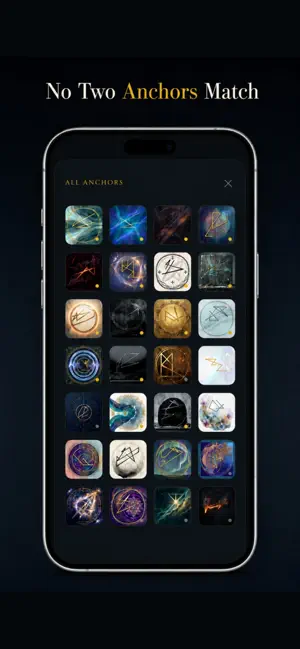


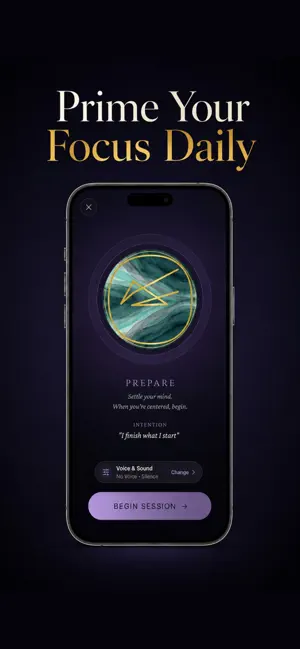
About Anchor: Visual Goal Setting
Turn your goals into personal visual anchors, then strengthen your focus through guided daily practice. Anchor is a visual goal-setting system that gives important intentions a distinct visual form. Write what you are working toward, transform your words into a personalized geometric anchor, and return to it through focused sessions designed to keep your goal present. YOUR GOALS, GIVEN A VISUAL FORM Goals often begin clearly, then disappear beneath distractions, responsibilities, and unfinished plans. Anchor turns each intention into a memorable visual symbol created from your own words. Instead of leaving your goal buried in a notes app or checklist, you gain a personal visual cue you can recognize and return to. GUIDED PRACTICE FOR DAILY FOCUS Choose the experience that fits your time and intention: • Focus for quick daily reinforcement • Deep Prime for longer, immersive practice • Visualize for mentally rehearsing your desired outcome • Release when an intention is complete Each session creates a dedicated moment to reconnect with what you are building, changing, or becoming. CONSISTENCY WITHOUT STREAK PRESSURE Anchor replaces fragile streaks with Thread Strength. Complete sessions, review your activity, and see how consistently you return to your practice. Missing one day does not erase your progress. Your thread can weaken, strengthen, and rebuild over time. CREATE ANCHORS FOR WHAT MATTERS Use Anchor for: • Career and business goals • Fitness and athletic performance • Focus and discipline • Confidence and personal growth • Creativity and learning • Important milestones • Long-term intentions MAKE EACH ANCHOR YOUR OWN Explore distinctive visual styles and choose the design that best represents the character of your goal. Keep active anchors organized inside your Sanctuary, revisit them whenever you need direction, and release completed intentions when their work is done. HOW ANCHOR WORKS 1. Write a clear intention. 2. Transform it into a personal visual anchor. 3. Choose a style that feels right. 4. Return through guided focus and visualization sessions. 5. Track your consistency through Thread Strength. Anchor is not a task manager, checklist, or traditional meditation app. It is a visual system for keeping meaningful goals present through intention, attention, and consistent practice. Give your intention a form. Create your first visual anchor today. Some features require Anchor Pro. https://www.apple.com/legal/internet-services/itunes/dev/stdeula/
What’s new
Version 1.5 · Updated September 3, 2026
Anchor 1.5 is our biggest update yet, redesigned to make your practice clearer, more focused, and easier to return to. What’s new: • Introducing The Weave See the patterns you’ve built over time and understand how your practice is developing. • A redesigned practice experience Focus, Deep Prime, and Visualize have been refined with clearer controls, improved feedback, and a more polished experience from start to finish. • Better Thread Strength feedback It’s easier to understand how each practice strengthens your connection and how consistency builds over time. • Smarter guidance New contextual teachings appear when they’re useful, helping you understand the mechanics behind your practice without getting in the way. • A refreshed Anchor We’ve updated the visual system, navigation, completion experiences, and dozens of details throughout the app. Plus performance improvements, fixes, and polish across the entire experience. Your intention sets the direction. Practice builds the connection.
App privacy
The developer, Deontrez Williams, reported these privacy practices to Apple.
Data Linked to You
The following data, which may be collected and linked to your identity, may be used for the following purposes:
- Financial Info: Payment Info
- Contact Info: Email Address, Name
- Identifiers: User ID
Used for: Analytics, App Functionality
Alternatives to Anchor: Visual Goal Setting
Looking for apps like Anchor: Visual Goal Setting? Here are 6 similar apps on the App Store. The highest rated is Pippin Activity Scheduler (5.0/5), and all 6 are free to download.
-
 Lodestar: Goals & Vision Board
-
 TIMBERplus Veneer Picking
-
 Pippin Activity Scheduler
5.0
Pippin Activity Scheduler
5.0
-
 STARTED: Goal & Habit Tracker
-
 Thrive - AI Routine
5.0
Thrive - AI Routine
5.0
-
 StreakUp Habit Tracker & Goals
5.0
StreakUp Habit Tracker & Goals
5.0
| App | Rating | Price | Last updated | Compare |
|---|---|---|---|---|
| Anchor: Visual Goal Setting | 5.0 / 5 (2 ratings) | Free | September 3, 2026 | |
| Lodestar: Goals & Vision Board | – | Free | Jul 14, 2026 | Compare |
| TIMBERplus Veneer Picking | – | Free | Nov 20, 2023 | Compare |
| Pippin Activity Scheduler | 5.0 / 5 (3) | Free | Sep 7, 2026 | Compare |
| STARTED: Goal & Habit Tracker | – | Free | Apr 17, 2026 | Compare |
| Thrive - AI Routine | 5.0 / 5 (6) | Free | Sep 22, 2026 | Compare |
| StreakUp Habit Tracker & Goals | 5.0 / 5 (1) | Free | Sep 26, 2026 | Compare |