

Pascal Capture
Pascal Group Inc Productivity iPhoneiPadiPod touch
Pascal Capture is a free Productivity app for iPhone and iPad by Pascal Group Inc. Rated 5.0/5 from 4 ratings. Requires iOS 17.0. Updated October 20, 2026.
- Rating
- 5.0
- 4 ratings
- Price
- Free
- on the App Store
- Size
- 76 MB
- Age 4+
- Updated
- Oct 20
- 2026 · v1.3.7
Screenshots

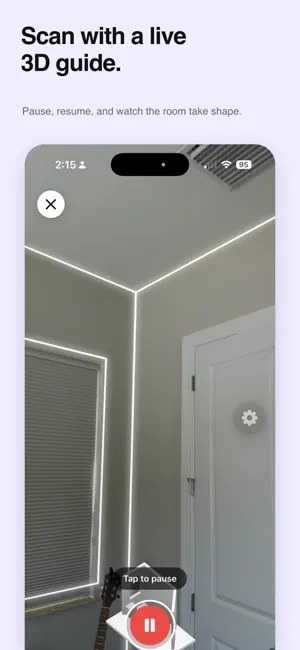

About Pascal Capture
Pascal Capture turns your iPhone or iPad into a precision room-scanning tool. Walk through any space and get a complete 3D model in seconds — walls, doors, windows, and furniture identified and measured automatically. Then open your project in the Pascal editor on the web to refine the layout, swap furniture from our catalog, and design the space you want. HOW IT WORKS 1. Open Pascal Capture and start a scan. 2. Walk slowly around the room — your iPhone's LiDAR sensor maps it in real time. 3. Tap Done. The scan uploads to your Pascal project automatically. 4. Open the project in the Pascal web editor to edit, design, or share. WHAT'S IN EVERY SCAN • Accurate geometry — walls, doors, and windows positioned to within centimeters • Auto-detected furniture — sofas, tables, beds, appliances recognized in place • Multi-room support — capture an entire floor and stitch rooms together • Editable floor plans — every dimension, position, and finish is yours to adjust • Cloud-synced projects — scans appear instantly in editor.pascal.app DESIGNED FOR • Homeowners planning a renovation or move • Interior designers presenting concepts to clients • Real estate professionals creating accurate listings • Anyone curious what their space could look like rearranged GET STARTED Sign in with email or Google. Your scans flow seamlessly into your Pascal account and become editable 3D projects in the Pascal web editor. REQUIREMENTS Pascal Capture requires an iPhone or iPad with a LiDAR sensor — iPhone 12 Pro, iPhone 13 Pro / Pro Max, iPhone 14 Pro / Pro Max, iPhone 15 Pro / Pro Max, iPhone 16 Pro / Pro Max, or iPad Pro (2020 or newer). iOS 17 or later.
What’s new
Version 1.3.7 · Updated October 20, 2026
Bug fixes and reliability improvements for scan uploads and sign-in.
App privacy
The developer, Pascal Group Inc, reported these privacy practices to Apple.
Data Linked to You
The following data, which may be collected and linked to your identity, may be used for the following purposes:
- Contact Info: Email Address, Name
Used for: App Functionality
Data Not Linked to You
The following data, which may be collected but is not linked to your identity, may be used for the following purposes:
- Diagnostics: Crash Data
Used for: App Functionality
Alternatives to Pascal Capture
Looking for apps like Pascal Capture? Here are 6 similar apps on the App Store. The highest rated is MLX-Serve (5.0/5), and all 6 are free to download.
-
 MLX-Serve
5.0
MLX-Serve
5.0
-
 Atomic Chat: Private Local AI
3.6
Atomic Chat: Private Local AI
3.6
-
 Buzz - chat with your hive
4.2
Buzz - chat with your hive
4.2
-
 TRMNL Companion
4.6
TRMNL Companion
4.6
-
 OpenDisplay
4.7
OpenDisplay
4.7
-
 LM Mini
4.5
LM Mini
4.5
| App | Rating | Price | Last updated | Compare |
|---|---|---|---|---|
| Pascal Capture | 5.0 / 5 (4 ratings) | Free | October 20, 2026 | |
| MLX-Serve | 5.0 / 5 (9) | Free | Sep 30, 2026 | Compare |
| Atomic Chat: Private Local AI | 3.6 / 5 (12) | Free | Aug 27, 2026 | Compare |
| Buzz - chat with your hive | 4.2 / 5 (64) | Free | Oct 24, 2026 | Compare |
| TRMNL Companion | 4.6 / 5 (5) | Free | Oct 14, 2026 | Compare |
| OpenDisplay | 4.7 / 5 (19) | Free | Oct 2, 2026 | Compare |
| LM Mini | 4.5 / 5 (154) | Free | Oct 25, 2026 | Compare |
Compare Pascal Capture with the top alternatives: ratings, updates, ASO score and keyword gaps →