

Teleprompter-Scrolling Scripts
曦月 张 Photo & Video iPhoneiPadiPod touchMac
Teleprompter-Scrolling Scripts is a free Photo & Video app for iPhone and iPad by 曦月 张. Rated 3.9/5 from 12 ratings. Requires iOS 17.0.
- Rating
- 3.9
- 12 ratings
- Price
- Free
- on the App Store
- Size
- 4 MB
- Age 4+
- Updated
- Oct 22
- 2026 · v3.11
Screenshots

About Teleprompter-Scrolling Scripts
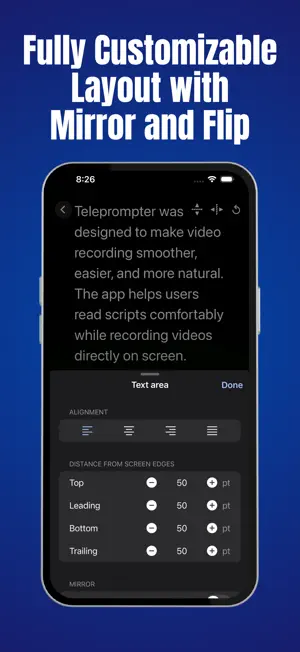
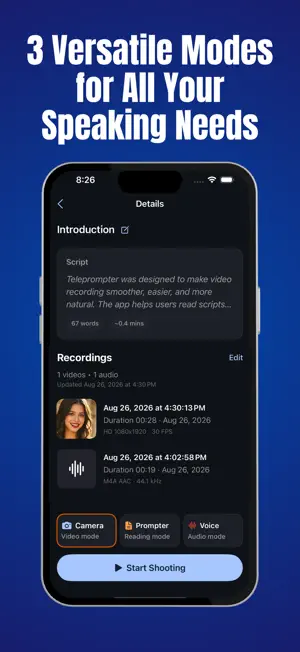
Teleprompter helps content creators, presenters, and educators read scripts naturally without memorizing every line. It can be used for social media videos, online courses, presentations, video interviews, and speeches. The app offers three modes for these different uses: video recording, a standalone teleprompter, and audio recording. ● VIDEO RECORDING Video recording mode displays the script on screen while the camera records. The front camera is useful for speaking directly to an audience, while the rear camera captures everyday moments with talking points still in view. This mode works well for TikTok videos, Instagram Reels, YouTube videos, vlogs, tutorials, and online courses. ● TELEPROMPTER MODE Teleprompter mode displays scrolling text without recording video or audio. It supports presentations, speeches, and rehearsals, with either a full script or a few notes on screen. The adjustable scrolling speed makes it suitable for both practice sessions and live presentations. ● AUDIO RECORDING Audio recording mode keeps scripts or lyrics on screen while recording voiceovers, vocals, and podcast segments. Everything stays in one app, so there’s no need to switch between notes and a separate audio recorder. ● CUSTOMIZATION Scrolling speed, text size, colors, and layout can be adjusted for a comfortable reading experience. Voice-controlled scrolling allows the text to follow the speaker’s voice. Portrait and landscape support provides flexibility for different recording setups. ● FEATURES • Video recording with an on-screen script • Standalone teleprompter mode • Audio recording for voiceovers and vocals • Front and rear camera support • Voice-controlled scrolling • Adjustable scrolling speed • Customizable text size, colors, and layout • Portrait and landscape support
Ratings & reviews
3.9
12 ratings
What’s new
Version 3.11 · Updated October 22, 2026
Getting your script ready is now faster and easier. • Import Your Scripts: Bring in a Word, PowerPoint, PDF, RTF, HTML, Markdown, TXT or subtitle (SRT, VTT) file from a project or the script editor. • Simpler Video Setup: Video settings and recording now share one screen. Drag the text area to move it, or pull its corner to resize it. • Customize While Recording: Change your text size, color, background and position at any time, even in the middle of a take.
App privacy
The developer, 曦月 张, reported these privacy practices to Apple.
Data Not Collected
The developer does not collect any data from this app.
Alternatives to Teleprompter-Scrolling Scripts
Looking for apps like Teleprompter-Scrolling Scripts? Here are 6 similar apps on the App Store. The highest rated is Rolltake - Teleprompter (5.0/5), and all 6 are free to download.
-
 Teleprompter Premium
-
 AI Teleprompter: Prompa
4.4
-
 Rolltake - Teleprompter
5.0
-
 Teleprompt Overlay
1.0
-
 CueCam: AI Video Teleprompter
4.4
-
 OwlPrompter Video Teleprompter
5.0
| App | Rating | Price | Last updated | Compare |
|---|---|---|---|---|
| Teleprompter-Scrolling Scripts | 3.9 / 5 (12 ratings) | Free | October 22, 2026 | |
| Teleprompter Premium | – | Free | Sep 8, 2026 | Compare |
| AI Teleprompter: Prompa | 4.4 / 5 (17) | Free | Oct 21, 2026 | Compare |
| Rolltake - Teleprompter | 5.0 / 5 (41) | Free | Sep 1, 2026 | Compare |
| Teleprompt Overlay | 1.0 / 5 (1) | Free | Jul 7, 2026 | Compare |
| CueCam: AI Video Teleprompter | 4.4 / 5 (39) | Free | Oct 27, 2026 | Compare |
| OwlPrompter Video Teleprompter | 5.0 / 5 (4) | Free | Oct 26, 2026 | Compare |