

PDF Compressor - Shrink Files
荣晖 丁 Productivity iPhoneiPadiPod touch
PDF Compressor - Shrink Files is a free Productivity app for iPhone and iPad by 荣晖 丁. Requires iOS 16.0. Updated October 12, 2026.
- Price
- Free
- on the App Store
- Size
- 7 MB
- Age 4+
- Updated
- Oct 12
- 2026 · v1.3.4
Screenshots
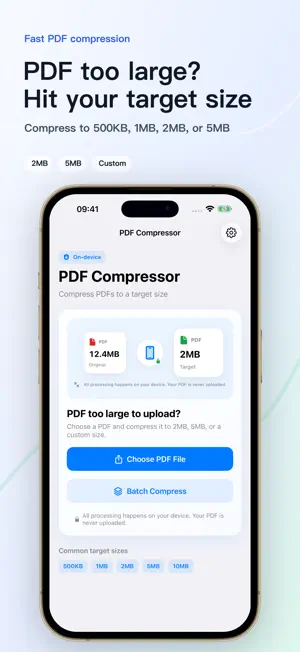

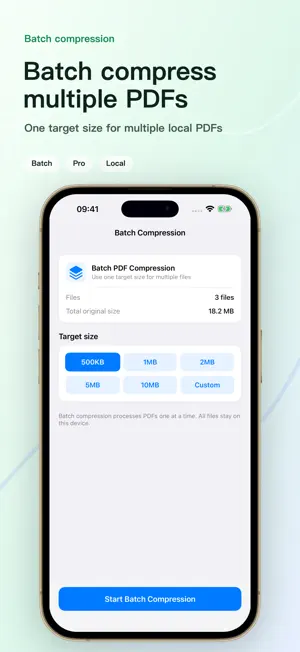

About PDF Compressor - Shrink Files
PDF Compressor is a fast, simple, and privacy-focused tool for reducing PDF file size on your iPhone and iPad. — COMMON PROBLEMS WE SOLVE — • Application system says "PDF must be under 2MB" but yours is 8MB • Exam registration (civil service, teaching certification, GRE, IELTS) requires smaller PDFs • Visa and passport scans are too large for embassy upload portals • Email attachments exceed the 25MB limit • Contracts, invoices, and resumes need to be smaller for sharing • Academic journal submission systems have strict PDF size limits If any of these sound familiar, PDF Compressor can fix it in seconds. — KEY FEATURES — COMPRESS TO A SPECIFIC TARGET SIZE Choose your target and let the app handle the rest: • 500KB — For strict application forms • 1MB — For exam registrations • 2MB — Most common, works for most upload systems • 5MB — For visa and passport documents • 10MB — For email attachments and file sharing • Custom — Set any target size you need CLEAR RESULTS • See original size vs. compressed size • View compression ratio (e.g., reduced by 78%) • Know immediately if your target was met • Preview the compressed PDF to verify readability SAVE & SHARE • Save to iCloud Drive, local folders, or other locations • Share via Messages, Mail, AirDrop, or any app • Smart file naming for easy organization • Batch compress multiple PDFs with Pro — PRIVACY FIRST — PDF Compressor processes everything on your device. Your PDF files are never uploaded to any server. We don't read, store, or share your file content. No third-party analytics, no ad tracking, no data collection. — PLEASE NOTE — Compression results vary by PDF type: • Scanned / image-heavy PDFs — Typically see 50%–90% size reduction • Text-only PDFs — Already small; limited compression possible • If the target isn't met, try a larger target — PDF COMPRESSOR PRO — Free users can compress up to 1 time per day. Upgrade to Pro for: • Unlimited PDF compression • Custom target sizes • Batch compression for multiple PDFs • Ad-free, distraction-free experience Choose from flexible options: a one-time purchase Lifetime Pro (unlocked forever), or flexible Monthly Pro and Yearly Pro auto-renewable subscription plans. — IN-APP PURCHASES & SUBSCRIPTIONS TERMS — • Plans and Billing: Monthly Pro and Yearly Pro are auto-renewable subscriptions. Lifetime Pro is a one-time purchase. Actual prices are shown on the App Store product page and purchase sheet. • Auto-Renewal: Payment will be charged to your iTunes Account at confirmation of purchase. Subscriptions will automatically renew at the same price and duration unless auto-renew is turned off at least 24 hours before the end of the current billing period. Your account will be charged for renewal within 24 hours prior to the end of the current period at the cost of the chosen plan. • Manage Subscriptions: You can manage your subscriptions and turn off auto-renewal at any time by going to your App Store Account Settings after purchase. • Restore Purchases: If you have previously unlocked Pro, you can reactivate it by clicking "Restore Purchases" on the paywall or settings screen. • Terms of Use (EULA): https://www.apple.com/legal/internet-services/itunes/dev/stdeula/ Questions or feedback? Reach us through Settings > Contact Us.
What’s new
Version 1.3.4 · Updated October 12, 2026
• One free export each day, including custom size targets. Preview the compressed PDF before saving or sharing. • Clearer target limits and result messages help you understand the actual compression result. • Export the same previously exported result again without using another free export. Existing history results remain available. • Improved export counting: canceled or failed saves and shares do not use your free export. • Pro continues to include unlimited exports and batch processing.
App privacy
The developer, 荣晖 丁, reported these privacy practices to Apple.
Data Not Collected
The developer does not collect any data from this app.
Alternatives to PDF Compressor - Shrink Files
Looking for apps like PDF Compressor - Shrink Files? Here are 6 similar apps on the App Store. The highest rated is PDF Compressor • Compress PDF (5.0/5), and all 6 are free to download.
-
 Shrink PDF: Compress PDF Files
-
 PDF Compressor: Shrink files
1.0
PDF Compressor: Shrink files
1.0
-
 PDF Compressor • Compress PDF
5.0
PDF Compressor • Compress PDF
5.0
-
 PDF Compressor : Compress Size
-
 PDF Compressor: Compress Files
-
 Compress PDF reduce pdf size
4.5
Compress PDF reduce pdf size
4.5
| App | Rating | Price | Last updated | Compare |
|---|---|---|---|---|
| PDF Compressor - Shrink Files | – | Free | October 12, 2026 | |
| Shrink PDF: Compress PDF Files | – | Free | Oct 11, 2026 | Compare |
| PDF Compressor: Shrink files | 1.0 / 5 (1) | Free | Mar 19, 2026 | Compare |
| PDF Compressor • Compress PDF | 5.0 / 5 (1) | Free | Jun 30, 2026 | Compare |
| PDF Compressor : Compress Size | – | Free | Jun 16, 2026 | Compare |
| PDF Compressor: Compress Files | – | Free | Sep 1, 2026 | Compare |
| Compress PDF reduce pdf size | 4.5 / 5 (37) | Free | Sep 15, 2025 | Compare |