

Lirivo: Text to Speech
Jewgenij Steinhart Productivity iPhoneiPadiPod touch
Lirivo: Text to Speech is a free Productivity app for iPhone and iPad by Jewgenij Steinhart. Requires iOS 18.0. Updated June 23, 2026.
- Price
- Free
- on the App Store
- Size
- 9 MB
- Age 4+
- Updated
- Jun 23
- 2026 · v1.0.2
Screenshots
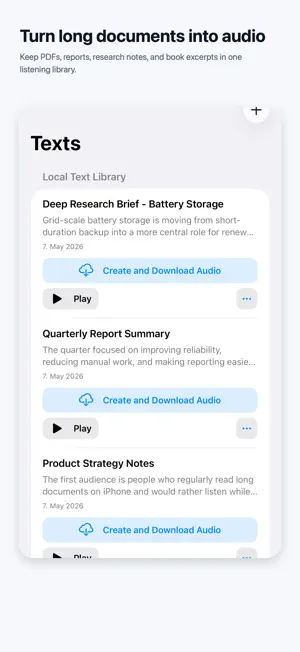


About Lirivo: Text to Speech
Turn text, PDF ebooks, notes, and documents into audio you can keep listening to. Lirivo is a text-to-speech reader for iPhone built around real reading moments: walking, commuting, cooking, studying, resting your eyes, or getting through longer material when staying on the screen is not realistic. Start instantly with built-in iPhone voices. No cloud account is required for basic listening. When you want more natural voice options, connect your own Azure or Google Cloud account. Lirivo connects directly from your iPhone, stores credentials locally in iOS Keychain, and does not send your provider keys to a Lirivo-operated server. What you can do with Lirivo: - Paste text or import documents you want to hear. - Listen with a focused text player that keeps the current passage visible. - Save generated audio files for offline replay. - Use player controls made for longer sessions: play, pause, speed, skip, and resume. - Choose built-in iPhone voices for simple local playback. - Optionally use Azure or Google Cloud voices when you want cloud-generated speech. - Use dark mode and accessibility-friendly playback flows. Lirivo is especially useful for long PDFs, PDF ebooks, notes, reports, Markdown, study material, and any text you would rather listen to than read on screen. Cloud voice features are optional. Azure and Google Cloud usage depends on your own provider account, provider availability, and provider pricing. PDF results work best with documents that contain selectable text.
What’s new
Version 1.0.2 · Updated June 23, 2026
Improved responsiveness when switching between main tabs and moving around the app. Reduced extra UI work in the text player for smoother long-document playback and faster interaction. Polished saved-audio recovery, cloud output refreshes, and small interface details across the app.
App privacy
The developer, Jewgenij Steinhart, reported these privacy practices to Apple.
Data Not Linked to You
The following data, which may be collected but is not linked to your identity, may be used for the following purposes:
- Location: Coarse Location
- Identifiers: Device ID
- Usage Data: Product Interaction
- Sensitive Info: Sensitive Info
- Diagnostics: Other Diagnostic Data
- User Content: Other User Content
Used for: Analytics, App Functionality
Alternatives to Lirivo: Text to Speech
Looking for apps like Lirivo: Text to Speech? Here are 6 similar apps on the App Store. The highest rated is VT PDF Voice Reader (5.0/5), and all 6 are free to download.
-
 VT PDF Voice Reader
5.0
VT PDF Voice Reader
5.0
-
 ListenUp-PDF & Image to Speech
1.0
ListenUp-PDF & Image to Speech
1.0
-
 Vox: Text to Speech PDF Reader
-
 Zenvor: Text to Speech Reader
-
 Ouve - Texto em Áudio
-
 Aloud — Text to Speech Reader
5.0
Aloud — Text to Speech Reader
5.0
| App | Rating | Price | Last updated | Compare |
|---|---|---|---|---|
| Lirivo: Text to Speech | – | Free | June 23, 2026 | |
| VT PDF Voice Reader | 5.0 / 5 (1) | Free | Sep 28, 2026 | Compare |
| ListenUp-PDF & Image to Speech | 1.0 / 5 (1) | Free | Jul 4, 2025 | Compare |
| Vox: Text to Speech PDF Reader | – | Free | Jul 16, 2026 | Compare |
| Zenvor: Text to Speech Reader | – | Free | Aug 20, 2026 | Compare |
| Ouve - Texto em Áudio | – | Free | May 1, 2026 | Compare |
| Aloud — Text to Speech Reader | 5.0 / 5 (2) | Free | Sep 27, 2026 | Compare |