

qBitRemote
Mykola Kholtobin Utilities iPhoneiPadiPod touch
qBitRemote is a paid Utilities app for iPhone and iPad by Mykola Kholtobin. Requires iOS 26.0. Updated August 28, 2026.
- Price
- 3.99 USD
- on the App Store
- Size
- 1 MB
- Age 4+
- Updated
- Aug 28
- 2026 · v1.02
Screenshots


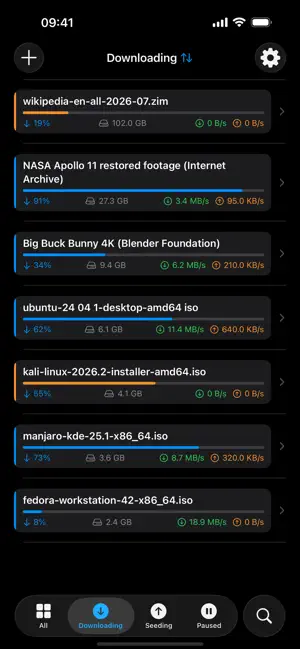

About qBitRemote
qBitRemote — qBittorrent Remote Control Take full control of your qBittorrent client right from your iPhone or iPad. qBitRemote connects directly to your qBittorrent Web UI, giving you a native iOS experience to manage all your downloads without ever touching a browser. MANAGE YOUR DOWNLOADS • View all torrents with real-time status, progress, speed, and size • Auto-refreshes every 3 seconds so you always see the latest state • Filter by status: All, Downloading, Seeding, Paused • Pause, resume, or delete individual torrents with ease ADD TORRENTS ON THE GO • Add torrents by opening .torrent files from Files, Mail, or Safari — sent directly to your own server • Set save path, category, and tags when adding • Manage categories and tags to keep your library organized FULL TORRENT DETAILS • Inspect individual files inside each torrent • Set per-file download priorities • View detailed info: tracker status, ratio, ETA, and more SECURE & PRIVATE • Passwords stored in iOS Keychain — never exposed in plain text • Connects to your own self-hosted qBittorrent instance • No cloud, no accounts, no third-party servers — your data stays yours NATIVE iOS EXPERIENCE • Built entirely with SwiftUI for a smooth, modern interface • Optimized for both iPhone and iPad REQUIREMENTS • qBittorrent with Web UI enabled on your server or home network • Access to your qBittorrent host via local network qBitRemote is the simplest way to keep your downloads under control.
What’s new
Version 1.02 · Updated August 28, 2026
Sorting is here. • Tap the list title to sort — 20 criteria across General, Transfer, Speed and Time. Tap the active one again to reverse the order. • Each torrent now shows the value it is sorted by, so sorting by ratio or ETA is actually readable. • Your choice is remembered between launches, and "Default" returns to the server's own order. • Settings → Sort lets you choose which criteria appear in the menu and which one the app starts with. • Search now tells the truth: if your filter hid the matches, it says so, shows how many were found elsewhere, and offers to search everywhere.
App privacy
The developer, Mykola Kholtobin, reported these privacy practices to Apple.
Data Not Collected
The developer does not collect any data from this app.
Alternatives to qBitRemote
Looking for apps like qBitRemote? Here are 6 similar apps on the App Store. The highest rated is TruDash – NAS Dashboard (5.0/5), and all 6 are free to download.
-
 TruDash – NAS Dashboard
5.0
TruDash – NAS Dashboard
5.0
-
 BitRemote - NAS Downloads
4.8
BitRemote - NAS Downloads
4.8
-
 Bee hive monitoring diag
5.0
Bee hive monitoring diag
5.0
-
 Tally Counter: Tap & Click
-
 Beok AC
5.0
Beok AC
5.0
-
 Tally: Simple Click Counter
4.6
Tally: Simple Click Counter
4.6
| App | Rating | Price | Last updated | Compare |
|---|---|---|---|---|
| qBitRemote | – | 3.99 USD | August 28, 2026 | |
| TruDash – NAS Dashboard | 5.0 / 5 (5) | Free | Aug 24, 2026 | Compare |
| BitRemote - NAS Downloads | 4.8 / 5 (4) | Free | Jun 22, 2026 | Compare |
| Bee hive monitoring diag | 5.0 / 5 (1) | Free | Jun 12, 2026 | Compare |
| Tally Counter: Tap & Click | – | Free | Oct 14, 2026 | Compare |
| Beok AC | 5.0 / 5 (1) | Free | Nov 14, 2025 | Compare |
| Tally: Simple Click Counter | 4.6 / 5 (30) | Free | Oct 4, 2026 | Compare |
Compare qBitRemote with the top alternatives: ratings, updates, ASO score and keyword gaps →