

SwipeFile: Save & Find Videos
SwipeFile LLC Photo & Video iPhoneiPadiPod touch
SwipeFile: Save & Find Videos is a free Photo & Video app for iPhone and iPad by SwipeFile LLC. Rated 5.0/5 from 2 ratings. Requires iOS 17.5.
- Rating
- 5.0
- 2 ratings
- Price
- Free
- on the App Store
- Size
- 127 MB
- Age 4+
- Updated
- Oct 30
- 2026 · v1.1.2
Screenshots



About SwipeFile: Save & Find Videos
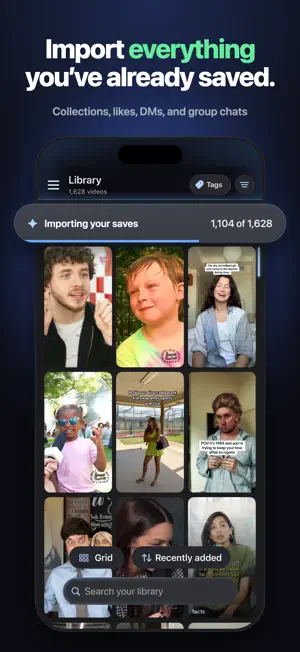
You've saved hundreds of videos. But how many can you actually find? SwipeFile turns the videos you save into your own searchable library. Save from Instagram, TikTok, YouTube, and Facebook, or import what you've already saved. Make a video searchable and find it by what was said, what appeared on screen, the caption, or something you wrote about it. Search even works when you don't remember the exact words. Add notes, tags, and collections, then share them with friends. The video you're vaguely remembering from six months ago? You can actually find it again. SwipeFile is a subscription app. Saving and importing new videos requires a free trial or active SwipeFile Pro subscription. If your plan ends, your library stays: you can still watch, search, organize, share, and export it. Videos you've made searchable stay searchable. SEARCH WHAT WAS SAID Tap "Make searchable" and SwipeFile reads a video's speech, caption, and on-screen text. Search for whatever you remember: "protein pancakes" or "that book about habits." SwipeFile can find the right video even when you don't remember the exact words. Search can also surface videos that might match but aren't fully searchable yet, so you can choose what to make searchable next. Videos saved from the share sheet can be made searchable automatically while you have searchable videos left. Your notes are always searchable. SAVE IN TWO TAPS Tap Share, pick SwipeFile, done. Add a note or tag on the spot, or skip it. BRING YOUR EXISTING SAVES Import from Instagram, TikTok, Facebook, and YouTube instead of starting over. Bring in supported saves, likes, collections, DMs, and group chats in batches, with existing organization preserved where available. TAGS, NOTES, COLLECTIONS Tag recipes, workouts, gift ideas, outfits, places to go, or references for your next project. Add notes, build collections, and filter or sort your library when you want to browse. SHARE ENTIRE COLLECTIONS Send a whole collection over iMessage in one link. Your friend gets all 18 gift ideas, not 18 separate links. Shared collections can stay up to date as you add more. WHO IT'S FOR Home cooks with 200 saved recipes. Creators keeping a swipe file of hooks and references. Students saving useful explanations. Anyone whose saved folder has become a black hole. Your library syncs across your devices, and you can export your data anytime. SWIPEFILE PRO A SwipeFile Pro subscription lets you save and import new videos and includes searchable videos. • Free trial: 7 days for eligible new subscribers, with 100 searchable videos • Monthly plan: up to 500 searchable videos each month • Yearly plan: up to 3,000 searchable videos each year Unused searchable videos from paid plans and refills carry over and don't expire. If your subscription ends, videos you've made searchable stay searchable, and any remaining paid searchable videos can still be used on videos already in your library. Saving or importing new videos requires an active plan. Unused free-trial searchable videos are removed if the trial is cancelled or ends without becoming a paid plan. ONE-TIME REFILLS Active, renewing monthly or yearly subscribers can buy one-time refills of 500, 1,500, or 3,000 searchable videos. Current prices are shown in the app and confirmed before you're charged. Payment is charged to your Apple Account at confirmation of purchase. Starting a paid plan during your free trial ends the trial and starts billing right away. Subscriptions renew automatically unless cancelled at least 24 hours before the end of the current period, and your account is charged for renewal within 24 hours before it ends. Manage or cancel anytime in Settings > Apple Account > Subscriptions. Terms of Use: https://swipefileapp.com/terms Privacy Policy: https://swipefileapp.com/privacy Support: [email protected]
What’s new
Version 1.1.2 · Updated October 30, 2026
This update polishes your first few minutes with SwipeFile and a few everyday details: • A clearer first-save guide that shows you how to find the video you just saved. • Notes from shared collections now stay with the video as its own note. • Setup screens fit better on larger iPhones. • Fixed an issue where typing in the search bar could start on the wrong line. • Sync, performance and stability improvements throughout the app.
App privacy
The developer, SwipeFile LLC, reported these privacy practices to Apple.
Data Linked to You
The following data, which may be collected and linked to your identity, may be used for the following purposes:
- Purchases: Purchase History
- Search History: Search History
- Identifiers: User ID, Device ID
- Usage Data: Product Interaction
- Diagnostics: Crash Data, Performance Data, Other Diagnostic Data
- Contact Info: Email Address, Name
- User Content: Customer Support, Other User Content
Used for: Analytics, App Functionality
Data Not Linked to You
The following data, which may be collected but is not linked to your identity, may be used for the following purposes:
- User Content: Other User Content
Used for: Analytics
Alternatives to SwipeFile: Save & Find Videos
Looking for apps like SwipeFile: Save & Find Videos? Here are 6 similar apps on the App Store. The highest rated is TikWatermark (4.9/5), and all 6 are free to download.
-
 BOKKI Encoder
-
 Lazy Cam — Film Camera
-
 GetTranscribe Video to Text
3.0
-
 PostFrame: AI Photo Guide
4.1
-
 AllVidConverter: Convert Video
-
 TikWatermark
4.9
| App | Rating | Price | Last updated | Compare |
|---|---|---|---|---|
| SwipeFile: Save & Find Videos | 5.0 / 5 (2 ratings) | Free | October 30, 2026 | |
| BOKKI Encoder | – | Free | Oct 26, 2026 | Compare |
| Lazy Cam — Film Camera | – | Free | Aug 18, 2026 | Compare |
| GetTranscribe Video to Text | 3.0 / 5 (2) | Free | Aug 7, 2026 | Compare |
| PostFrame: AI Photo Guide | 4.1 / 5 (10) | Free | Apr 12, 2026 | Compare |
| AllVidConverter: Convert Video | – | Free | Aug 11, 2026 | Compare |
| TikWatermark | 4.9 / 5 (7) | Free | Aug 12, 2026 | Compare |