

BackingBand: Jam Tracks
昆山 郑 Music iPhoneiPadiPod touch
BackingBand: Jam Tracks is a free Music app for iPhone and iPad by 昆山 郑. Requires iOS 16.6. Updated October 29, 2026.
- Price
- Free
- on the App Store
- Size
- 411 MB
- Age 4+
- Updated
- Oct 29
- 2026 · v2.6.66
Screenshots


About BackingBand: Jam Tracks
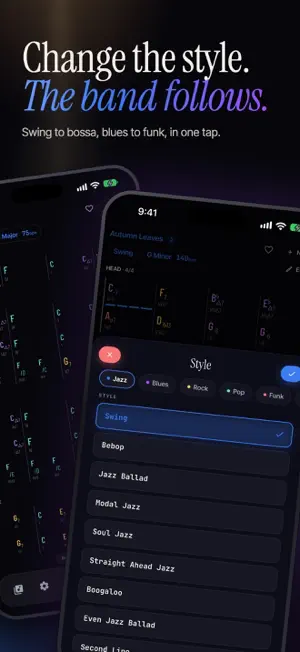
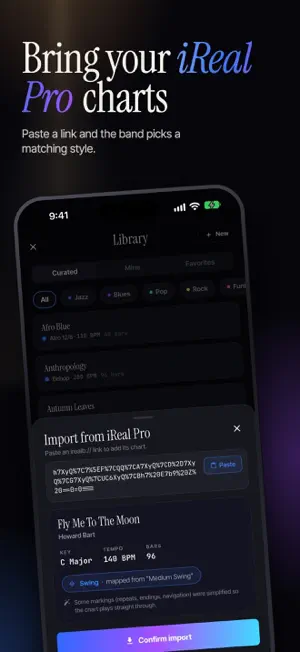
Your own band, ready to play whatever you're working on. BackingBand turns a chord chart into a real-sounding rhythm section: drums, bass, keys and guitar that actually groove. Pick a chart, press play, and practice with a band behind you instead of a metronome. WHAT YOU CAN DO • Start from a curated library of ready-to-play tunes, or build your own: enter the chords, arrange your sections (intro, verse, chorus, bridge, solo, outro), and the band plays them back. • Import charts from iReal Pro: paste a link or choose an exported file, and the band picks a matching style for supported charts. • Pick from 38 styles: swing, jazz waltz, bebop, modal jazz, bossa nova, samba, shuffle and slow blues, classic and hard rock, funk, disco, neo-soul, reggae, ska, K-pop, second line, Afro and more. Switch styles anytime and the whole band re-arranges. • Make it yours: set the tempo and key, reshape the groove section by section, and balance, mute, solo or swap instruments in the mixer. • Practice with purpose: loop any passage with A-B repeat, count yourself in, and follow the chart as it scrolls with the music. A BAND THAT BREATHES, NOT A STIFF LOOP Real intros and endings, fills between sections, and a rhythm section that lifts behind your solo instead of repeating the same bar. Whether you're shedding ii-V-I changes, grinding the 12-bar blues or running a pop tune, the backing feels like players in a room. READS LIKE A REAL LEAD SHEET Clean chord symbols in jazz shorthand or spelled out, Roman numerals under every chord, colors by chord quality, and 2 or 4 bars per row. On iPad the chart grows with the screen, in portrait or landscape, and works in Split View and Stage Manager. GENRES Jazz · Blues · Pop · Rock · Funk · Soul/R&B · Latin · Reggae FOR EVERY PLAYER Guitarists, pianists, horn and reed players, bassists, singers, students and teachers: anyone who learns faster with a band behind them. Available in English and Simplified Chinese. FREE TO START, PRO ONCE Start free and save up to 5 charts. BackingBand Pro is a one-time purchase, no subscription: • Save unlimited charts • Play any chart in all 12 keys • The full chord palette: sus, color chords and every 7th beyond the dominant 7th • Create charts in 3/4, 6/8 and 12/8, and change individual bars to supported meters, including 2/4 PRIVATE BY DESIGN No account or ads. Your charts stay on your device, and the band keeps playing in the background. Usage analytics helps us improve the app; you can turn it off in Settings. We do not send your chart contents or audio to analytics. Download BackingBand and never practice to silence again.
What’s new
Version 2.6.66 · Updated October 29, 2026
This update comes from your feedback. • N.C. and Rest: two new keys on the chord wheel. N.C. stops the harmony and bass while the drums keep going. Rest stops the whole band. Either can cover a few beats or a whole bar. An n imported from iReal Pro now reads as N.C. • Change a whole song's meter: pick a new meter in Song settings and every bar stays. If a bar can't fit the new meter, the app tells you which one. A whole song can now be in 2/4. (Meters other than 4/4 are a Pro feature.) • Change a section's type: in Section settings, turn a section into another type, such as a Verse into a Chorus. • Two jazz styles are rebuilt. Swing is now a steady walking trio. Modal Jazz now plays So What style answers over a bass that walks through the mode. • When the Library opens, the style filter scrolls to the style you picked last time. • Two jazz demos are corrected. Moanin' now follows the real form: an AABA head with its break, a solo chorus, and the tag at the end. In Sidewinder, the N.C. beats stay in the head and the solos play straight through the changes. Got a request? Tap Send feedback in Settings.
App privacy
The developer, 昆山 郑, reported these privacy practices to Apple.
Data Not Linked to You
The following data, which may be collected but is not linked to your identity, may be used for the following purposes:
- Purchases: Purchase History
- Identifiers: Device ID
- Usage Data: Product Interaction
- Diagnostics: Performance Data
- Other Data: Other Data Types
Used for: Analytics
Alternatives to BackingBand: Jam Tracks
Looking for apps like BackingBand: Jam Tracks? Here are 6 similar apps on the App Store. The highest rated is Guitar Jam Backing Tracks (5.0/5), and all 6 are free to download.
-
 SUS4 Backing Tracks: Jam Along
-
 Jam-Master
4.8
-
 Guitar Jam Backing Tracks
5.0
-
 Play Jazz Tracks Mobile
4.3
-
 JAMMATES Lite
2.6
-
 Cover Band Tracks
4.9
| App | Rating | Price | Last updated | Compare |
|---|---|---|---|---|
| BackingBand: Jam Tracks | – | Free | October 29, 2026 | |
| SUS4 Backing Tracks: Jam Along | – | Free | Oct 12, 2026 | Compare |
| Jam-Master | 4.8 / 5 (6) | Free | Feb 17, 2024 | Compare |
| Guitar Jam Backing Tracks | 5.0 / 5 (2) | Free | Aug 4, 2026 | Compare |
| Play Jazz Tracks Mobile | 4.3 / 5 (6) | Free | Aug 31, 2026 | Compare |
| JAMMATES Lite | 2.6 / 5 (5) | Free | Jun 30, 2025 | Compare |
| Cover Band Tracks | 4.9 / 5 (96) | Free | Oct 18, 2026 | Compare |