

AI Image Compressor: Reduce KB
Vishal Kalkani Photo & Video iPhoneiPadiPod touch
AI Image Compressor: Reduce KB is a free Photo & Video app for iPhone and iPad by Vishal Kalkani. Requires iOS 16.0. Updated October 20, 2026.
- Price
- Free
- on the App Store
- Size
- 11 MB
- Age 9+
- Updated
- Oct 20
- 2026 · v1.2
Screenshots


About AI Image Compressor: Reduce KB
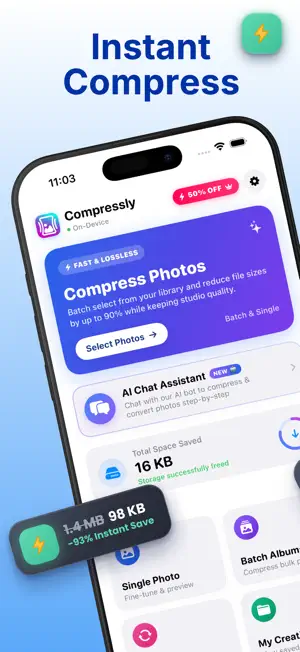
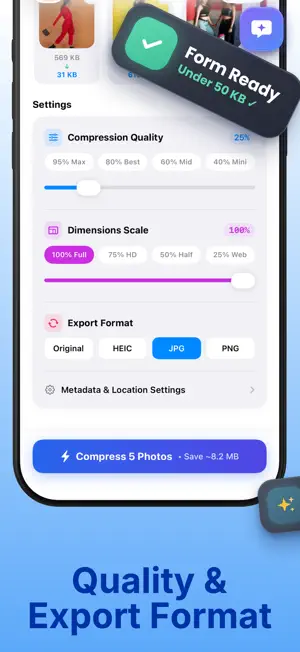
Just chat to compress photos. Tell the AI the size you need, like 50KB or 100KB, and your photo is ready in seconds. Getting "file too large" on a form, an email or WhatsApp? Image Compressor now has an AI assistant. Add your photo, type what you want in plain words and the AI compresses it for you. You can also use one-tap compression with simple controls. NEW: AI COMPRESS CHAT • Type "Compress this to 50KB" and get the result in the chat • Ask in your own words, no settings to learn • Say what the photo is for, like a form, email or WhatsApp, and get help picking the right size • Ask for a smaller or sharper version and the AI adjusts it WHY PEOPLE USE IT • Upload photos and signatures to exam forms, job applications, passport and government portals • Send pictures by email or WhatsApp without upload errors • Free up storage on your iPhone or iPad • Resize pictures for social media, websites and online profiles • Make photos load and share faster on slow networks COMPRESS TO THE EXACT SIZE YOU NEED Many websites accept only small files, such as 20KB, 50KB or 200KB. Set a target size, or ask the AI, and the app compresses your photo to fit. You can also choose a custom size or use the quality slider to balance file size and sharpness. A live preview shows the new file size before you save, so you know it will work before you upload. FEATURES • AI chat assistant for compressing photos • One-tap photo compression • Target size: 20KB, 50KB, 100KB, 200KB or custom • Batch mode: compress many photos at once and save time • Resize images by width and height • Quality slider for full control • Works with common formats such as JPG, PNG and HEIC • Before and after file size comparison • Share directly to WhatsApp, email and social apps, or save to Photos • Clean, easy design that anyone can use HOW IT WORKS 1. Choose a photo from your gallery 2. Tell the AI the size you need, or pick a target size yourself 3. Check the preview 4. Save to Photos or share anywhere PERFECT FOR • Students filling in exam forms and applications • Job seekers uploading resume photos and signatures • Families sharing photos on WhatsApp • Professionals sending images by email • Creators posting to social media • Anyone whose phone storage is full QUICK ANSWERS How do I compress a photo to 50KB? Open the AI chat, add the photo and type "compress to 50KB". You can also choose 50KB as the target size and tap Compress. Will my photo look worse? The app reduces file size while keeping your picture clear. The smaller the target size, the more compression is applied, so check the preview to find the right balance. Can I compress many photos at once? Yes. Select several photos and compress them together with batch mode. What if my photo is still too big for a form? Ask the AI for a smaller size, or lower the quality slider a little, then compress again. TIPS FOR BEST RESULTS • Start with the original photo, not a screenshot of it • Tell the AI the size your form asks for, such as 100KB or 200KB • Check the preview for sharpness before you upload • Compress signatures and ID photos separately, since each form may have different limits FREE AND PREMIUM Compress photos for free with ads. Upgrade to Premium to remove ads and unlock [add what Premium includes, for example: AI chat, batch mode, higher limits]. Premium plans: • Monthly: ₹99 • Yearly: ₹499 • Lifetime: ₹999 (one-time purchase) Payment is charged to your Apple ID at confirmation of purchase. Subscriptions renew automatically unless cancelled at least 24 hours before the end of the current period. You can manage or cancel your subscription anytime in your Apple ID account settings. Privacy Policy: https://sites.google.com/view/kalkani-privacy-policy/home Terms of Use (EULA): https://www.apple.com/legal/internet-services/itunes/dev/stdeula/
What’s new
Version 1.2 · Updated October 20, 2026
NEW: AI Compress Chat You can now compress photos by chatting with an AI assistant. Add your photo, type something like "compress to 50KB" and get the result in seconds. No settings to learn. Also in this update: • Target sizes: 20KB, 50KB, 100KB, 200KB or custom • Faster compression • Better results at very small file sizes • Smoother, cleaner design • Bug fixes and performance improvements Using the app? A quick rating really helps us keep improving it. Thank you!
App privacy
The developer, Vishal Kalkani, reported these privacy practices to Apple.
Data Not Collected
The developer does not collect any data from this app.
Alternatives to AI Image Compressor: Reduce KB
Looking for apps like AI Image Compressor: Reduce KB? Here are 6 similar apps on the App Store. The highest rated is Image Compressor: Reduce Size (4.0/5), and all 6 are free to download.
-
 Offline Image Compressor
-
 Image Compressor: Reduce Size
4.0
Image Compressor: Reduce Size
4.0
-
 PhotoShrink: Photo Compressor
-
 Compressly
-
 Image Compressor: Resize PDF
-
 Image Reducer, Compress photos
| App | Rating | Price | Last updated | Compare |
|---|---|---|---|---|
| AI Image Compressor: Reduce KB | – | Free | October 20, 2026 | |
| Offline Image Compressor | – | Free | May 18, 2026 | Compare |
| Image Compressor: Reduce Size | 4.0 / 5 (1) | Free | Jun 30, 2026 | Compare |
| PhotoShrink: Photo Compressor | – | Free | Aug 22, 2026 | Compare |
| Compressly | – | Free | Sep 15, 2025 | Compare |
| Image Compressor: Resize PDF | – | Free | Jun 26, 2026 | Compare |
| Image Reducer, Compress photos | – | Free | May 10, 2026 | Compare |