

TheWorks
map16 Asset Management ltd Productivity iPhoneiPad
TheWorks is a free Productivity app for iPhone and iPad by map16 Asset Management ltd. Requires iOS 15.0. Updated September 29, 2026.
- Price
- Free
- on the App Store
- Size
- 34 MB
- Age 4+
- Updated
- Sep 29
- 2026 · v2.2.0
Screenshots


About TheWorks
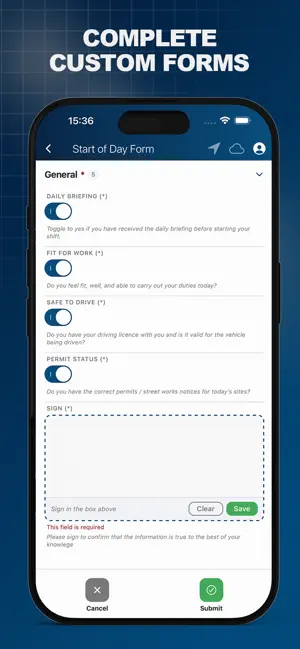
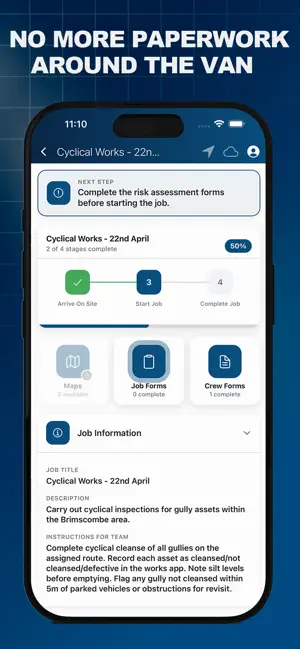
TheWorks Mobile is the field companion for teams that build, inspect, maintain and manage real-world assets. Built by map16, it turns every phone and tablet in the field into a powerful workflow tool — so the right job, asset, form and map is always one tap away. Whether you're running planned maintenance, reactive jobs, asset surveys, safety inspections or defect reporting, TheWorks Mobile adapts to the way your team works. Use it for jobs, for assets, for forms — or all three together. — FIELD WORKFLOWS, DONE PROPERLY — • JOBS: View today's work, accept assignments, update status, log time and materials, capture proof-of-work photos, and complete jobs from site — even with no signal. • ASSETS: Inspect, update or add new assets in seconds. Capture points, lines and polygons with GPS-grade accuracy and link them to live records. • DEFECTS: Raise issues exactly where they are. Add photos, severity, location and notes — they appear instantly on the office map. • INSPECTIONS: Run repeatable, standardised inspection routines with smart checklists, conditional questions and digital signatures. • FORMS: Fill flexible smart forms built for your business — required fields, dropdowns, photos, files, signatures, GPS, dates and conditional logic that adapts as you complete it. — GATED WORKFLOWS THAT ENFORCE COMPLIANCE — Stop work happening out of sequence. TheWorks Mobile lets administrators design a visual workflow for every job type — and the app enforces it on site. • Build a custom job lifecycle per job type (e.g. Travel → On Site → Working → Complete) • Lock state transitions behind mandatory forms — no going "On Site" without a vehicle check, no starting work without a RAMS sign-off, no completing a job without a sign-off form • Show clear, configurable messages explaining exactly what's required to proceed • Mark any supplementary form as mandatory: pre-job safety, toolbox talks, dynamic risk assessments, sign-offs • Every gated step is logged with timestamp, GPS and user — a defensible audit trail • Gating is enforced on the device, so it works fully offline; the audit trail syncs the moment connection returns The result: standardised, compliant fieldwork — without paperwork, without phone calls, and without trusting people to remember. — DESIGNED FOR THE WAY MOBILE TEAMS WORK — • High-quality interactive maps of your network, sites and assets • Capture points, lines, polygons, photos, files and signatures • Cascading dropdowns and conditional fields keep forms short and relevant • Pre-filled data from linked assets, jobs and clients — less typing, more doing • Search locations, addresses and what3words to find any site fast • Assign work to yourself or a teammate without leaving the field • Works fully offline — sync happens automatically when you're back online • One-tap sync sends everything straight into your map16 platform — BUILT TO INTEGRATE — TheWorks Mobile syncs in real time with map16's web platform, where managers see live progress on dashboards, maps and reports. It also connects to your existing enterprise asset management (EAM), GIS and back-office systems, so field data flows where it needs to without re-keying. — FLEXIBLE BY DESIGN — Use TheWorks Mobile as a job management app, an asset capture and inspection app, a defect reporting tool, a forms platform — or all of the above, combined into one streamlined app. — WHO IT'S FOR — Utilities, highways, rail, telecoms, civils, facilities management, environmental services, local authorities and any organisation that owns or maintains a network of assets in the field. — REQUIREMENTS — A map16 organisation account is required to log in and sync data. Visit map16.co.uk to get started.
What’s new
Version 2.2.0 · Updated September 29, 2026
Release Notes: - Added video, audio, file upload, and sketch form inputs - Added "Copy from last" for repeat form submissions - Added asset duplication and geometry copying - Restored what3words search and form lookups - Improved multi-select fields and collapsible form sections - Added in-app help guides, restart option, and release onboarding - General troubleshooting and UI improvements
App privacy
The developer, map16 Asset Management ltd, reported these privacy practices to Apple.
Data Linked to You
The following data, which may be collected and linked to your identity, may be used for the following purposes:
- Location: Precise Location
- Contact Info: Email Address
- User Content: Photos or Videos
- Identifiers: User ID
Used for: App Functionality
Data Not Linked to You
The following data, which may be collected but is not linked to your identity, may be used for the following purposes:
- Identifiers: Device ID
- Diagnostics: Crash Data, Performance Data, Other Diagnostic Data
Used for: App Functionality
Alternatives to TheWorks
Looking for apps like TheWorks? Here are 6 similar apps on the App Store. The highest rated is Bite: AI Video Summaries (5.0/5), and all 6 are free to download.
-
 Teamleaf 8
-
 Bite: AI Video Summaries
5.0
Bite: AI Video Summaries
5.0
-
 ezytreev Onsite
-
 SMART Forms
-
 Scannable Safety Equipment App
4.9
Scannable Safety Equipment App
4.9
-
 SiteAssist
| App | Rating | Price | Last updated | Compare |
|---|---|---|---|---|
| TheWorks | – | Free | September 29, 2026 | |
| Teamleaf 8 | – | Free | Sep 5, 2026 | Compare |
| Bite: AI Video Summaries | 5.0 / 5 (1) | Free | Sep 29, 2026 | Compare |
| ezytreev Onsite | – | Free | Jul 23, 2026 | Compare |
| SMART Forms | – | Free | Sep 1, 2026 | Compare |
| Scannable Safety Equipment App | 4.9 / 5 (8) | Free | Sep 7, 2026 | Compare |
| SiteAssist | – | Free | Aug 10, 2026 | Compare |
Compare TheWorks with the top alternatives: ratings, updates, ASO score and keyword gaps →