

Field View Pro
Field View LLC Business iPhoneiPadiPod touch
Field View Pro is a free Business app for iPhone and iPad by Field View LLC. Rated 5.0/5 from 1 ratings. Requires iOS 15.1. Updated August 20, 2026.
- Rating
- 5.0
- 1 ratings
- Price
- Free
- on the App Store
- Size
- 51 MB
- Age 4+
- Updated
- Aug 20
- 2026 · v2.0.0
Screenshots


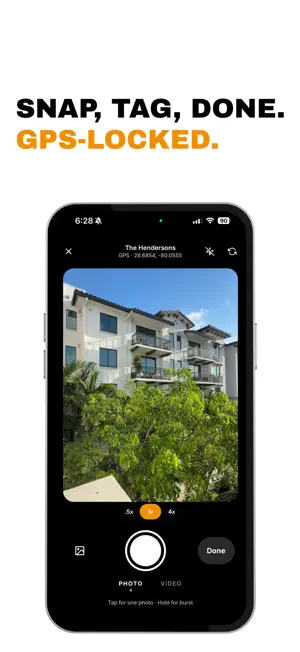
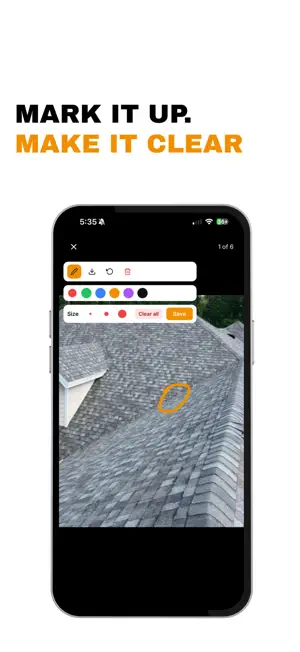
About Field View Pro
Field View is photo documentation and project management built for trade contractors — painters, roofers, HVAC technicians, plumbers, and the crews who do the work. Capture what happens on every job site. Let AI write it up. AI REPORTS - Pick photos, add a note, get a client-ready report - Walkthrough mode: talk while you walk the site, get a written report - Voice notes on any field, transcribed automatically - Reports tuned to your trade PHOTO DOCUMENTATION - Take, geo-tag, and organize photos by project - Automatic captions on every photo - Search across every photo on the job - Timestamp and address stamps - Annotate with notes and markup - Burst mode for quick capture PROJECT CHECKLISTS - Build reusable templates for repeatable work - Generate checklists from a voice note - Require photo evidence for each item - Track progress section by section TASKS AND ASSIGNMENTS - Assign work to your crew with deadlines - Status tracking from to-do to done - Priority levels and due dates CREW AND CLIENTS - Invite crew with role-based permissions - Project messaging with @mentions - Client contacts on every project - Shareable links that look polished Built for the trades. No bloat. Just the tools you actually need to document the work. Terms of Use (EULA): https://www.field-view.com/legal/terms-and-conditions
What’s new
Version 2.0.0 · Updated August 20, 2026
Field View 2.0 brings AI to your job site photos. - AI reports — pick photos, add a note, get a client-ready report - Walkthrough mode — talk while you walk the site, get a written report - Voice notes on any field, with automatic transcription - Photo search across every caption on the job - Project messaging with @mentions - Client contacts on projects - Timestamp and address stamps on photos - Redesigned project and photo screens
App privacy
The developer, Field View LLC, reported these privacy practices to Apple.
Data Used to Track You
The following data may be used to track you across apps and websites owned by other companies:
- Purchases: Purchase History
- Identifiers: Device ID
- Usage Data: Product Interaction, Advertising Data
Data Linked to You
The following data, which may be collected and linked to your identity, may be used for the following purposes:
- Contact Info: Email Address, Name
- Usage Data: Advertising Data, Product Interaction
- Identifiers: User ID, Device ID
- Diagnostics: Crash Data, Performance Data, Other Diagnostic Data
- Location: Precise Location
- User Content: Photos or Videos, Audio Data, Other User Content
Used for: Developer’s Advertising or Marketing, Analytics, App Functionality
Data Not Linked to You
The following data, which may be collected but is not linked to your identity, may be used for the following purposes:
- Purchases: Purchase History
- Identifiers: Device ID
- Usage Data: Product Interaction
Used for: Developer’s Advertising or Marketing
Alternatives to Field View Pro
Looking for apps like Field View Pro? Here are 6 similar apps on the App Store. The highest rated is DripJobs Chat (5.0/5), and all 6 are free to download.
-
 DripJobs Chat
5.0
-
 DripJobs
4.2
-
 RelayCam: Job Photo App
4.7
-
 BestMate - Small Business App
4.9
-
 Contractor Foreman
4.3
-
 QuoteIQ: Contractor CRM
4.7
| App | Rating | Price | Last updated | Compare |
|---|---|---|---|---|
| Field View Pro | 5.0 / 5 (1 rating) | Free | August 20, 2026 | |
| DripJobs Chat | 5.0 / 5 (12) | Free | Jul 4, 2026 | Compare |
| DripJobs | 4.2 / 5 (33) | Free | Jul 14, 2026 | Compare |
| RelayCam: Job Photo App | 4.7 / 5 (42) | Free | Oct 27, 2026 | Compare |
| BestMate - Small Business App | 4.9 / 5 (393) | Free | Oct 21, 2026 | Compare |
| Contractor Foreman | 4.3 / 5 (559) | Free | Oct 29, 2026 | Compare |
| QuoteIQ: Contractor CRM | 4.7 / 5 (3,444) | Free | Oct 28, 2026 | Compare |
Compare Field View Pro with the top alternatives: ratings, updates, ASO score and keyword gaps →