

Use Your Ear
Juerg Andres Music iPhoneiPadiPod touch
Use Your Ear is a free Music app for iPhone and iPad by Juerg Andres. Requires iOS 15.0. Updated May 6, 2026.
- Price
- Free
- on the App Store
- Size
- 4 MB
- Age 4+
- Updated
- May 6
- 2026 · v1.0
Screenshots

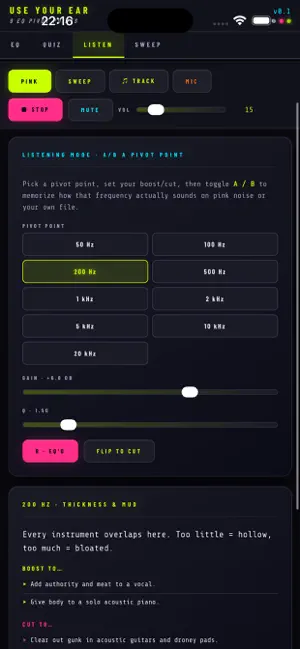
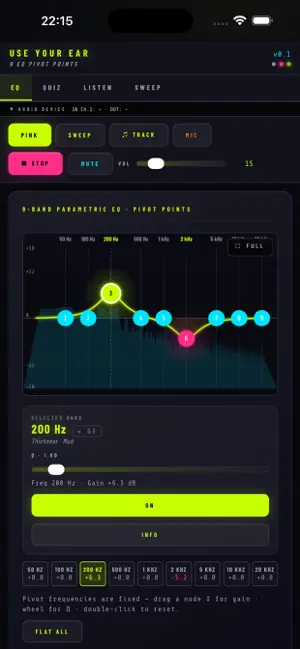
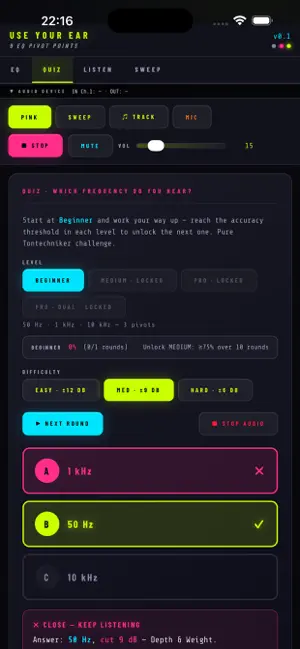
About Use Your Ear
The 9 pivot points: · **50 Hz** — Depth & Weight · **100 Hz** — Warmth & Punch · **200 Hz** — Thickness & Mud · **500 Hz** — Boxy & Gargle · **1 kHz** — Nasal & Knock · **2 kHz** — Edge & Clarity · **5 kHz** — Presence & Bite · **10 kHz** — Sizzle & Snap · **20 kHz** — Air & Plastic Each pivot mapped to perceptual adjectives — so you don't just memorize numbers, you learn what they SOUND like. Four training modes: EQ Workbench — Interactive 9-band parametric. Drag nodes vertically for gain, scroll wheel for Q, double-click to reset. Frequencies are locked to the pivot points (that's the whole point). Quiz — Blind pivot trainer. The app boosts or cuts a random pivot on pink noise at Easy / Medium / Hard difficulty. A/B between processed and bypass, then pick the frequency + direction. Scoring tracks your accuracy over time. Listen — A/B reference mode. Set gain and Q on a single pivot, toggle A/B against bypass, and read the "Boost to..." / "Cut to..." cheat sheet. Train your ear by hearing the same EQ move at multiple frequencies. Sweep — Manual sine tone across the spectrum, plus an automatic logarithmic sweep from 20 Hz to 20 kHz with the nearest-pivot readout. Hear the spectrum, build the mental map. Sources: · Pink noise (Paul Kellet generator, 4-second loopable buffer) · Sine tone · Log sweep · Your own audio file · Live microphone (with feedback warning) Hearing safety built in: Three independent ways to instantly stop audio: 1. Mute button — instant silence, playback can resume 2. Stop button — tears down the audio source completely 3. Always: keep your master volume LOW, use headphones at safe levels Sine tones and sweeps are internally attenuated to 15% of full scale. Why is it free? Tomorrow's working sound engineers are today's audio students. We want you to learn properly — not paywalled, not gated, not crippled. No ads. No data harvesting. Just a real tool. Where next? · Surviving Audio — Plan and design PA systems before the show · Soundtools Pro — Real-time tools during the show Three apps, one story: train, plan, execute.
App privacy
The developer, Juerg Andres, reported these privacy practices to Apple.
Data Not Collected
The developer does not collect any data from this app.
Alternatives to Use Your Ear
Looking for apps like Use Your Ear? Here are 6 similar apps on the App Store. The highest rated is Natural Tune (5.0/5), and 4 of the 6 are free to download.
-
 Feedback Trainer
-
 Stemly Live Multitrack
-
 Melody Ear Training
4.6
Melody Ear Training
4.6
-
 Negative Harmony
-
 Natural Tune
5.0
Natural Tune
5.0
-
 PRISM Monitor
| App | Rating | Price | Last updated | Compare |
|---|---|---|---|---|
| Use Your Ear | – | Free | May 6, 2026 | |
| Feedback Trainer | – | Free | Jul 22, 2026 | Compare |
| Stemly Live Multitrack | – | Free | Sep 19, 2026 | Compare |
| Melody Ear Training | 4.6 / 5 (37) | 9.99 USD | Jul 19, 2024 | Compare |
| Negative Harmony | – | 2.99 USD | Jun 23, 2026 | Compare |
| Natural Tune | 5.0 / 5 (1) | Free | May 17, 2025 | Compare |
| PRISM Monitor | – | Free | Oct 7, 2026 | Compare |
Compare Use Your Ear with the top alternatives: ratings, updates, ASO score and keyword gaps →