

Rosetta Translate
Xiaoyuan Zhu Reference iPhoneiPadiPod touch
Rosetta Translate is a free Reference app for iPhone and iPad by Xiaoyuan Zhu. Requires iOS 18.0. Updated May 19, 2026.
- Price
- Free
- on the App Store
- Size
- 8 MB
- Age 4+
- Updated
- May 19
- 2026 · v1.0.2
Screenshots

About Rosetta Translate
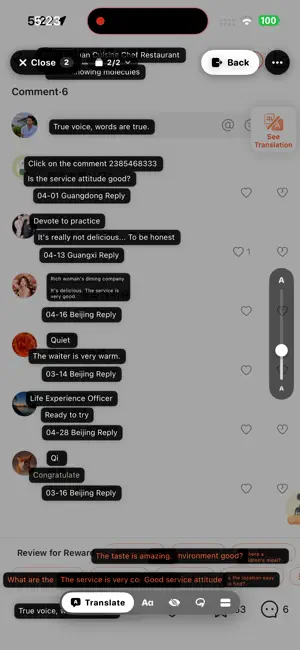
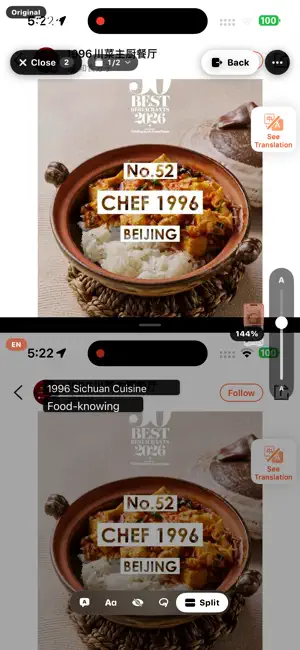
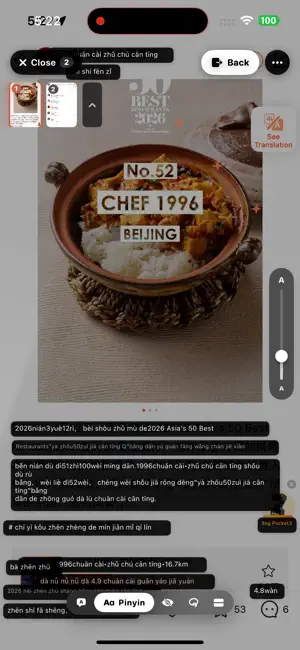
Stop copy-pasting screenshots into Translate. You know the loop — screenshot, switch to Translate, paste the image, wait, squint at the cropped result, switch back. Rosetta kills it. Snap a screenshot in any app and Rosetta lays the translation right where the original text was. No switching apps. No retyping. TWO TAPS. OR ZERO WITH BACK TAP. 1. Take a screenshot — any app, any time. 2. Open Rosetta — your screenshot's already there, already translating. Set up iOS Back Tap once and step 1 becomes a double-tap on the back of your phone. The whole flow takes a couple seconds. AUTO-PICKUP Just take screenshots — anywhere, in any app. When you open Rosetta, they're already queued and already translating. Take a few in a row and Rosetta stacks them into a deck — swipe through, every shot already done. THREE WAYS TO READ • Chips view — translations overlaid right where the original text was. Tap any chip for pronunciation, full sentence, or to copy. • Split-view — original on top, English below, scrolling together as you read. • Pinyin mode — for Chinese, romanization above each character so you can actually pronounce what you're reading. TAP TO SELECT Drag a box around just the phrase you want. Skip the noise on the rest of the screen. 30+ LANGUAGES Chinese (Simplified & Traditional), English, Japanese, Korean, Spanish, French, German, Italian, Portuguese, Russian, Arabic, Hindi, Vietnamese, Thai, Indonesian, Turkish, Polish, Dutch, Ukrainian, and more. New languages roll out as Apple adds them. PRIVATE BY DEFAULT • No account, no sign-in, no email. • Translation runs on your iPhone using Apple's framework. The default mode never sends a screenshot to any server. • Optional: Rosetta can auto-delete screenshots from your camera roll after translating, so it doesn't clutter your photos. • Optional Cloud mode: for tricky stuff (handwriting, dense text, mixed languages), swap in your own AI provider key in Settings. Cloud requests are not stored. WHO IT'S FOR • Travelers reading menus, signs, and apps in another language. • Students translating homework or research. • Anyone using WeChat, LINE, KakaoTalk, Xiaohongshu, or any chat app where copy-paste is awkward. • Manga and webtoon readers. • People learning a language who want to read in context. WHY ROSETTA Most translation apps make you copy text out, paste into a translator, then re-read. Rosetta keeps the layout — you stay in the moment, see the translation right where the original was, and move on. No subscription. No ads. No account. Just a clean translator that does one thing very well.
What’s new
Version 1.0.2 · Updated May 19, 2026
The new auto-pickup flow: take a screenshot anywhere, open Rosetta, and it's already there, already translating. Stack multiple screenshots and swipe through the deck. Refreshed Split-view scrolls original and translation together. Faster Select toolbar, tighter chips, smoother animations across the app.
App privacy
The developer, Xiaoyuan Zhu, reported these privacy practices to Apple.
Data Not Linked to You
The following data, which may be collected but is not linked to your identity, may be used for the following purposes:
- Identifiers: Device ID
- Usage Data: Product Interaction
Used for: Analytics, App Functionality
Alternatives to Rosetta Translate
Looking for apps like Rosetta Translate? Here are 6 similar apps on the App Store. The highest rated is HTML Creator(Pro) (3.0/5), and 5 of the 6 are free to download.
-
 Kiddy: AI Bedtime Stories
-
 kiddiOS: Kids Learning Games
-
 StudyTracker - Study
2.0
-
 LearnTurkish AI
-
 HTML Creator(Pro)
3.0
-
 Mind the Guitar
| App | Rating | Price | Last updated | Compare |
|---|---|---|---|---|
| Rosetta Translate | – | Free | May 19, 2026 | |
| Kiddy: AI Bedtime Stories | – | Free | Oct 11, 2026 | Compare |
| kiddiOS: Kids Learning Games | – | Free | Aug 4, 2026 | Compare |
| StudyTracker - Study | 2.0 / 5 (1) | Free | Aug 27, 2026 | Compare |
| LearnTurkish AI | – | Free | Sep 24, 2026 | Compare |
| HTML Creator(Pro) | 3.0 / 5 (4) | 2.99 USD | Jul 24, 2026 | Compare |
| Mind the Guitar | – | Free | Sep 17, 2026 | Compare |
Compare Rosetta Translate with the top alternatives: ratings, updates, ASO score and keyword gaps →