

Pocket Seismograph: Vibration
lapnito.cz s.r.o. Utilities iPhoneiPadiPod touch
Pocket Seismograph: Vibration is a free Utilities app for iPhone and iPad by lapnito.cz s.r.o. Requires iOS 13.0. Updated August 5, 2026.
- Price
- Free
- on the App Store
- Size
- 23 MB
- Age 4+
- Updated
- Aug 5
- 2026 · v2.0
Screenshots

About Pocket Seismograph: Vibration
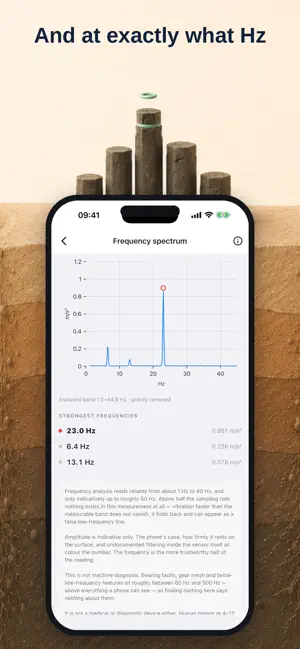
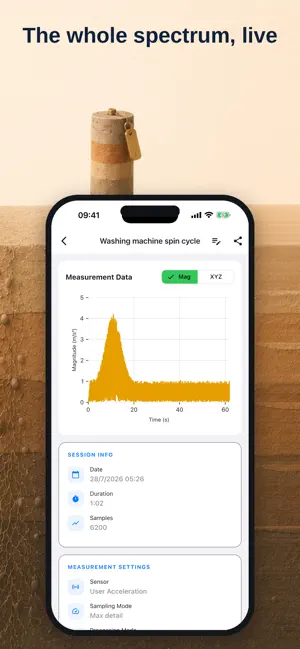
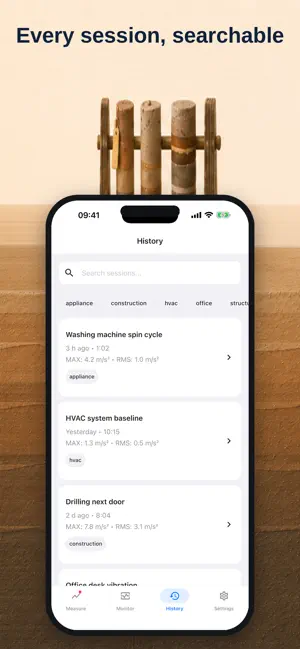
See how hard a surface is shaking, and at what frequency. Pocket Seismograph reads your iPhone's accelerometer at 100 Hz, draws the vibration live, and names the strongest frequency it can find in it. WHAT YOU GET - Dominant frequency in Hz, with a full spectrum chart behind it - Live trace with NOW, MAX, AVG and RMS, as magnitude or full XYZ - Rotation-speed readout in rpm, offered as a hypothesis when the reading looks like a rotating part - Estimated felt intensity and estimated peak ground velocity - Three processing modes: Raw, Stable and Vibration - Sessions you can name, tag, search and reopen - CSV export through the system save dialog, with locale-aware profiles - Calibration wizard that measures your own device's noise floor - Works offline. No account, no sign-in. GREAT FOR - A washing machine that walks across the floor. A spin cycle sits around 17 to 27 Hz, and the app names it. - HVAC units and fans: read the running frequency, then the rpm it implies. - Floors, stairs and beams that move when someone walks past. - Construction, traffic or machinery you want recorded with a timestamp. - Feeling a tremor and wanting the next one captured. HOW IT WORKS 1. Put the phone flat on the surface, screen up. 2. Press Start. Watch the trace and the frequency card. 3. Save the session, add a note, export CSV when you need to show someone. WHAT IT WILL NOT DO Frequency analysis reads reliably from about 1 Hz to 40 Hz, and only indicatively up to roughly 50 Hz. Vibration faster than half the sampling rate does not simply disappear, it folds back and can appear as a false low-frequency line. Amplitude is indicative: the case, how firmly the phone rests on the surface, and filtering inside the sensor itself all color the number. The frequency is the more trustworthy half of the reading. When nothing stands clearly above the noise, the app says "No clear frequency" rather than inventing one. That is the correct reading for a phone lying still on a desk. This is not a certified seismic instrument and it is not calibrated for legal evidence. It is not a medical or diagnostic device. It sends no seismic alerts, so for early warnings use your country's official system. It cannot see the 60 Hz to 500 Hz range where bearing and gear features live, so finding nothing here says nothing about them. Available in 49 languages. Built by an independent developer who thinks a measurement tool should tell you when it does not know. If it is useful to you, a review is the best thanks.
What’s new
Version 2.0 · Updated August 5, 2026
Version 2.0 is about measuring honestly, and then measuring something new. FREQUENCY, NOT JUST AMPLITUDE - A dominant-frequency card on the Measure screen, in Hz, with a spectrum beside it - A full frequency spectrum screen with the three strongest lines listed - An optional rpm reading for 2 Hz to 50 Hz, phrased as a hypothesis about a rotating part - A clear "No clear frequency" state, because a flat spectrum is a real answer MEASUREMENT CHAIN REBUILT - Default sampling raised from 5 Hz to 100 Hz, with a 50 Hz option - Samples now carry the hardware sensor clock in microseconds instead of delivery time - Both processing filters are rate-independent now, at fixed 0.5 Hz and 2.0 Hz corners - Peak ground velocity is a real number: it was structurally always 0.00 before - Monitor now samples at 50 Hz instead of 5 Hz, so it reacts to events it used to miss SETTINGS THAT NOW DO SOMETHING - The AVG/RMS window setting reconfigures the real window, live, at 1, 5 or 10 seconds - The saved export profile is finally read and pre-selected in the export dialog - The sampling-mode subtitles are generated from the real target rate FIXES - Renaming a session, or editing its note or tags, no longer erases its felt intensity and PGV - One unreadable record can no longer wipe the whole session archive - A recording can no longer end as a zero-byte file - A second recording no longer appends to the first one's chart - The Start button stays reachable on small screens - The empty-chart hint no longer clips in 30 languages LANGUAGES - 54 locale codes across 43 languages, all hand-translated - Czech, which was translated but never delivered, now works - British English is no longer a copy of the US text - The recording status badge is translated instead of staying English Because the measurement chain changed, calibration values and the sampling-mode preference from 1.x are not carried forward. Re-run calibration once, it takes about 10 seconds.
App privacy
The developer, lapnito.cz s.r.o., reported these privacy practices to Apple.
Data Not Collected
The developer does not collect any data from this app.
Alternatives to Pocket Seismograph: Vibration
Looking for apps like Pocket Seismograph: Vibration? Here are 6 similar apps on the App Store.
-
 VibraScope: Vibration Meter
-
 VibroMeter - Vibration Meter
-
 Seismo: Vibration Meter
-
 Vibration Detector: Earthquake
-
 MeterWorks Vibrometer
-
 Vibration Meter - EMF Meter
| App | Rating | Price | Last updated | Compare |
|---|---|---|---|---|
| Pocket Seismograph: Vibration | – | Free | August 5, 2026 | |
| VibraScope: Vibration Meter | – | Free | Aug 8, 2026 | Compare |
| VibroMeter - Vibration Meter | – | Free | Sep 11, 2026 | Compare |
| Seismo: Vibration Meter | – | Free | Jul 9, 2026 | Compare |
| Vibration Detector: Earthquake | – | Free | Apr 8, 2026 | Compare |
| MeterWorks Vibrometer | – | Free | Aug 22, 2026 | Compare |
| Vibration Meter - EMF Meter | – | Free | Sep 30, 2026 | Compare |