

Pomoro – Focus Timer
Rathkalyforgna Chhin Productivity iPhoneiPadiPod touch
Pomoro – Focus Timer is a free Productivity app for iPhone and iPad by Rathkalyforgna Chhin. Requires iOS 26.0. Updated May 25, 2026.
- Price
- Free
- on the App Store
- Size
- 2 MB
- Age 4+
- Updated
- May 25
- 2026 · v1.1
Screenshots


About Pomoro – Focus Timer
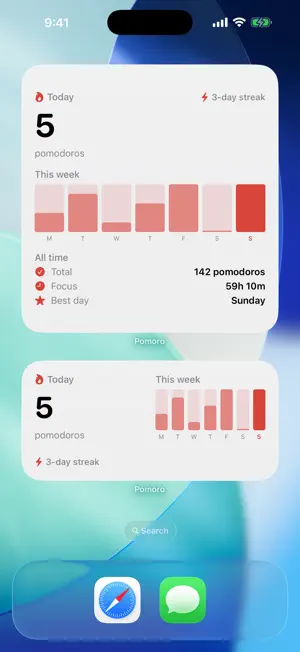
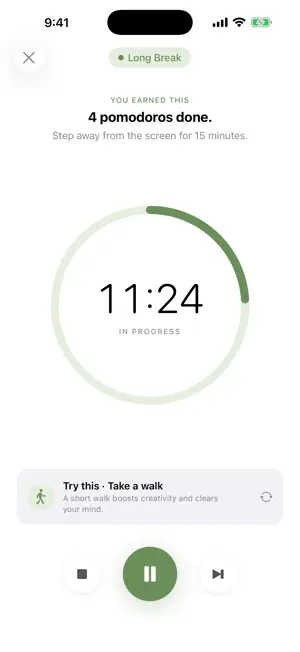
Pomoro is a simple, beautiful Pomodoro timer that helps you focus deeply and build a consistent work routine. Work in structured 25-minute focus sessions with short and long breaks. No accounts. No ads. No distractions. Just a clean timer that respects your attention. FEATURES • Focus Timer — Customizable focus sessions with a clean countdown ring. Start, pause, or reset anytime. • Smart Breaks — Short breaks between sessions and a longer break after every full Pomodoro cycle, with curated activity suggestions to help you truly rest. • Task Management — Create tasks with estimated pomodoros, custom durations, and tags. Edit, reorder, filter, and clear completed tasks with ease. • Stats & Streaks — Track daily pomodoros, total focus time, and your current streak. A weekly chart shows your consistency over time. • Home Screen Widget — See today's focus count and current streak without opening the app. • Local Notifications — Get notified when a session ends, even when the app is in the background. • Customization — Adjust durations, sounds, haptics, and theme (Light, Dark, or System) to fit your style. • Privacy First — Everything runs on your device. No accounts. No analytics. No internet required. THE POMODORO TECHNIQUE Developed by Francesco Cirillo in the late 1980s, the Pomodoro Technique breaks work into focused intervals separated by short breaks. After a set of sessions, you take a longer break. It's one of the most popular time management methods in the world — simple, proven, and effective. MADE WITH CARE Pomoro is crafted by an independent developer who believes great tools should be quiet, useful, and beautifully made. Built natively for iPhone and iPad.
What’s new
Version 1.1 · Updated May 25, 2026
Widget & Polish • New Home Screen widget — see today's pomodoros and current streak at a glance. Pick the size that fits: small for the essentials, medium adds your week, large adds all-time stats. • Tap the widget to jump straight to your tasks. • Short Break is now blue and Long Break is green, so you can tell them apart at a glance. • New tasks now default to 4 pomodoros — a full Pomodoro cycle.
App privacy
The developer, Rathkalyforgna Chhin, reported these privacy practices to Apple.
Data Not Collected
The developer does not collect any data from this app.
Alternatives to Pomoro – Focus Timer
Looking for apps like Pomoro – Focus Timer? Here are 6 similar apps on the App Store. The highest rated is Check In Habit: Tracker, To Do (5.0/5), and 5 of the 6 are free to download.
-
 GGPomodoro
-
 ScrollTax: Earn Screen Time
4.8
-
 Habit Tracker: Routine Tracker
3.0
-
 Check In Habit: Tracker, To Do
5.0
-
 Name Reminder: Remember Names
4.6
-
 ConstruCalc Pro
| App | Rating | Price | Last updated | Compare |
|---|---|---|---|---|
| Pomoro – Focus Timer | – | Free | May 25, 2026 | |
| GGPomodoro | – | Free | May 25, 2026 | Compare |
| ScrollTax: Earn Screen Time | 4.8 / 5 (4) | Free | Sep 28, 2026 | Compare |
| Habit Tracker: Routine Tracker | 3.0 / 5 (2) | Free | Jan 26, 2026 | Compare |
| Check In Habit: Tracker, To Do | 5.0 / 5 (2) | Free | Sep 30, 2026 | Compare |
| Name Reminder: Remember Names | 4.6 / 5 (8) | Free | Sep 3, 2026 | Compare |
| ConstruCalc Pro | – | 2.99 USD | Mar 25, 2026 | Compare |