

Plico - Time to Focus Today
Hyeonho Lee Productivity iPhoneiPadiPod touchMacApple Watch
Plico - Time to Focus Today is a free Productivity app for iPhone and iPad by Hyeonho Lee. Requires iOS 17.0. Updated October 21, 2026.
- Price
- Free
- on the App Store
- Size
- 39 MB
- Age 4+
- Updated
- Oct 21
- 2026 · v1.14.1
Screenshots


About Plico - Time to Focus Today
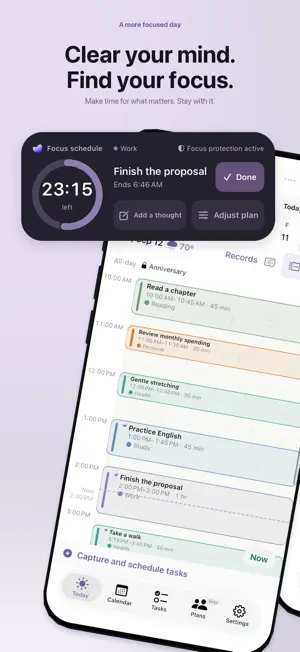
Plenty to do, but no time set aside to do it? Plico gives your Apple Reminders tasks time on your calendar. Get the tasks out of your head, find a place for them in your day, and plan what you can realistically do. CAPTURE NOW. MAKE TIME WHEN YOU'RE READY. Add, search and filter tasks using your existing Reminders lists. Place them around calendar events, or plan another day when today is full. Follow your day in Flow, or use Timeline to see durations and overlaps. Move events and adjust their length as plans change. PUT YOUR PHONE DOWN. STAY WITH YOUR TASK. A Lock Screen card shows your current event and time remaining. Complete the schedule alone or its linked Reminder too. In StandBy, turn your charging iPhone sideways to see the current task inside a large ring, with nearby upcoming events and their dates beside it, including tomorrow and beyond. Keep your current task close with the circular widget, or see the day in the existing Day Shape ribbon. Widget refresh and Live Activity display duration are system-managed. YOUR TASKS AND YOUR DAY, SIDE BY SIDE On an unfolded iPhone Duo, keep the task list and today's schedule in view together. Add or search for a task in the sidebar, drag it onto the timetable, then adjust its time in the editor below and save. Tapping a task only selects it. The planning layout adapts to the available screen area. PROTECT TIME FOR WHAT MATTERS Create blocking lists for work, study, reading or your routines. Select apps and websites in Apple's system picker. Plico temporarily restricts your selection during saved time blocks of at least 15 minutes with blocking enabled. After skipping a block, resume protection from the same schedule. Screen Time authorization is required; blocking does not silence other apps' notifications. LOOK BACK ON YOUR WEEK Review completed events, reflections and recorded protection time. Protection time records when blocking was applied; it does not measure attention or app usage. Confirmed intervals are stored in the event's Plico notes. Unsaved measurements stay on the recording device. Undo completed schedules on iPhone or Apple Watch. Reminders completed together by Plico can also be restored when the recorded completion and source state still match. A GLANCE TO FOCUS. A WORD TO REMEMBER. On Apple Watch, see current and next focus tasks, time remaining and progress. Add a complication to your watch face and use system dictation to capture a thought. Plico saves it to Reminders through your paired iPhone; offline thoughts stay as Watch drafts. Set up permissions and your capture list on iPhone first. Transfers and updates depend on connection and system conditions. Change the app language without restarting. Optionally show a weather scene, save events from shared messages, or coordinate dates through a link. Weather uses location while the app is in use, and motion can be turned off. Time planning requires Reminders and Calendar access, with no separate Plico account. Google Calendar is optional. Standard text parsing runs on device. Weather, connected calendars and date coordination use their respective services. Banner ads may appear in Tasks, Today, Plans and Duo layouts. Requires iOS 17.0+. The Watch app requires a paired iPhone and watchOS 11.0+. Scheduled Live Activities require iOS 26+ and depend on settings and system permission. Contact: [email protected]
What’s new
Version 1.14.1 · Updated October 21, 2026
More accurate event information, where you need it. • On Duo’s wide screen, add or search for tasks in the sidebar, drag them onto the timetable, then adjust and save in the editor below. • Event names edited in Today now appear on automatically starting Lock Screen cards. • The Day Shape widget shows ongoing events even when they are not marked important. • New focus/break setup and start controls are temporarily hidden while we prepare how this feature will be offered. Existing events and records are preserved, and sessions already started can still be ended. Calendar planning, task scheduling and app blocking remain available.
App privacy
The developer, Hyeonho Lee, reported these privacy practices to Apple.
Data Linked to You
The following data, which may be collected and linked to your identity, may be used for the following purposes:
- Location: Coarse Location
- Identifiers: Device ID, User ID
- Usage Data: Product Interaction, Advertising Data
- Contact Info: Email Address
- User Content: Other User Content
Used for: Third-Party Advertising, Analytics, App Functionality
Data Not Linked to You
The following data, which may be collected but is not linked to your identity, may be used for the following purposes:
- Diagnostics: Performance Data, Other Diagnostic Data, Crash Data
Used for: Third-Party Advertising, Analytics
Alternatives to Plico - Time to Focus Today
Looking for apps like Plico - Time to Focus Today? Here are 6 similar apps on the App Store. The highest rated is Emphasis: Kanban Made Simple (5.0/5), and all 6 are free to download.
-
 ShiftBell: Shift Work Alarm
-
 해냄 : 하루 한 줄 일기, 작은 성취 다이어리
-
 Calmoa – Schedule Polling App
-
 Emphasis: Kanban Made Simple
5.0
-
 Plantri: Time Block Planner
-
 Hoply - HWP/HWPX Viewer
5.0
| App | Rating | Price | Last updated | Compare |
|---|---|---|---|---|
| Plico - Time to Focus Today | – | Free | October 21, 2026 | |
| ShiftBell: Shift Work Alarm | – | Free | Oct 18, 2026 | Compare |
| 해냄 : 하루 한 줄 일기, 작은 성취 다이어리 | – | Free | Mar 18, 2026 | Compare |
| Calmoa – Schedule Polling App | – | Free | Sep 1, 2026 | Compare |
| Emphasis: Kanban Made Simple | 5.0 / 5 (3) | Free | May 28, 2025 | Compare |
| Plantri: Time Block Planner | – | Free | Oct 6, 2026 | Compare |
| Hoply - HWP/HWPX Viewer | 5.0 / 5 (2) | Free | May 31, 2026 | Compare |