

HEIC Converter: HEIC to JPG
Monolayer Studio Photo & Video iPhoneiPadiPod touch
HEIC Converter: HEIC to JPG is a free Photo & Video app for iPhone and iPad by Monolayer Studio. Requires iOS 17.0. Updated June 25, 2026.
- Price
- Free
- on the App Store
- Size
- 2 MB
- Age 4+
- Updated
- Jun 25
- 2026 · v2026.2
Screenshots

About HEIC Converter: HEIC to JPG
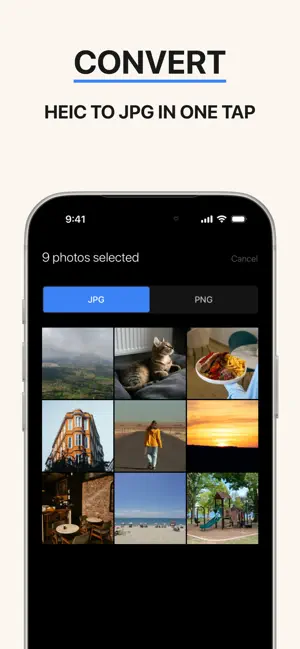
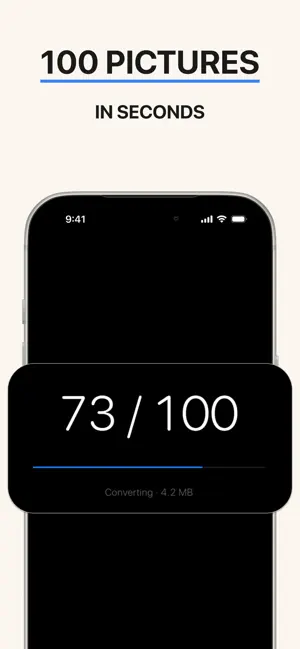
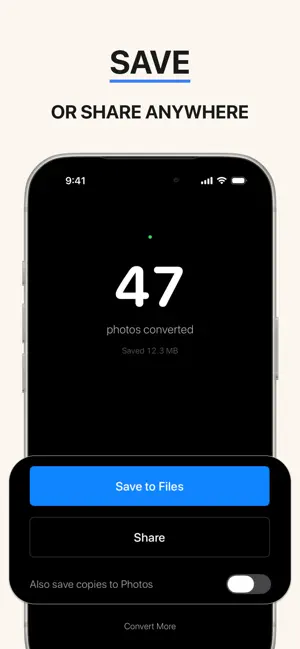
Convert HEIC photos to JPG or PNG in one tap. Works completely offline. No account. No watermarks. No tracking. — iPhone takes photos in HEIC format, which is great for storage but doesn't open on Windows, Android, older email clients, government portals, or many web upload forms. HEIC Converter turns those files into JPG or PNG so you can send your photos to anyone, anywhere. WHAT IT DOES - Convert HEIC photos to JPG or PNG in one tap - Batch convert up to 100 photos at once - Save converted files to Files app or share via the system share sheet - Optionally save copies back to your Photos library - Works on JPG and PNG inputs too if you need to swap formats WHAT IT DOESN'T DO This is a converter, not an editor. It does not crop, filter, enhance, watermark, or modify your photos beyond format conversion. If you need editing, use a different app. YOUR ORIGINALS STAY SAFE Your original HEIC photos are never modified, moved, or deleted. The app only reads them. The converted files are new copies — you decide where they go. PRIVACY - Works completely offline — no internet required - No account, no sign-up, no email required - No analytics, no tracking, no telemetry - No third-party SDKs of any kind - Your photos never leave your device Check our App Privacy label — every category says "Data Not Collected." That's not marketing, it's the architecture. WHO IT'S FOR If you've ever sent a photo to a Windows or Android user and got "can't open this file" — this app is for you. Same if you've tried to upload an iPhone photo to a government portal, a job application, an old email system, or any web form that doesn't accept HEIC. One tap and it's a JPG. MADE WITH CARE HEIC Converter is built by a solo developer at Monolayer Studio. No VC pressure, no growth hacks, no upsells designed to nag you. The app does one thing well, the privacy claims are real, and the price stays fair. Questions, feedback, or feature requests: [email protected]
What’s new
Version 2026.2 · Updated June 25, 2026
Bug fixes
App privacy
The developer, Monolayer Studio, reported these privacy practices to Apple.
Data Not Collected
The developer does not collect any data from this app.
Alternatives to HEIC Converter: HEIC to JPG
Looking for apps like HEIC Converter: HEIC to JPG? Here are 6 similar apps on the App Store.
-
 Image Converter: HEIC JPG PNG
-
 HEIC to JPG – Photo Converter
-
 HEIC to JPG & PNG: HiConvert
-
 HEIF/HEIC to JPG&PNG Converter
-
 HEIC Converter: to JPG PNG
-
 All Video Player HD
| App | Rating | Price | Last updated | Compare |
|---|---|---|---|---|
| HEIC Converter: HEIC to JPG | – | Free | June 25, 2026 | |
| Image Converter: HEIC JPG PNG | – | Free | Jul 1, 2026 | Compare |
| HEIC to JPG – Photo Converter | – | Free | Sep 22, 2026 | Compare |
| HEIC to JPG & PNG: HiConvert | – | Free | Oct 6, 2026 | Compare |
| HEIF/HEIC to JPG&PNG Converter | – | Free | Jan 13, 2026 | Compare |
| HEIC Converter: to JPG PNG | – | Free | Oct 8, 2026 | Compare |
| All Video Player HD | – | Free | Dec 9, 2025 | Compare |