

Copy Paste Keyboard - copipi
GUC Inc. Productivity iPhoneiPadiPod touch
Copy Paste Keyboard - copipi is a free Productivity app for iPhone and iPad by GUC Inc. Requires iOS 17.0. Updated November 2, 2026.
- Price
- Free
- on the App Store
- Size
- 14 MB
- Age 4+
- Updated
- Nov 2
- 2026 · v5.21.0
Screenshots
Save to Pinterest
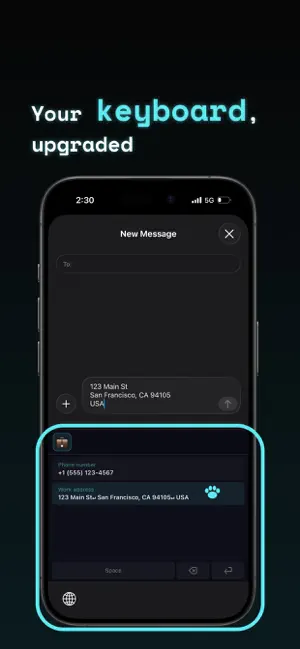


About Copy Paste Keyboard - copipi
Copy & Paste, Faster. copipi for iPhone/iPad saves words/phrases as templates for one-tap copy. Unlike iOS Text Replacement, it supports line breaks. Use folders or insert from the keyboard. Simple to use, for everyone. USES Messages; AI prompts; addresses/emails; social posts/replies/hashtags; marketplace listings/replies; work/sales/reports; customer support/inquiries. HOW TO USE 1. Top “+”: make a folder. 2. Bottom “+”: enter “Text”, then “Add”. 3. Tap a template to copy. 4. Hold a text field in another app; choose “Paste”. FEATURES & SETTINGS • App Settings > App: Show in Lists (Both/Title/Text), Haptic Feedback. Main list/Favorites/search. Title: one title line, no text and protected content in the app switcher; no title → Untitled. Copy/edit as usual. Haptics apply to copy/settings; device haptics off overrides the app setting. Keyboard display is separate. • Custom Keyboard (Recommended) Settings > Custom Keyboard: Getting Started > Open Settings to enable. Hold the globe key to select copipi and insert templates in other apps. Action Key Position (delete/space/return): Left/Bottom/Right. Columns: 1 Column/2 Columns. Show: Both/Title/Text. Title: no text; no title → Untitled. • General App/keyboard display. Theme Color: color/mascot/icon. Appearance: Light/Dark (default Dark), separate from theme; icon follows. Text Size and Language. • Folder Add/edit/delete/duplicate/reorder folders; favorite templates. Name/nest folders by use. Folder > Subfolders enables Parent Folder/None. Favorites first when a template is favorited. Folder > Manage Custom Emoji adds image icons. • Data Create Backup/Import Backup: JSON export for restore/transfer; append or replace. Reset deletes folders, templates and custom emoji together. • Support Settings > Support: How to Use/Contact Us/Rate the App. • Manage and Copy Templates Add/edit/delete/duplicate/reorder/favorite/search; one-tap copy. Titles aid finding; favorites stand out. “Text” character count during add/edit. • Share Add text from Safari, Notes and other apps via Share Sheet. • iCloud Sync Sync and back up data across devices. Icons show loading, data loaded onto this device, or sync issues. Tap for details. Settings > App > Show iCloud Icon: hide icons without stopping sync. • Placeholders {{name}} asks for values on copy: same name, one value; different names, separate values. Date placeholders insert today in your format. Add via the text field’s bottom-right icon. Keyboard: date supported, {{name}} unsupported. • Integrations Widgets: templates/Recent Copies. Siri, Shortcuts, Spotlight, Control Center (iOS 18+). Run Add Clipboard Text from Shortcuts/Control Center/Spotlight, review text/folder and tap Add to save. No background capture from other apps; add manually in the app, Share Sheet or Add Clipboard Text. ACCESSIBILITY VoiceOver; voice button control; device Larger Text; Light/Dark; non-color state cues; contrast; Reduce Motion (shorter/hidden animations); device-aware haptics. copipi Pro No ads. All features free for up to 20 templates; Pro removes this limit. Family Sharing. PRIVACY & SECURITY No copied text, analytics or usage data collected. Only Apple (iCloud/App Store), no other servers. On-device data; iCloud backup. Works offline; sync/subscriptions need internet. App Store: Data Not Collected. Terms of Use (EULA): https://gu-c.com/copipi/terms
What’s new
Version 5.21.0 · Updated November 2, 2026
Added an icon that shows your iCloud connection status. You can show or hide the icon in Settings. We’ve also improved guidance for when iCloud is unavailable or you want to transfer your data.
App privacy
The developer, GUC Inc., reported these privacy practices to Apple.
Data Not Collected
The developer does not collect any data from this app.
Alternatives to Copy Paste Keyboard - copipi
Looking for apps like Copy Paste Keyboard - copipi? Here are 6 similar apps on the App Store. The highest rated is CopyPaste - Paste Quickly Now (4.7/5), and all 6 are free to download.
-
 clipboood - Auto Clipboard
-
 Clippy me - Ai Clip Note Japan
-
 Clipboard Keyboard Snippets
-
 CopyPasteClip
-
 CopyPaste - Paste Quickly Now
4.7
-
 コピペ手帳 - 定型文キーボード
| App | Rating | Price | Last updated | Compare |
|---|---|---|---|---|
| Copy Paste Keyboard - copipi | – | Free | November 2, 2026 | |
| clipboood - Auto Clipboard | – | Free | Sep 3, 2026 | Compare |
| Clippy me - Ai Clip Note Japan | – | Free | Apr 30, 2026 | Compare |
| Clipboard Keyboard Snippets | – | Free | Aug 19, 2026 | Compare |
| CopyPasteClip | – | Free | Apr 5, 2025 | Compare |
| CopyPaste - Paste Quickly Now | 4.7 / 5 (6) | Free | Oct 28, 2026 | Compare |
| コピペ手帳 - 定型文キーボード | – | Free | Oct 22, 2026 | Compare |