

WakeUpBroo: No Snooze Alarm
Shyam Tawli Utilities iPhoneiPadiPod touch
WakeUpBroo: No Snooze Alarm is a free Utilities app for iPhone and iPad by Shyam Tawli. Requires iOS 15.1. Updated October 16, 2026.
- Price
- Free
- on the App Store
- Size
- 56 MB
- Age 4+
- Updated
- Oct 16
- 2026 · v1.4.0
Screenshots


About WakeUpBroo: No Snooze Alarm
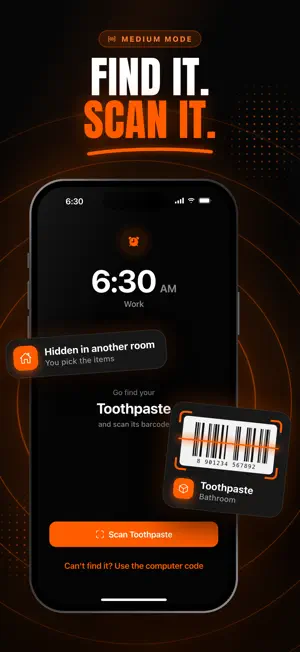
You don't sleep through your alarm because it's too quiet. You wake up, reach over, turn it off, and go back to sleep — and you don't remember doing it. WakeUpBroo is an alarm for heavy sleepers that you can't stop from your iPhone. To dismiss it, open wakeupbroo.com/code on your PC, Mac, laptop, or tablet, then scan the QR code or enter the code. No snooze. No easy escape. You have to get up first. WHY IT WORKS Most alarm apps let your half-asleep brain tap snooze or dismiss from bed. WakeUpBroo removes that option. The dismiss code lives on another screen, so stopping the alarm requires physical movement and enough focus to actually wake up. KEY FEATURES • Stop alarms with a QR code or dismiss code from your computer • No snooze button • Trying to silence it from your iPhone only buys you a minute — it rings again • Rings through Silent Mode, Do Not Disturb, and Sleep Focus • Built for heavy sleepers and chronic oversleepers • Repeat on the days you choose: weekdays, weekends, or any mix • Motivational quotes when you dismiss your alarm — pick your favorites • Multiple alarms with custom labels and schedules • Loud, hand-picked alarm sounds • Light and Dark mode — follow your phone or choose your own • Privacy-first, no ads WAKEUPBROO PRO WakeUpBroo is a Pro app: one subscription unlocks everything — unlimited alarms, every alarm sound, priority support, and all future features. Start with a free trial; cancel anytime. PRIVACY FIRST We do not track you, sell your data, or run ads. Just an alarm app that does its job. Privacy Policy: https://www.wakeupbroo.com/privacy Terms of Use: https://www.wakeupbroo.com/terms
What’s new
Version 1.4.0 · Updated October 16, 2026
New in 1.4: choose how your alarm stops • Three modes. Pick a different one for each alarm: – Easy: remember 5 words, then type them back – Medium: a scavenger hunt. The alarm names one of your items. Find it and scan its barcode – Hard: type the code from your computer, just like before • Your existing alarms stay on Hard, so nothing changes unless you want it to. • Set up your scavenger hunt with 3 to 8 items from around your home. Put them in different rooms so you can't keep them by your bed. • 5 new ringtones: Organic Flow, Happy Cook, Mariachi Plaza, Escape Your Love and Cosmic Pulse. Preview any sound before you pick it. • A fresh new look across the whole app, plus a quick setup guide the first time you open it. • Fixed: the alarm sound no longer plays twice while you're solving the challenge.
App privacy
The developer, Shyam Tawli, reported these privacy practices to Apple.
Data Not Linked to You
The following data, which may be collected but is not linked to your identity, may be used for the following purposes:
- Identifiers: Device ID
- Purchases: Purchase History
Used for: Product Personalization, App Functionality
Alternatives to WakeUpBroo: No Snooze Alarm
Looking for apps like WakeUpBroo: No Snooze Alarm? Here are 6 similar apps on the App Store.
-
 Alarm Clock: Smart Wake Up!
-
 WakeZap
-
 Mornly - No Snooze Alarm
-
 Wake Up Bro - alarm challenge
-
 Connect Now Mobile
-
 Nunodori: Fabric Planner
| App | Rating | Price | Last updated | Compare |
|---|---|---|---|---|
| WakeUpBroo: No Snooze Alarm | – | Free | October 16, 2026 | |
| Alarm Clock: Smart Wake Up! | – | Free | May 22, 2026 | Compare |
| WakeZap | – | Free | Aug 26, 2026 | Compare |
| Mornly - No Snooze Alarm | – | Free | Jul 15, 2026 | Compare |
| Wake Up Bro - alarm challenge | – | Free | Sep 30, 2026 | Compare |
| Connect Now Mobile | – | Free | Apr 14, 2025 | Compare |
| Nunodori: Fabric Planner | – | Free | Oct 5, 2026 | Compare |