

Harmony Lab:Chord Progressions
Sean Ray Dvir Music iPhoneiPadiPod touch
Harmony Lab:Chord Progressions is a free Music app for iPhone and iPad by Sean Ray Dvir. Requires iOS 17.6. Updated September 17, 2026.
- Price
- Free
- on the App Store
- Size
- 29 MB
- Age 4+
- Updated
- Sep 17
- 2026 · v1.13
Screenshots
About Harmony Lab:Chord Progressions
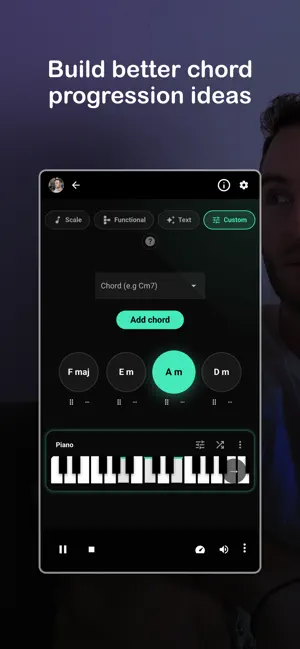
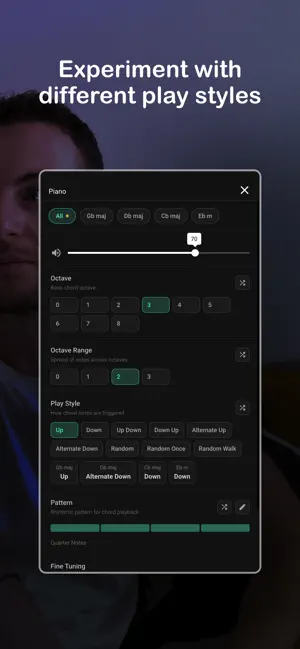
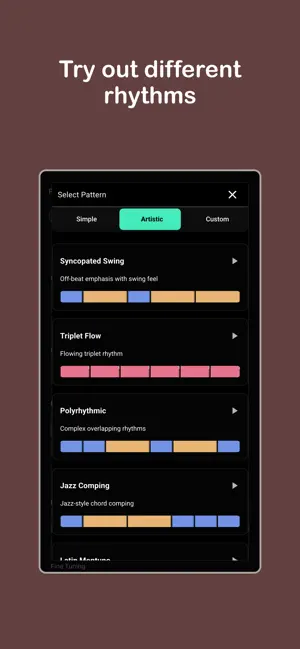
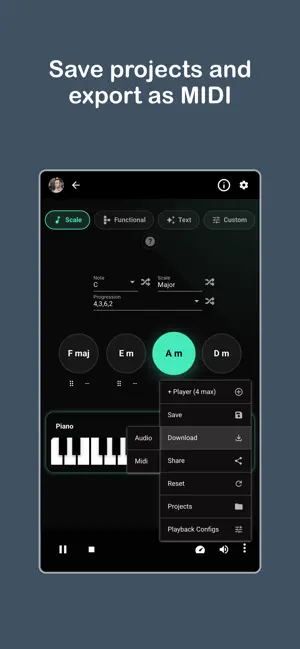
Create chord progressions and hear them come to life. Harmony Lab is built for exploring harmony in a way that feels clear and immediate. It gives you a space to build progressions, shape how they are played, and understand how everything connects. You can create progressions in multiple ways. Build them manually, generate them from scales, or follow harmonic relationships. Each approach leads to the same goal: turning ideas into sound quickly. Every chord you add is playable instantly. You hear how it fits, how it moves, and how it feels in context. This makes it easy to experiment, adjust, and refine your ideas without breaking flow. Playback is fully customizable. Choose how chords are played using different styles such as up, down, alternating patterns, or more dynamic variations. You can control octave placement and spread notes across multiple octaves to shape the depth of the sound. Rhythm is part of the process. Use built-in patterns or create your own to control how chords are triggered over time. This lets you move beyond static playback and explore groove, timing, and feel. Harmony Lab also gives you control over the details. Adjust note density, introduce probability to create variation, and add humanization to make playback feel more natural. These small changes can completely transform how a progression sounds. You can hear everything across multiple instruments. Switch between piano, guitar, strings, and more to explore different textures and directions. Each instrument gives a new perspective on the same harmonic idea. The interface keeps things focused. You add chords, shape how they are played, and hear the result instantly. Key Features: • Build chord progressions manually/from scales/Using Functional Harmony/Using a text description • Multiple playback styles and patterns • Control octave, range, and note spread • Adjust timing, density, and variation • Add humanization for a more natural feel • Multi-instrument playback • Real-time feedback while editing Harmony Lab works for writing, practice, and exploration. It helps you hear harmony more clearly and turn simple ideas into something more expressive. You explore, listen & create - That’s the core idea behind Melodic Mind. Let music feel natural again. Terms of Use (EULA): https://www.apple.com/legal/internet-services/itunes/dev/stdeula/ Privacy Policy: https://melodic-mind.com/privacy-policy
What’s new
Version 1.13 · Updated September 17, 2026
Updated native app dependencies and improved in-app purchase integration. Includes stability improvements.
App privacy
The developer, Sean Ray Dvir, reported these privacy practices to Apple.
Data Used to Track You
The following data may be used to track you across apps and websites owned by other companies:
- Contact Info: Email Address, Name
Data Not Linked to You
The following data, which may be collected but is not linked to your identity, may be used for the following purposes:
- Contact Info: Email Address, Name
- Usage Data: Product Interaction
Used for: Analytics, App Functionality
Alternatives to Harmony Lab:Chord Progressions
Looking for apps like Harmony Lab:Chord Progressions? Here are 6 similar apps on the App Store. The highest rated is I Ching Music Generator (5.0/5), and 5 of the 6 are free to download.



| App | Rating | Price | Last updated | Compare |
|---|---|---|---|---|
| Harmony Lab:Chord Progressions | – | Free | September 17, 2026 | |
| Chord Invaders | – | Free | May 27, 2026 | Compare |
| maxChord | – | Free | Aug 9, 2026 | Compare |
| I Ching Music Generator | 5.0 / 5 (1) | Free | May 12, 2026 | Compare |
| Harmonize Trainer | – | 1.99 USD | Oct 3, 2026 | Compare |
| Pulse Rhythm | – | Free | Mar 30, 2026 | Compare |
| ChordLoop | – | Free | Oct 7, 2026 | Compare |