

Align Life OS
B NASHSANDBOX COMPANY LIMITED Productivity iPhoneiPadiPod touch
Align Life OS is a free Productivity app for iPhone and iPad by B NASHSANDBOX COMPANY LIMITED. Requires iOS 16.6. Updated October 19, 2026.
- Price
- Free
- on the App Store
- Size
- 60 MB
- Age 4+
- Updated
- Oct 19
- 2026 · v2.1.7
Screenshots

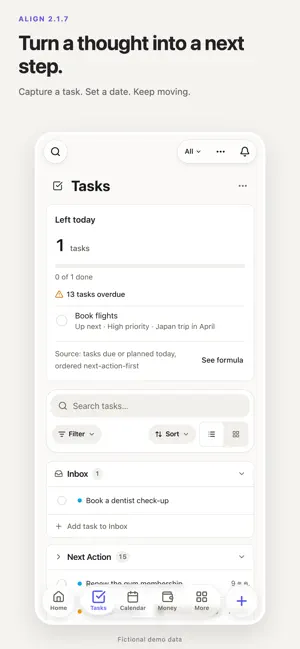

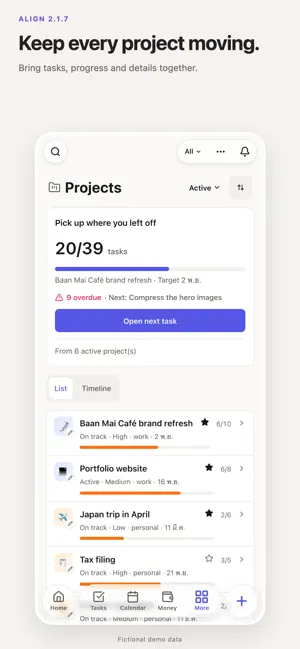
About Align Life OS
Give the important parts of your day a place to belong. Align brings tasks, notes, calendar, projects and everyday planning together. Start with one real task, keep its details close, and come back to see what is next. A clearer view of today Home brings today's tasks, your next event and overdue work into one compact view. Private and team spaces share a consistent design, with glass navigation and refreshed widgets. Keep work moving • Tasks: capture ideas, set priorities and dates, and track progress. • Projects and Team Spaces: organize shared work, assignments and project views according to your plan. • Notes: keep ideas, meeting notes and useful details together. Sticky Notes share the same document editing tools. • Calendar: see appointments and dated tasks in the same place. • Goals and Habits: turn intentions into goals and regular check-ins. • Money: record income and expenses and review your spending. • Focus: use a Pomodoro timer to make room for focused work. Make it easier to return Related notifications are grouped so you can scan the overview and open the details when you need them. Choose an illustrated profile and customize its hair, glasses and other details to make it yours. Meet Alin Keep conversation history and suggested questions close as you talk with Alin about information you keep in the app. AI features depend on your plan and available credits. Check important answers against their supporting records. Start with Free Use Free, then choose Plus or Pro if you need more. Check Membership in the app for current features, limits, prices and any trial eligibility. AI usage is subject to plan and credit limits. You can keep using Free without buying a subscription. Subscriptions Paid plans renew automatically until cancelled. For App Store purchases, the price and terms shown on Apple's purchase confirmation apply. Manage or cancel your subscription in your App Store account settings. Your plan remains active until the end of the paid period. Supports Thai and English. Privacy Policy: https://align.bnashsandbox.com/privacy Terms of Use (EULA): https://align.bnashsandbox.com/terms
What’s new
Version 2.1.7 · Updated October 19, 2026
A more useful Home, refreshed Alin conversations with history and suggestions, animated glass navigation, consistent headings and clearer widgets. Sticky Notes now share the Notes editing tools, with improved list editing. Choose calendars and hide tasks in the month widget. Google calendar widgets gain refresh controls and a last-updated indicator. Background refresh timing is managed by iOS.
App privacy
The developer, B NASHSANDBOX COMPANY LIMITED, reported these privacy practices to Apple.
Data Not Collected
The developer does not collect any data from this app.
Alternatives to Align Life OS
Looking for apps like Align Life OS? Here are 6 similar apps on the App Store. The highest rated is Lyffe: Life Planner (5.0/5), and all 6 are free to download.
-
 Lyffe: Life Planner
5.0
Lyffe: Life Planner
5.0
-
 Complete OS
5.0
Complete OS
5.0
-
 MITH: Personal Planner
5.0
MITH: Personal Planner
5.0
-
 HourLife: Life Planner
-
 Daylyft – Structure Planner
-
 LifeOS: Daily Intelligence
| App | Rating | Price | Last updated | Compare |
|---|---|---|---|---|
| Align Life OS | – | Free | October 19, 2026 | |
| Lyffe: Life Planner | 5.0 / 5 (2) | Free | Oct 19, 2026 | Compare |
| Complete OS | 5.0 / 5 (2) | Free | Oct 20, 2026 | Compare |
| MITH: Personal Planner | 5.0 / 5 (1) | Free | Aug 22, 2026 | Compare |
| HourLife: Life Planner | – | Free | Oct 18, 2026 | Compare |
| Daylyft – Structure Planner | – | Free | Feb 23, 2026 | Compare |
| LifeOS: Daily Intelligence | – | Free | Aug 3, 2026 | Compare |
Compare Align Life OS with the top alternatives: ratings, updates, ASO score and keyword gaps →