

LiteScan: PDF Scanner & OCR
鹏远 韩 Utilities iPhoneiPadiPod touch
LiteScan: PDF Scanner & OCR is a free Utilities app for iPhone and iPad by 鹏远 韩. Requires iOS 17.0. Updated May 11, 2026.
- Price
- Free
- on the App Store
- Size
- 3 MB
- Age 4+
- Updated
- May 11
- 2026 · v1.0
Screenshots
About LiteScan: PDF Scanner & OCR
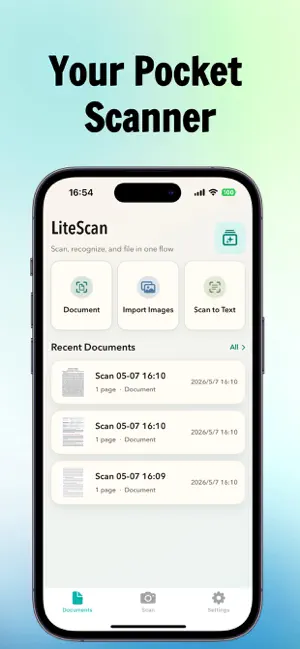
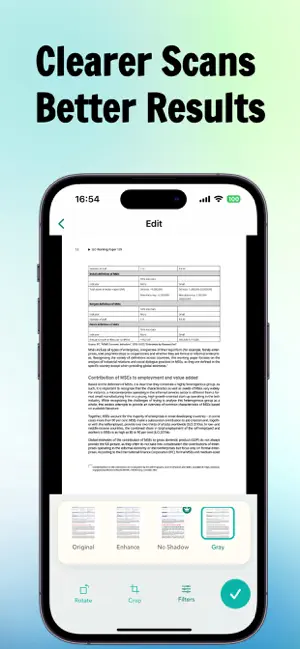
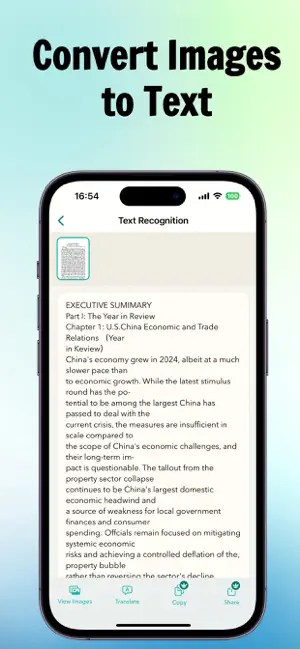
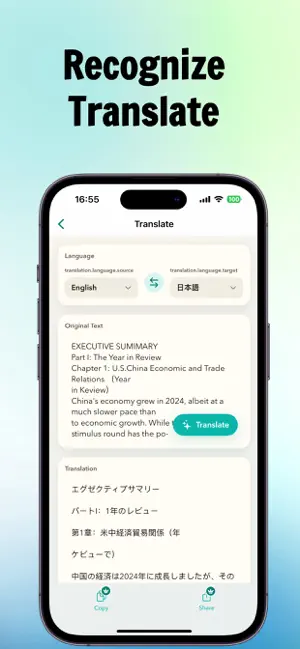
LiteScan is a lightweight document scanner and text recognition app for everyday work, study, and personal filing. Scan paper documents with your iPhone camera or import existing images from Photos, then crop, straighten, enhance, save, recognize, translate, and export them in one flow. LiteScan helps turn paper into clean, manageable, and editable digital documents. Key features: Document scanning Quickly scan contracts, receipts, notes, worksheets, handouts, reference pages, and manuals. Image import Import photos, screenshots, or existing document images from your library for cropping, enhancement, OCR, and filing. Auto crop and perspective correction Detect document edges and straighten angled pages. You can also adjust corners manually for precise control. Document filters Use Original, Enhance, No Shadow, Gray, and Black & White modes to improve readability and clean up page backgrounds. Multi-page document management Save multi-page scans, add pages later, edit pages, rename documents, and keep everything organized locally. OCR text recognition Turn scanned images into copyable text. Text recognition supports Simplified Chinese, Traditional Chinese, and English. Translate after OCR Translate recognized text for study materials, foreign-language documents, and cross-language work. Export and share Export scanned documents as PDFs. Copy recognized or translated text, or export text as TXT or Word documents for further editing. The free version includes basic scanning, cropping, auto enhancement, and PDF export. LiteScan Pro is designed for frequent scanning and deeper document processing. Pro includes: - Unlimited text recognition - Translation after OCR - TXT / Word text export - Advanced document filters - Batch image import Great for: - Scanning contracts, invoices, reimbursement forms, and meeting materials - Organizing class notes, textbook pages, and worksheets - Extracting text from printed documents for editing - Reading and translating foreign-language materials - Saving copies of IDs, manuals, forms, and daily records LiteScan is built to be simple, direct, and practical. Scanned files, thumbnails, recognized text, and app preferences are mainly stored in the app sandbox on your device. Please back up important files when needed. https://litescan-html.vercel.app/privacy.html https://litescan-html.vercel.app/terms.html
App privacy
The developer, 鹏远 韩, reported these privacy practices to Apple.
Data Not Collected
The developer does not collect any data from this app.
Alternatives to LiteScan: PDF Scanner & OCR
Looking for apps like LiteScan: PDF Scanner & OCR? Here are 6 similar apps on the App Store. The highest rated is Photos to PDF: Image Converter (4.4/5), and all 6 are free to download.
-
 PDF document and QR scanner
-
 Converter : Image & PDF & Text
-
 CZUR Scan
-
 Acronis Cyber Protect
4.2
Acronis Cyber Protect
4.2
-
 Photos to PDF: Image Converter
4.4
Photos to PDF: Image Converter
4.4
-
 Photo Blur: Motion Effects
4.4
Photo Blur: Motion Effects
4.4
| App | Rating | Price | Last updated | Compare |
|---|---|---|---|---|
| LiteScan: PDF Scanner & OCR | – | Free | May 11, 2026 | |
| PDF document and QR scanner | – | Free | Sep 7, 2026 | Compare |
| Converter : Image & PDF & Text | – | Free | Apr 14, 2025 | Compare |
| CZUR Scan | – | Free | Mar 19, 2026 | Compare |
| Acronis Cyber Protect | 4.2 / 5 (70) | Free | Dec 22, 2025 | Compare |
| Photos to PDF: Image Converter | 4.4 / 5 (39) | Free | Aug 21, 2026 | Compare |
| Photo Blur: Motion Effects | 4.4 / 5 (86) | Free | Dec 14, 2023 | Compare |