

SMS Forwarder - Text, OTP, 2FA
Mehmed Ihsan Kahramanoglu Utilities iPhoneiPadiPod touch
SMS Forwarder - Text, OTP, 2FA is a free Utilities app for iPhone and iPad by Mehmed Ihsan Kahramanoglu. Requires iOS 17.0. Updated October 5, 2026.
- Price
- Free
- on the App Store
- Size
- 19 MB
- Age 4+
- Updated
- Oct 5
- 2026 · v1.5
Screenshots


About SMS Forwarder - Text, OTP, 2FA
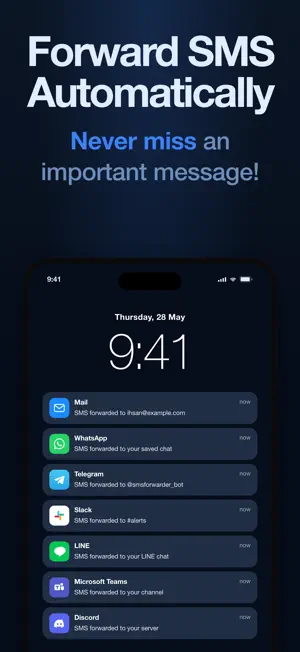
Never miss a text again! SMS Forwarder automatically forwards every SMS you receive to email, Telegram, WhatsApp, your favorite messaging platform - or straight to your own API. No manual copying, no missed messages. Built on Apple Shortcuts, SMS Forwarder runs as a native iOS automation. The moment an SMS arrives on your iPhone, the shortcut triggers, applies your forwarding rules, and routes the message to your chosen destination. Once it's configured, it runs hands-free! FORWARD YOUR SMS TO: Email - receive every text directly in your inbox, automatically Telegram - route messages to yourself or a group via a dedicated Telegram bot LINE - receive your SMS on LINE via the SMS Forwarder official account WhatsApp - forward texts to a WhatsApp contact or number of your choice Slack - pipe incoming SMS into any Slack channel, instantly Discord - deliver texts straight to a Discord channel Microsoft Teams - send incoming SMS to a Microsoft Teams channel via webhook Custom API - NEW! Send every incoming SMS as a JSON POST to any HTTPS endpoint you control - your server, your automations, your rules KEY FEATURES: Custom API destination - each text is delivered to your endpoint as a clean JSON POST, ready to parse and automate Forwarding rules - create rules that map specific senders or keywords to specific destinations AES-256 encryption - every text is encrypted on your iPhone before it's forwarded, and never stored Built-in test message flow - verify your setup works before relying on it In-app Shortcuts onboarding - a step-by-step walkthrough gets you configured in under 5 minutes Native Apple approach - works entirely through Apple Shortcuts, using iOS the way it was designed Personalized experience - Personalize your SMS forwarding experience for your own needs Keyword filtering - Add filtering keywords to only forward messages that are necessary HOW IT WORKS: Install SMS Forwarder and open the app Follow the in-app guide to set up an Apple Shortcuts automation on your iPhone Add a forwarding rule - choose your destination (email, Telegram, LINE, WhatsApp, Slack, Discord, Microsoft Teams or your own API) and set any filters Send a test SMS to confirm everything is working Most users are fully set up in under 5 minutes. PERFECT FOR: Travelers, expats and dual-SIM users - land abroad, switch to a travel eSIM, and still see every text sent to your main number: OTPs, bank alerts and delivery updates follow you on any device, in any country Developers and technical teams - point the Custom API destination at your own REST endpoint and every SMS arrives as structured JSON - trigger pipelines, log messages, feed bots, or integrate with internal tools Business owners and solopreneurs - receive client texts in Slack, Teams or email so nothing slips through while you're heads-down Anyone managing OTPs and 2FA codes - auto forward verification codes to email or Telegram so they're always within reach Frequent SMS forwarders - stop copy-pasting texts manually; let the automation handle it every time SMS backup - Backup and save all your important SMS messages in your email or desired destination PRIVACY: SMS Forwarder uses Apple Shortcuts to access your incoming SMS details so you have full control over which messages get forwarded. Every message is encrypted with AES-256 on your iPhone before it's sent, then delivered only to the destination you chose - we never store your message content. Terms of Service: https://hoholapps.com/apps/queens-puzzle/terms/ Privacy Policy: https://hoholapps.com/apps/queens-puzzle/privacy/ EULA: https://www.apple.com/legal/internet-services/itunes/dev/stdeula/
What’s new
Version 1.5 · Updated October 5, 2026
New: Zapier, Make & IFTTT destinations! Paste your webhook URL and every SMS triggers your automations. New: Regex filters - forward only the messages that match a pattern, including a one-tap filter for 4- or 6-digit verification codes. New: Weekly plan - get Premium with a short, flexible subscription. Plus reliability improvements and minor bug fixes.
App privacy
The developer, Mehmed Ihsan Kahramanoglu, reported these privacy practices to Apple.
Data Not Linked to You
The following data, which may be collected but is not linked to your identity, may be used for the following purposes:
- Identifiers: Device ID
- Usage Data: Product Interaction
- Diagnostics: Crash Data, Performance Data, Other Diagnostic Data
- Contact Info: Email Address, Name, Phone Number
- User Content: Emails or Text Messages
Used for: Analytics, App Functionality
Alternatives to SMS Forwarder - Text, OTP, 2FA
Looking for apps like SMS Forwarder - Text, OTP, 2FA? Here are 6 similar apps on the App Store. The highest rated is SMS Forwarder - Forwardly (4.0/5), and all 6 are free to download.
-
 MessagePilot - SMS Forwarder
-
 Text Forwarder
-
 Text SMS Forwarder
-
 Forward SMS | SMS Forwarder
-
 SMS Forwarder - Forwardly
4.0
-
 Relay: SMS Forwarding
| App | Rating | Price | Last updated | Compare |
|---|---|---|---|---|
| SMS Forwarder - Text, OTP, 2FA | – | Free | October 5, 2026 | |
| MessagePilot - SMS Forwarder | – | Free | May 22, 2026 | Compare |
| Text Forwarder | – | Free | Apr 28, 2026 | Compare |
| Text SMS Forwarder | – | Free | Aug 17, 2026 | Compare |
| Forward SMS | SMS Forwarder | – | Free | May 12, 2026 | Compare |
| SMS Forwarder - Forwardly | 4.0 / 5 (4) | Free | Jun 12, 2026 | Compare |
| Relay: SMS Forwarding | – | Free | Jun 30, 2026 | Compare |