

Study Planner AI
matthew newman Productivity iPhoneiPadiPod touch
Study Planner AI is a free Productivity app for iPhone and iPad by matthew newman. Rated 5.0/5 from 3 ratings. Requires iOS 16.4. Updated October 10, 2026.
- Rating
- 5.0
- 3 ratings
- Price
- Free
- on the App Store
- Size
- 43 MB
- Age 4+
- Updated
- Oct 10
- 2026 · v2.3.1
Screenshots


About Study Planner AI
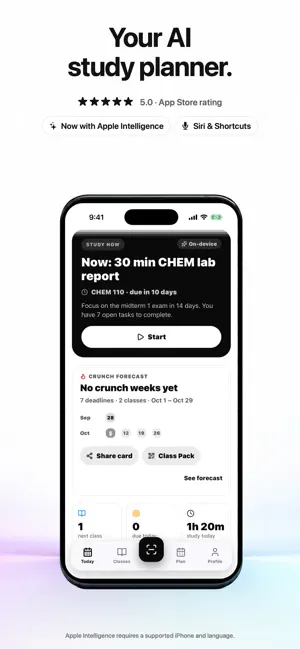
StudyPlanner 2.3, now with Apple Intelligence. Snap a syllabus and get your whole semester: every deadline, your crunch weeks months ahead, and one clear move each day. On supported iPhones, Apple Intelligence does it on the device: private, offline, no account. THE BIGGEST UPDATE YET: ON-DEVICE AI • Smart Syllabus: two on-device readers read tables, week grids and multi-page PDFs, surfacing only the rows worth trusting — you confirm every one • Study Now: picks what to study now and tells you why, on Today, your Lock Screen and Siri • Exam Mode: writes flashcards and practice questions from your own notes, each citing its source line • Smart quick add: turns "Lab report Friday, 10%" into a task you confirm once • Siri, Spotlight and Shortcuts: ask what to study now, or add work hands-free • Crunch Forecast and start-by reminders: spots your busiest weeks months ahead and nudges you before they hit Uses on-device Apple Intelligence when available on your iPhone; the same features work with a built-in fallback on other supported devices. SCAN EVERY CLASS • Camera, PDF, pasted text or manual entry • Tables, week grids and multi-page PDFs are read correctly • Review every assignment, quiz and exam before anything is saved CRUNCH FORECAST • One semester-wide heatmap across all your classes • Red weeks show up months early, with dates like "start Bio on Oct 12" • Share your forecast as a card (class names hidden by default) CLASS PACK • Send a class's deadlines to classmates as a link or QR code • They get the same dates in seconds, no scanning ONE CLEAR MOVE A DAY • Today, your Lock Screen widget and Siri agree: "Now: 25 min Bio ch. 7" • Missed a session? The plan repairs itself • Reminders before the dates that matter EXAM MODE • Turns your own notes into flashcards and practice questions, each citing the line it came from • Works offline, with no credits or monthly caps • Weak topics get extra review before the exam • Quiz Duel: challenge a friend with the same questions Exam Mode is practice from your own notes. It doesn't answer homework or write assignments for you. CAPTURE IN SECONDS • Type or tell Siri "Lab report Friday, 10%", then confirm once • Find classes and deadlines in Spotlight PRIVATE BY DESIGN No account. Your syllabi and notes are processed on your iPhone and never leave it. Uses on-device Apple Intelligence on supported iPhones. Smart extraction, daily briefs and quizzes use on-device Apple Intelligence on iPhone 15 Pro/Pro Max, iPhone 16 and 17 models and iPhone Air, with Apple Intelligence turned on, in supported languages and regions. Everything else works on iOS 16.4+. STUDYPLANNER PLUS Scanning, importing and your full plan require StudyPlanner Plus, an auto-renewing subscription that also unlocks Study Now, Exam Mode, widgets, reminders and Siri. Where eligible, new subscribers can start with an introductory offer: 7 days free on yearly, 3 days free on monthly, or $0.99 for the first week on weekly. Apple confirms eligibility and local pricing at purchase. Playing a received Quiz Duel is free. Cancel anytime in your Apple Account settings. StudyPlanner doesn't connect to your school account or submit work, and nothing is added until you review it. Terms of Use: https://www.apple.com/legal/internet-services/itunes/dev/stdeula/ Privacy Policy: https://studyplanner-ai.xxmnewman9xx.workers.dev/privacy
What’s new
Version 2.3.1 · Updated October 10, 2026
A simpler start: shorter onboarding takes you straight to choosing your plan. Updated App Store previews for iPhone Duo.
App privacy
The developer, matthew newman, reported these privacy practices to Apple.
Data Not Collected
The developer does not collect any data from this app.