

Declutter: Delete Photos
Gustavo Severo Utilities iPhoneiPadiPod touch
Declutter: Delete Photos is a free Utilities app for iPhone and iPad by Gustavo Severo. Requires iOS 18.0. Updated May 23, 2026.
- Price
- Free
- on the App Store
- Size
- 22 MB
- Age 4+
- Updated
- May 23
- 2026 · v26.4
Screenshots

About Declutter: Delete Photos
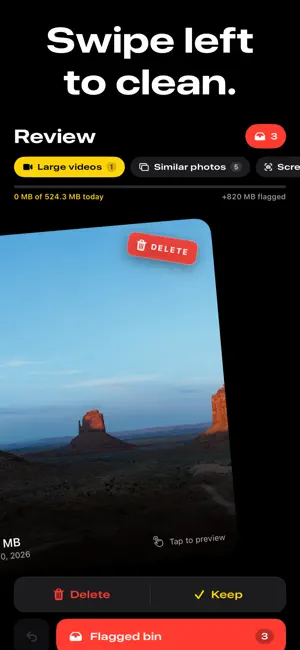
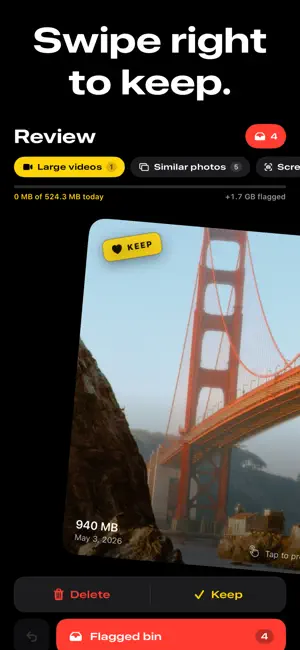
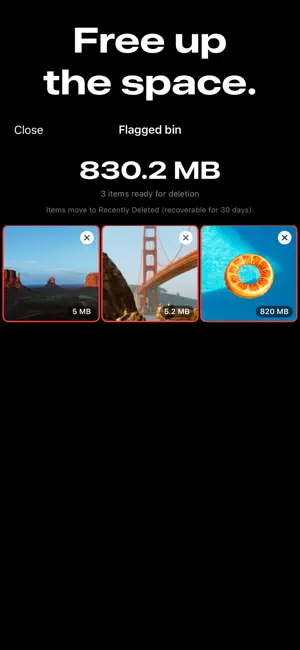
Free up gigabytes by clearing the duplicates, screenshots, and oversized videos already clogging your photo library — without uploading a single image. Declutter scans your library on-device and shows exactly what you can clear, sorted by biggest payoff first. Swipe through clutter: right to keep, left to clean. Nothing leaves your library without your confirmation. WHAT DECLUTTER FINDS • Duplicates from burst shots, edits, and accidental re-saves • Similar photos that pile up around the same moment • Screenshots you took weeks ago and forgot about • Large videos taking up the most space on your phone • Already-decided items stay out of the deck — no second-guessing SWIPE TO CLEAN • Right to keep, left to flag for deletion • Tap to preview at full size before you decide • Undo any swipe with a single tap • Categories load by priority — knock out the biggest wins first YOU STAY IN CONTROL • Flagged items wait in your bin — review the full list before anything is deleted • Confirm exactly what gets removed; everything moves to Recently Deleted (recoverable for 30 days) • Un-flag with one tap if you change your mind PRIVACY FIRST Your photos never leave your phone. Declutter runs entirely on-device — we never see a single image. No accounts, no tracking, no cloud uploads. DAILY GOAL & STATS • Set a daily cleanup goal that resets each morning • Track all-time storage recovered and your active streaks • Cleanup activity calendar shows your progress at a glance REMINDERS THAT WORK FOR YOU Optional notifications nudge you on a cadence you choose — daily, every few days, or weekly. Off if you prefer. BUILT FOR DAILY USE A few minutes of cleanup compounds. Open Declutter when you're standing in line, watching TV, or waiting on a coffee — knock out a category, watch your storage grow, and build the habit over time. Made by indie developers. Your support keeps our apps alive. Terms of Use (EULA): https://www.apple.com/legal/internet-services/itunes/dev/stdeula/
What’s new
Version 26.4 · Updated May 23, 2026
A round of small improvements and bug fixes under the hood. Thanks for using Declutter — if the app has helped you reclaim some space, a quick rating in the App Store goes a long way.
App privacy
The developer, Gustavo Severo, reported these privacy practices to Apple.
Data Linked to You
The following data, which may be collected and linked to your identity, may be used for the following purposes:
- Purchases: Purchase History
- Identifiers: User ID, Device ID
- Usage Data: Product Interaction
Used for: Analytics, App Functionality
Alternatives to Declutter: Delete Photos
Looking for apps like Declutter: Delete Photos? Here are 6 similar apps on the App Store.
-
 MySpaceCleaner
-
 Cleanr: Photo Cleaner
-
 Photo Cleaner - Clean Space
-
 Clear Storage for Photos&Space
-
 CleanSweep - Storage Manager
-
 ClearRoll - Photo Cleaner
| App | Rating | Price | Last updated | Compare |
|---|---|---|---|---|
| Declutter: Delete Photos | – | Free | May 23, 2026 | |
| MySpaceCleaner | – | Free | Apr 30, 2026 | Compare |
| Cleanr: Photo Cleaner | – | Free | May 20, 2026 | Compare |
| Photo Cleaner - Clean Space | – | Free | Jun 7, 2026 | Compare |
| Clear Storage for Photos&Space | – | Free | Sep 22, 2026 | Compare |
| CleanSweep - Storage Manager | – | Free | May 20, 2026 | Compare |
| ClearRoll - Photo Cleaner | – | Free | Jun 2, 2026 | Compare |