

Memoria: Restore Old Photos AI
Sergii Petrychenko Photo & Video iPhoneiPadiPod touch
Memoria: Restore Old Photos AI is a free Photo & Video app for iPhone and iPad by Sergii Petrychenko. Rated 2.0/5 from 1 ratings. Requires iOS 15.1.
- Rating
- 2.0
- 1 ratings
- Price
- Free
- on the App Store
- Size
- 57 MB
- Age 4+
- Updated
- May 25
- 2026 · v1.0.2
Screenshots



About Memoria: Restore Old Photos AI
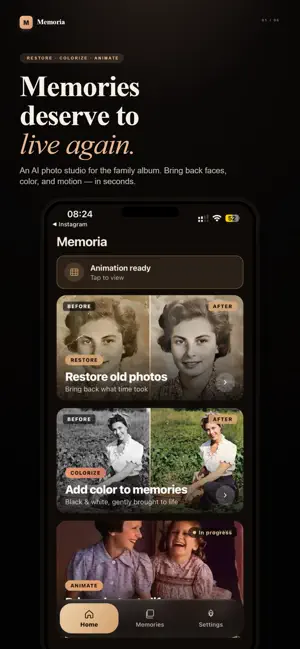
Some photographs are the only thing left of a person. A grandmother you never met. A house that's long gone. An afternoon nobody wrote down. Memoria brings those photos back — carefully, the way a real restorer would. RESTORE Cracks, scratches, water stains, the yellow of decades — gone. Faces come back sharp and believable, never plastic or over-smoothed. Memoria runs Microsoft's BOPBTL damage model and GFPGAN face restoration — the same research-grade pipeline a professional studio would use. COLORIZE See a black-and-white memory in color for the first time. Skin, hair, fabric, sky — natural tones, not garish guesses. ANIMATE The hardest part of an old photo is that it can't move. Memoria can give it a breath: a soft smile, a glance, a turn of the head. Real, gentle motion powered by the Wan 2.2 video model — not a cheap wiggle. BUILT FOR FAMILIES, NOT FEEDS • Every restoration is kept in your Memories grid, beside the original • Save full-resolution copies straight to your photo library • Available in eight languages • No ads. No feed. No clutter. YOUR PHOTOS STAY YOURS Uploads are processed on secure servers and deleted within 24 hours. We never train models on your images. We never sell your data. HOW IT WORKS 1. Pick an old photo 2. Tap Restore, Colorize, or Animate 3. Wait a moment — or close the app, we'll notify you when it's ready 4. Save it, share it, keep it forever MEMORIA PREMIUM Available as a Yearly plan with a 3-day free trial, or a Weekly plan. Unlimited restorations, AI animations, HD output and priority processing. Prices are shown in your local currency before you confirm. Subscriptions auto-renew unless cancelled at least 24 hours before the period ends — manage or cancel anytime in your App Store account settings. Privacy Policy: https://memoria-legal.memoria-worker.workers.dev/privacy Terms of Use: https://memoria-legal.memoria-worker.workers.dev/terms
What’s new
Version 1.0.2 · Updated May 25, 2026
Major restore quality upgrade — now powered by next-gen AI for dramatically better results on damaged, faded, and old photos. Identity preserved, period-accurate colors. Bug fixes and stability improvements.
App privacy
The developer, Sergii Petrychenko, reported these privacy practices to Apple.
Data Used to Track You
The following data may be used to track you across apps and websites owned by other companies:
- Identifiers: Device ID
- Usage Data: Product Interaction
Data Not Linked to You
The following data, which may be collected but is not linked to your identity, may be used for the following purposes:
- Purchases: Purchase History
- Identifiers: Device ID
- Usage Data: Product Interaction
Used for: Analytics
Alternatives to Memoria: Restore Old Photos AI
Looking for apps like Memoria: Restore Old Photos AI? Here are 6 similar apps on the App Store. The highest rated is Picback: Restore Old Photos AI (5.0/5), and all 6 are free to download.
-
 Heirloom AI: Photo Restore
-
 Maxie: Photo Cleanup
-
 Picback: Restore Old Photos AI
5.0
Picback: Restore Old Photos AI
5.0
-
 REAL FACE - AI写真修復
-
 PhotoSoom: Photo Transfer
-
 Revive: Restore Old Photos
| App | Rating | Price | Last updated | Compare |
|---|---|---|---|---|
| Memoria: Restore Old Photos AI | 2.0 / 5 (1 rating) | Free | May 25, 2026 | |
| Heirloom AI: Photo Restore | – | Free | Oct 19, 2026 | Compare |
| Maxie: Photo Cleanup | – | Free | Jul 4, 2026 | Compare |
| Picback: Restore Old Photos AI | 5.0 / 5 (1) | Free | Aug 23, 2026 | Compare |
| REAL FACE - AI写真修復 | – | Free | Apr 10, 2026 | Compare |
| PhotoSoom: Photo Transfer | – | Free | Jul 12, 2026 | Compare |
| Revive: Restore Old Photos | – | Free | Oct 14, 2026 | Compare |