

Leganote: Guitar Chord Charts
Chih Han Lin Music iPhoneiPadiPod touch
Leganote: Guitar Chord Charts is a free Music app for iPhone and iPad by Chih Han Lin. Requires iOS 17.0. Updated October 24, 2026.
- Price
- Free
- on the App Store
- Size
- 48 MB
- Age 4+
- Updated
- Oct 24
- 2026 · v1.1
Screenshots


About Leganote: Guitar Chord Charts
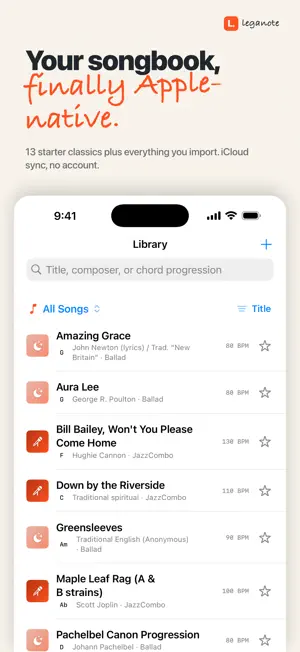
A chord chart app for practicing musicians. Lead sheets, ChordPro, MusicXML, PDFs, and a backing-track player — all in one songbook on your iPhone and iPad. $5.99 once. No subscription. Ever. Hey — Leganote is the app I wished existed. I'm zhi, a solo dev. I built it in evenings and weekends because I was tired of paying yearly fees for music tools I just want to own — and tired of "lifetime" apps that quietly turned into yearly plans. So I made my own. $5.99 unlocked on every iPhone and iPad on your Apple ID, including everyone in your Family. No subscription, no trial, no ads, no upsell screens. — What it does Chord charts and lead sheets that look the way they should. Handwritten chord symbols, section markers, repeats and 1./2. endings. Tap a bar, type a chord. Drag to reorder sections. A backing-track player so you can practice without booking a band. Drums, bass, guitar and a recorded grand piano all playing along. Live transpose at the next bar boundary. Tempo control without changing pitch. A light PDF reader for charts you didn't write yourself. Apple Pencil works on it. — Practice tools A-B loop a tricky section. Tempo Ramp gradually steps the BPM up each time the loop comes around. Metronome with quarter, 8th, triplet, 16th, and shuffle subdivisions. Bass, ukulele, guitar, and piano fingering diagrams — long-press a chord to pick a different voicing. — Open formats only Import ChordPro for free, MusicXML with Pro. Open PDF charts straight from the Files app. Export to MusicXML or print to PDF. Your songs leave with you. — Your library lives in your iCloud Drive In your own iCloud Drive, under a folder named Leganote. There's no Leganote server — I genuinely don't have one. There's no account because there's nothing to log in to. If you uninstall the app tomorrow, your files stay right where you put them. — Free vs Pro The editor is free. So are the player, the metronome, A-B loop, ChordPro import, the PDF viewer, and bass + ukulele fingering diagrams. You get two ready-to-play starter songs (Amazing Grace and When the Saints Go Marching In), an eight-bar preview of every other one, and room for three songs of your own — written or imported. $5.99 unlocks Pro: an unlimited library, every bundled starter song (Bill Bailey, Pachelbel Canon, Twelve-Bar Blues in F, Tico-Tico no Fubá and more), Tempo Ramp practice, Apple Pencil PDF annotation, guitar and piano fingering diagrams, and MusicXML import + export. — A note from the developer If something is off, email [email protected]. It goes straight to me. Bug reports usually get a fix within a week or two, not a quarter, because I don't have a sprint board — just a list. — zhi
What’s new
Version 1.1 · Updated October 24, 2026
This update is about the band actually playing your chart. — Five styles that sound like five styles Jazz Combo swings, with a walking bass. Bossa Nova has the clave and the bossa bass line. Pop / Rock, Blues shuffle and Ballad each have their own drums, bass and comping. Switch style from the STYLE chip while you play. — A real piano The piano is now a recorded concert grand, the Salamander Grand Piano, four dynamics deep. And each style brings its own guitar: a jazz box for Jazz Combo, nylon strings for Bossa Nova and Ballad, a clean electric for Blues, palm-muted chugs for Pop / Rock. — Every chord, in every meter When a bar has two chords, you now hear both — before, only the first one played. Waltzes play in three and 6/8 in two. Amazing Grace, Greensleeves and Scarborough Fair are now written in the time they're sung in. — Live transpose Tap the KEY chip to move a song up or down while it plays. The band changes at the next bar, the chart and diagrams change at once, and the chords are spelled the way the new key is written. — A-B loop loops A to B It used to loop the whole song. Now it repeats just the bars you picked, and Tempo Ramp speeds up right on the loop's downbeat. — Count-in A bar of clicks before the band comes in. You can turn it off in Settings. — Try before you buy Every starter song now plays an eight-bar preview, so you can hear the band before deciding. And the free version holds three songs of your own — starter songs no longer count. — Steadier timing Every note is now scheduled to the exact audio sample, so scrolling the chart or a busy screen no longer pushes the beat around. The highlighted bar also allows for Bluetooth headphone delay. — Your library, looked after • Edits save as you go, and a save that fails tells you instead of pretending. • A song you'd just saved could vanish on the next launch. Fixed. • Apple Pencil marks no longer rewrite the whole PDF on every stroke. • Songs added on another device download by themselves, and songs iOS offloads to save space stay in your list. • Edit the same song on two devices before they sync and you keep both versions. • A new device no longer ends up with a second copy of the starter songs. — Also • Fixed a rare crash during playback. • New here? The welcome ends with the band playing Amazing Grace. • "Open in Leganote" from Files, Mail and AirDrop works. • The screen stays on while you play, and the lock screen, Control Center and AirPods controls work. • The chart scrolls to follow the music. • PDFs reopen on the page you left. • Prices show in your own currency. • VoiceOver can read the chord chart. • Settings links to Leganote for Mac — your library is already there through iCloud. Email [email protected] if anything's off. I'm one person and I read every mail. — zhi
App privacy
The developer, Chih Han Lin, reported these privacy practices to Apple.
Data Not Collected
The developer does not collect any data from this app.