

Tactical MAP PRO : Navigation
mustafa pistofoglu Navigation iPhoneiPadiPod touch
Tactical MAP PRO : Navigation is a paid Navigation app for iPhone and iPad by mustafa pistofoglu. Requires iOS 13.0. Updated July 3, 2026.
- Price
- 4.99 USD
- on the App Store
- Size
- 34 MB
- Age 4+
- Updated
- Jul 3
- 2026 · v5.0.20.80
Screenshots

About Tactical MAP PRO : Navigation
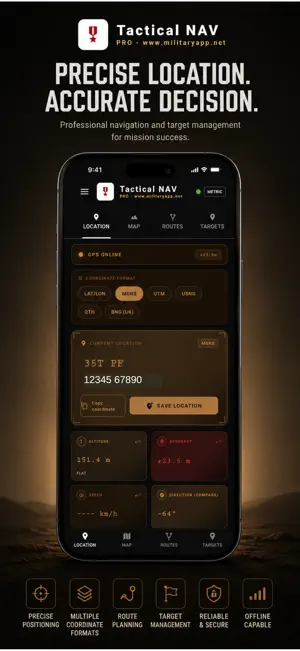
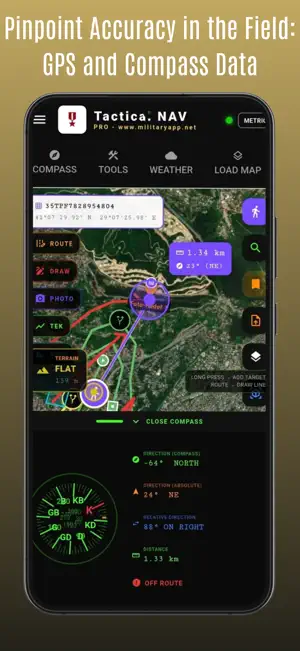
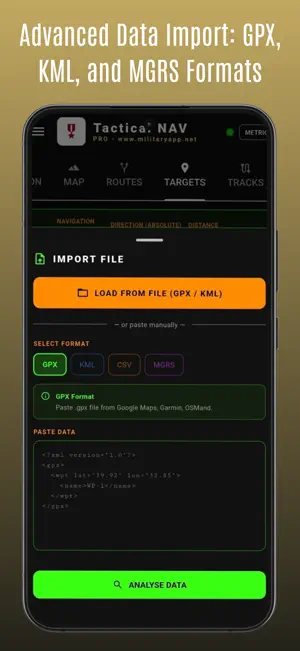
TACTICAL MAP PRO PROFESSIONAL TACTICAL GPS NAVIGATION Tactical NAVIGATION is a professional field tool offering GPS navigation and map management at military standards. It meets all your needs in a single application for off-road drivers, mountaineers, military personnel, search and rescue teams, hunters, radio amateurs, and aviators. Works without internet. Your data stays on your device. Ad-free. MULTI-LANGUAGE SUPPORT Worldwide support with 32 languages: Turkish, English, German, French, Spanish, Italian, Dutch, Portuguese, Polish, Norwegian, Bulgarian, Croatian, Lithuanian, Romanian, Slovak, Slovenian, Ukrainian Chinese, Japanese, Korean, Hindi, Indonesian, Malay, Thai, Filipino (Tagalog) Arabic, Persian, Russian, Azerbaijani, Kazakh, Uzbek Afrikaans ONE-TIME PURCHASE, FULL ACCESS – NO SUBSCRIPTIONS! There are no monthly or yearly subscription fees, no in-app purchases, and no hidden costs. Pay just once and get lifetime access to all advanced professional features—like offline maps, MGRS, and tactical tools—that other apps lock behind a paywall. 1. LOCATION Your GPS location in 5 different coordinate formats simultaneously: - MGRS (Military Grid Reference System) 1 meter precision - UTM (Universal Transverse Mercator) - USNG (US National Grid) - QTH (Maidenhead Locator for radio amateurs) - BNG (British National Grid) - LAT/LON (decimal degrees) 2. MAP Switch between 6 different map layers: - OpenStreetMap (street) - Satellite (high resolution) - Topographic (with contour lines) - Hybrid (satellite + names) 3. TARGETS Bulk import: GPX, KML, KMZ, CSV, MGRS text format. Each target is marked with a red pin, tap to start navigation. Target name, coordinate, description, and category (green/yellow/red/blue tag) can be edited. 4. TRACKS Start track recording with a single touch. Works even when the screen is off (foreground service). Pause / Resume / Stop. Automatically calculated statistics: - Distance traveled - Average and maximum speed - Total ascent and descent - Elevation profile graph The track is colored on the map according to speed (green-slow, red-fast). Export as GPX or view on the map. 5. COMPASS Military style digital compass. Absolute and relative direction (bearing) to the active target in real time. The compass automatically locks to the active route, deviation warnings appear. 6. TOOLS - COORDINATE CONVERTER LAT/LON MGRS UTM USNG QTH mutual conversion - AREA CALCULATOR draw polygon on map - DISTANCE MEASURER distance and bearing between two points - OFFLINE MAP DOWNLOADER select region, download 7. WEATHER Detailed 7-day weather forecast based on your location. 8. LOAD MAP (OFFLINE MAP) - MBTiles Most common offline format, fast, single file - GeoPackage (.gpkg) OGC standard, SQLite based - GeoTIFF (.tif/.tiff) Satellite/aerial photo (Avenza, ArcGIS, QGIS) - GeoPDF (.pdf) USGS topography, FAA aviation, NOAA maritime, military maps 9. ROUTES Saved route management center. Load GPX/KML file, draw manually, or paste text. Multiple routes are displayed on the map at the same time, automatic color palette. Route editing: move point, delete, add waypoint, split/merge segment. START MISSION compass locks to the route, track recording opens automatically, ETA is calculated. 10. AREAS Area measurement by drawing polygons on the map. Perimeter calculation. View multiple areas at the same time, separate with color palette. Ideal for agriculture, land, hunting ground, mission area planning. Export as GPX/KML. 11. BRIEFING Freehand drawing tool on map for field briefings. Visually mark attack directions, safe zones, critical points, and roads. Color palette (10+ colors), thickness selector (3 levels). Draw with one finger, pan/zoom map with two fingers. Show/hide multiple briefings at the same time, name, delete, share with teammates. PRIVACY & SECURITY Your location data is stored ONLY on your device Not sent to any server Not shared with any third party Ad-free, no advertising network
What’s new
Version 5.0.20.80 · Updated July 3, 2026
Bug fixes
App privacy
The developer, mustafa pistofoglu, reported these privacy practices to Apple.
Data Not Collected
The developer does not collect any data from this app.
Alternatives to Tactical MAP PRO : Navigation
Looking for apps like Tactical MAP PRO : Navigation? Here are 6 similar apps on the App Store. The highest rated is TopoKit: Offline Field GIS (5.0/5), and all 6 are free to download.
-
 TopoKit: Offline Field GIS
5.0
TopoKit: Offline Field GIS
5.0
-
 Iris Tactics
-
 Kerteriz Taktik GPS
-
 Batı Antalya Tur
-
 MapLayers
5.0
MapLayers
5.0
-
 Hot Air Balloon Map AI
| App | Rating | Price | Last updated | Compare |
|---|---|---|---|---|
| Tactical MAP PRO : Navigation | – | 4.99 USD | July 3, 2026 | |
| TopoKit: Offline Field GIS | 5.0 / 5 (2) | Free | Jul 19, 2026 | Compare |
| Iris Tactics | – | Free | Aug 11, 2025 | Compare |
| Kerteriz Taktik GPS | – | Free | Aug 14, 2026 | Compare |
| Batı Antalya Tur | – | Free | Dec 22, 2025 | Compare |
| MapLayers | 5.0 / 5 (1) | Free | Nov 7, 2023 | Compare |
| Hot Air Balloon Map AI | – | Free | Oct 13, 2026 | Compare |