

Fotony: Photo & Video Editor
Mikalaj Karhin Photo & Video iPhoneiPadiPod touchMac
Fotony: Photo & Video Editor is a free Photo & Video app for iPhone and iPad by Mikalaj Karhin. Requires iOS 26.0. Updated July 23, 2026.
- Price
- Free
- on the App Store
- Size
- 12 MB
- Age 4+
- Updated
- Jul 23
- 2026 · v1.1
Screenshots


About Fotony: Photo & Video Editor
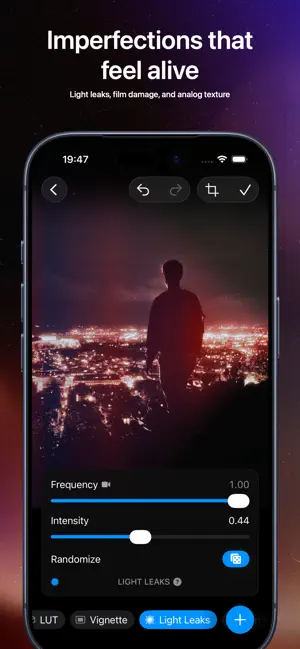
Fotony is a fast photo and video editor for film-inspired color, cinematic looks, and precise creative control. Build a look from modular tools, stack adjustments in your own order, and see every change in real time. Fotony gives you professional grading controls, analog-inspired finishing tools, and clear built-in guidance so you can move quickly while still understanding what each tool is doing. Start from 50+ film-inspired presets, make a clean clip feel like VHS, an old digital camera, compression artifacts, or a glitchy signal, soften highlights with glow, and fine-tune color without losing control of the edit. What you can do with Fotony: - Edit photos and videos in one studio - Build custom looks with 10+ pro tools and 50+ advanced controls - Shape tone and color with Curves, Color Balance, Color Wheel, Saturation, Luminance, Tetra, and LUT tools - Add film-inspired character with Halation, Light Leaks, Vignette, Structure, grain, dust, hairs, and scratches - Crop, straighten, undo, redo, refine, and export without leaving your workflow - Export photos as HEIC, JPEG, or PNG and videos as MP4 or HEVC - Choose resolution, quality, frame rate, audio, and metadata options when sharing - Keep projects available across iPhone, iPad, and Mac with iCloud sync - Learn as you edit with simple explanations for every tool Fotony is designed to stay focused on the image: a clean studio, fast real-time adjustments, and enough depth for serious color work. Whether you are finishing portraits, shaping a cinematic video look, making social posts, or learning color grading one step at a time, Fotony gives you a creative workspace that feels powerful, calm, and yours. Terms of Use: https://fotony.karh.in/legal/terms-of-use
What’s new
Version 1.1 · Updated July 23, 2026
Fotony 1.1 is a major update with presets and five brand-new tools. - New Presets section with 50+ film-inspired looks: Film K, Film F, Film A, Black & White, and Instant. Presets are built from regular editor tools, grouped by default for intensity control, and can be unboxed for full customization. - New Adjustments tool for fast exposure, contrast, brightness, and color edits. - New Digital Damage tool for resolution loss, bit-depth changes, compression artifacts, channel shifting, VHS distortion, magnetic tape instability, and signal noise. - New Soft Glow tool for light diffusion and highlight bloom while keeping the subject in focus. - New Tetra Luma tool for finer control over shadows, midtones, and highlights. - New Color Map tool with 16 color-wheel segments for precise color balance corrections. - New projects now start with Adjustments and Presets by default. This can be changed in Settings. - UI refinements and performance optimizations throughout the app.
App privacy
The developer, Mikalaj Karhin, reported these privacy practices to Apple.
Data Linked to You
The following data, which may be collected and linked to your identity, may be used for the following purposes:
- Usage Data: Product Interaction
- Diagnostics: Crash Data, Performance Data
- Contact Info: Email Address, Other User Contact Info
- User Content: Other User Content
- Identifiers: User ID, Device ID
Used for: Analytics, App Functionality
Alternatives to Fotony: Photo & Video Editor
Looking for apps like Fotony: Photo & Video Editor? Here are 6 similar apps on the App Store.
-
 LUMISELA Photo
-
 VlogrCam
-
 Kwideo: Pro Video Editor
-
 Develop Log: Color Grading
-
 Reelo: AI Video Editor
-
 filterFairy
| App | Rating | Price | Last updated | Compare |
|---|---|---|---|---|
| Fotony: Photo & Video Editor | – | Free | July 23, 2026 | |
| LUMISELA Photo | – | Free | Aug 20, 2026 | Compare |
| VlogrCam | – | Free | May 9, 2026 | Compare |
| Kwideo: Pro Video Editor | – | Free | Oct 21, 2026 | Compare |
| Develop Log: Color Grading | – | Free | Oct 19, 2026 | Compare |
| Reelo: AI Video Editor | – | Free | Oct 21, 2026 | Compare |
| filterFairy | – | Free | May 2, 2026 | Compare |